Karl Voit made the excellent comment on my post, “Defining Org Agenda Tasks”, that using a repeated timestamp can be more trouble than is worth. Instead, his guidance is to make multiple copies of a task using the org-clone-subtree-with-time-shift function, so that uniquely tracking each event is trivial.
Because there are a multitude of attributes that one can apply to an Org headline, it might be instructive to draw out a state machine to see under what conditions a headline will be displayed by a default agenda view. For clarity, we will describe this state machine with an abbreviated set of transitions, where each transition is a single Org task attribute change. Transitions where an attribute change is reverted are not included also for clarity. In the diagram below, note that the states todo and repeating todo have qualifications when displayed in a default agenda view.
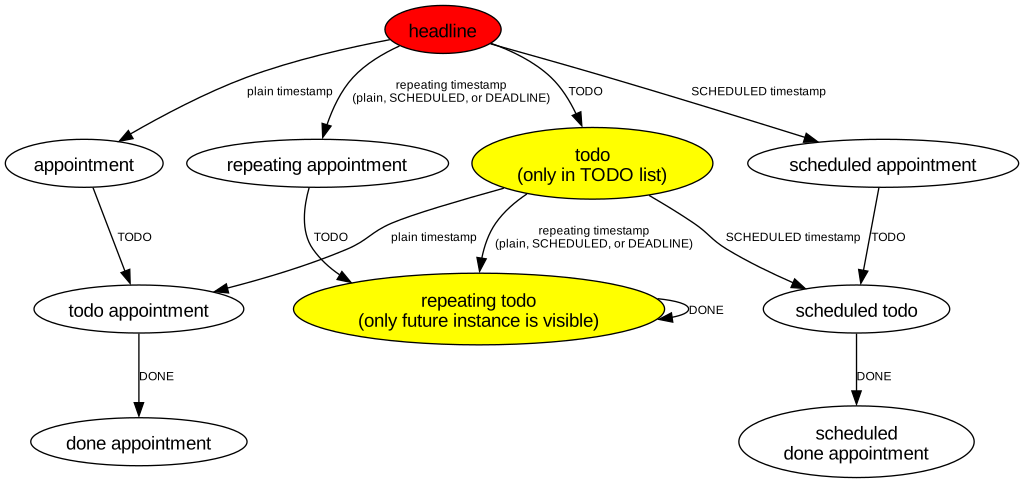
The following tables describe the above states and transitions respectively.
| State | Description | Visible in Default Agenda View? |
|---|---|---|
| headline | Headline with no attributes. | No |
| appointment | Task with plain timestamp. | Yes |
| todo appointment | TODO item/task with plain timestamp. | Yes |
| repeating appointment | Task with repeating timestamp. | Yes |
| done appointment | DONE task with plain timestamp. | Yes |
| todo | TODO item/task with no timestamp(s). | Not shown in time grid; only shown in TODO list if agenda view supports it. |
| repeating todo | TODO item/task with repeating timestamp. | Only a future instance is visible in default agenda view. Setting the agenda view mode to display inactive timestamps (keyboard shortcut 'v-[') can display completed tasks. |
| scheduled appointment | Task with scheduled timestamp. | Yes |
| scheduled todo | TODO item/task with scheduled timestamp. | Yes |
| scheduled done appointment | DONE task with scheduled timestamp. | Yes |
| Transition | Description |
|---|---|
| plain timestamp | Add plain timestamp to task. |
| repeating timestamp | Add repeating timestamp to task. Timestamp can be plain, SCHEDULED, or DEADLINE. |
| scheduled timestamp | Add scheduled timestamp to task. |
| TODO | Add TODO attribute. |
| DONE | Change task state to DONE. |
From the above diagram, using a repeating todo might not be the right approach to describing your task. Making copies of the same task, which Org makes easy with the command org-clone-subtree-with-time-shift, might be the better fit for you.