ChatGPT has taken the world by storm. Unfortunately, however, being the world’s most widely-used chatbot isn’t all plain sailing. ChatGPT error messages occur when things don't go quite right, and seem to increase in regularity when a lot of users are using ChatGPT simultaneously.
Although there are lots of viable ChaGPT alternatives, it’s worth taking the time to troubleshoot common ChatGPT problems. Many issues with ChatGPT can be solved quite easily by following some simple steps.
This guide covers everything you need to know about common ChatGPT problems that users are facing in 2023 – some of which you may have encountered before. We've also provided instructions detailing how to fix them quickly so hopefully, you won't be stuck for long.
- ChatGPT Network Error
- ChatGPT Internal Server Error
- ChatGPT Error 1020
- ChatGPT “An Error Occurred” Message
- ChatGPT 429 Error
- ChatGPT Login Error
-
ChatGPT Not Working: Other Options Verifying
Get the latest tech news, straight to your inbox Don't miss out on the top business tech news with Tech.co's weekly highlights reel
Please fill in your name Please fill in your email Please verify before subscribing. Subscribe ChatGPT Network ErrorChatGPT network errors sometimes occur when users ask ChatGPT to provide multi-faceted, lengthy, or complex responses. This image is also served to users whose internet connection is disrupted while ChatGPT is generating answers, as shown in the image below:
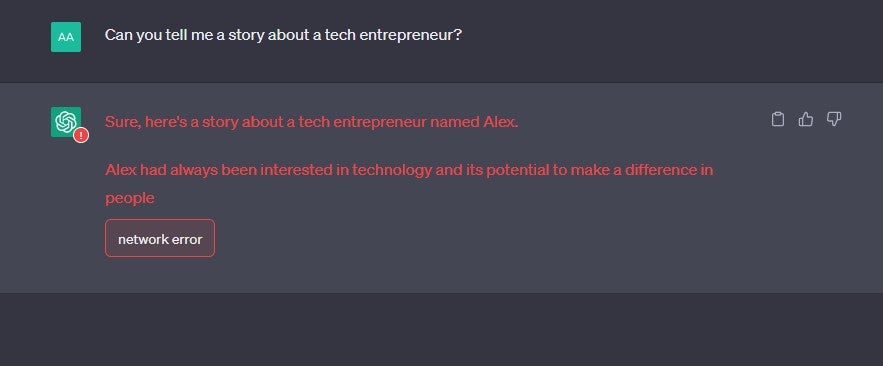 You may also see the network error if there's some sort of server-side problem, or if the chatbot attempts to write for longer than 60 seconds – something which can also be induced by a sufficiently long-winded question. All in all, it's one of the more common ChatGPT errors.
How to fix the ChatGPT network errorHere are some steps you can take to avoid ChatGPT network errors:
- Test your internet connection. ChatGPT may have shown you this message if your internet connection is poor or cutting out intermittently. This should be the first troubleshooting technique you try, especially if you haven't been requesting lots of information.
- Break down your request into smaller sub-requests. Are you asking ChatGPT to do multiple things at once? An easy way to avoid a network error is to split your prompt up into two or even three requests.
- Set limitations on ChatGPT’s responses. One way to avoid consistent network error messages is to limit what you want ChatGPT to give you. Ask for things “in no more than 100 words/four lines”, for example.
- Simplify what you’re asking ChatGPT to do. Are you explaining what you’d like from ChatGPT in simple enough terms? Although it can typically handle quite complex instructions, if you are getting a network error message, it may be time to dumb down your commands a little.
If you’re coding, you can use the phrases “don’t use comments in code” or alternatively, “don’t use empty lines in code” if you’re asking ChatGPT to code for you and you want to reduce the size of the answer it responds with.
ChatGPT Internal Server ErrorIf you’ve been using ChatGPT for a while now, the chances are you’ve probably been served the “internal server error” message at least once.
Internal server errors can happen for a number of reasons. ChatGPT simply may not have enough storage or memory to handle the number of concurrent users it's receiving prompts from, for instance.
This ChatGPT error message usually indicates a server-side problem, rather than an issue with the end-user's device or internet connection.
How to fix the ChatGPT internal server errorHere are some common troubleshooting methods for this problem:
- Refresh your browser. A simple browser refresh often solves ChatGPT errors. This will also indicate whether it’s in fact your internet connection, rather than ChatGPT, that is causing you problems.
- Clear your browser cookies. This can often resolve a ChatGPT internal server error. You can also achieve the same effect by searching for ChatGPT in incognito/private browsing mode.
- Use a different browser. There may be a problem with the way you’re accessing ChatGPT through the browser you’re using specifically. Switching between browsers will let you know if it’s the application that’s the problem, not the chatbot.
- Log back in to your OpenAI account. Logging in and out of the OpenAI account you’ve created to use ChatGPT often brings the Chatbot back to life.
ChatGPT Error 1020: Access DeniedError code 1020 is an HTTP error code that informs you that the website you’re trying to visit has blocked your Internet Protocol (IP) address. If you’re seeing this code, your IP address has been flagged by Cloudflare’s security system, which is used by OpenAI to protect its website.
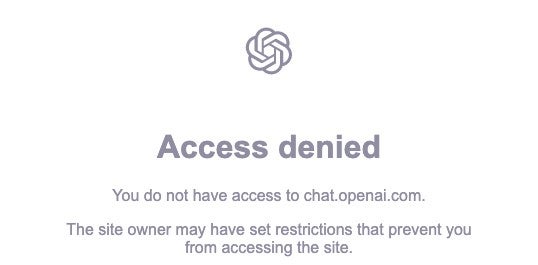 There could be any number of reasons why you're seeing this request. It could simply be that the Wi-Fi you're using to connect to the internet has been flagged by the system – ChatGPT “access denied” requests are quite common on unsecured public Wi-Fi hotspots, for example.
It could, however, also be an issue with Cloudflare's firewall. Either way, there are things you can to do avoid it.
How to fix ChatGPT error 1020If you're getting an error code when using ChatGP, here are some ways you can get around it:
- Use a VPN. A VPN is a quick and easy way to both mask and change your IP address. There are a few reliable, free VPNs out there that will get you up and running in minutes without demanding any payment, but make sure you opt for a reputable provider.
- Use a proxy server. Like a VPN, a proxy server can also spoof your IP address, so you can use it for troubleshooting this error. Just bear in mind that proxy servers don’t encrypt user data like VPNs do.
- Disable your browser extensions. You may be blocked because you have a corrupt or problematic browser extension, which can sometimes interfere with Cloudflare’s firewall. Disable your browser extensions to make sure this isn’t the case.
ChatGPT “An Error Occurred” MessageSince ChatGPT's release in November of last year, a number of users have reported that they've received a message that reads “An error occurred. If this issue persists please contact us through our help center at help.openai.com.” This has been widely reported on OpenAI's community forum.
As you can see, this is quite a general error code and is served when something is impairing ChatGPT from functioning to its full capabilities. It could be that ChatGPT is close to reaching its user threshold but the now-famous “ChatGPT is at capacity” message is not yet being sent out to users, for instance.
How to fix the ChatGPT “an error occurred” messageIf you haven't found an answer in OpenAI's help center, try these troubleshooting tactics:
- Refresh your screen. Some users who encountered this problem were able to make it disappear simply by refreshing their screen – although this doesn't necessarily work every time.
- Disconnect or reconnect your VPN. This will change your IP address, which might be causing this error to occur. On one OpenAI forum, users complaining about this problem reported turning off advanced tools like threat protection on providers like NordVPN.
- Clear your cookies or change your browser. Some users who've been served this message have found that switching browsers makes it disappear. You can also just clear your current cache of cookies if you don't have access to another browser.
ChatGPT Error 429Error 429 is a rate limit error that is served to users who make too many requests to the ChatGPT API in a short period of time. In a nutshell, the ChatGPT API allows developers to build their own chatbots using the natural language processing and machine learning technology that underpins ChatGPT.
 If you see the ChatGPT error shown above (Image credit: Machine Learning Yearning), it probably means the system is unable to properly process your request because you've exceeded your quota of permitted requests. If you haven't done this, the error code might have been served to you simply because you're using ChatGPT at a time when the network is very busy.
How to fix the ChatGPT error 429If you're a business using ChatGPT and you find you've reached your API request limit, you should:
- Minimize the number of requests you make. This will ensure you stay within your rate limit. You could also compress your requests too.
- Monitor your API usage more closely. Keeping closer tabs on exactly how many requests you're lodging will also go some way to ensuring that you stay within your API rate limit.
ChatGPT Login ErrorsSome ChatGPT users have found themselves caught in “login loops” where ChatGPT won’t let them log into their accounts. It seems a significant number of users have encountered this issue after failing to verify their email addresses with OpenAI.
However, that's not the only type of login error you'll encounter when using ChatGPT. For example, you'll receive an error message if you're attempting to log in using an authentication method that wasn't the same as the one you used when you first created your account with OpenAI.
How to fix the ChatGPT login errorIf you're struggling to log into ChatGPT, or you're getting login error messages, here's what to do:
-
- Verify your email address. As mentioned above, one of the explanations for these login loops is unverified email addresses. So, sift through your inbox to see if you have any unread emails from OpenAI.
- Request a password change. If you're consistently being told that you can't log in to ChatGPT, request a password change, as this may reset your account and help you break out of your login loop.
- Sing up for a new OpenAI account. This might sound slightly defeatist – but if you don’t have any important chats saved, making a new account might be the quickest way to fix this issue. Remember, it’s completely free, and all you’ll need is another email address.
ChatGPT Not Working: Other OptionsIf ChatGPT still isn't working for you, remember, there are other AI chatbots out there you can use to help you during your workday or simply to find information in a quicker and more efficient fashion that you can. Of course, Google's Bard AI is the obvious alternative, but you currently have to join a waitlist to use it.
Chatsonic is one of the best ChatGPT alternatives readily available for anyone to use. However, if you'd like to be served web results alongside a summarised paragraph from an AI chatbot, we'd recommend YouChat. Plerplexity.ai is also worth a try, and it cites its sources for every answer it gives. Jasper is a good option for businesses too, with impressive content generation powers.
Whatever your use case, make sure you try our troubleshooting suggestions first – but if you're fed up with ChatGPT errors, there's no harm in seeing what else is out there.
The post ChatGPT Errors: Why They Happen and How to Fix Them appeared first on Tech.co.