Meta has quietly introduced a Facebook privacy setting where you can request to restrict your data from being used to train its generative AI models. Here's what you need to know about the new option, including how to access it and stop Facebook using your data to train AI.
If you're unhappy about how much data Facebook collects and how it's used, the alternative has long been to delete Facebook entirely. However, if it's having your data scraped to train AI models that you specifically object to, then this looks like a useful new privacy feature.
How much mileage you get from your opt out request may vary depending on your location, but it's worth a shot and at least partially addresses one of the AI ethics issues that has arisen as the technology booms in 2023.
Verifying
Get the latest tech news, straight to your inbox Don't miss out on the top business tech news with Tech.co's weekly highlights reel

Please fill in your name   Please fill in your email    Please verify before subscribing.   Subscribe   How To Find Facebook's New AI Privacy Setting We say Facebook has “quietly” launched its new AI privacy option because the page you need is buried in the platform's Privacy Center. It's not easy to find, but there are two ways you can do it.
The easiest is to take the shortcut and jump straight to the Generative AI Data Subject Rights form here. However, you can also do it manually on the site by following these simple steps:
- Click on your account icon in the top right-hand corner
- Select “Settings & privacy” then go to “Privacy Center”
- On the left-hand nav menu, click “Other policies and articles”
- Select “How Meta uses information for generative AI models”
- Scroll down and click “Learn more and submit requests here”
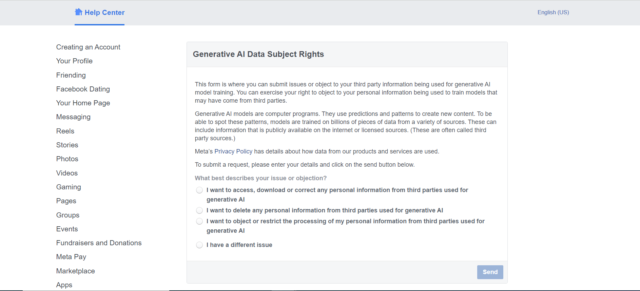
Once you've arrived at the Generative AI Data Subject Rights form, you can then select what kind of request you want to make.

Get two months FREE, when you sign up with Surfshark VPN today 📅📅
Grab Deal Now 🔥 How To Opt Out of Your Facebook Data Training AIYou'll find three main options on the Generative AI Data Subject Rights page related to how personal information “from third parties [is] used for generative AI”.
In short, you can now ask Facebook to:
- Access, download or correct personal information
- Delete personal information
- Restrict the processing of personal information
The third option, “I want to object or restrict the processing of my personal information from third parties used for generative AI”, is the one you should select if you want to ask Facebook to stop using your data to train its AI models. The first two let you see what data has already been used and delete what's currently on file, respectively.
There's also a fourth and final option to report “a different issue”, if you want to make a bespoke request.
Will Facebook Actually Stop Using My Data To Train AI?That's the big question. You'll have noticed that what you're actually doing here is asking Facebook to stop using your data to train generative AI tools like Llama 2 – it's not a straight “opt out”, but rather a request.
Whether or not Facebook grants it remains to be seen and much will depend on where you're located. Some places, like the EU and UK, have more robust data privacy laws than others. The likelihood is that Facebook users there will have their request granted.
It's less clear how willing the company will be in the US, where data protection laws are less strict. Our team in both the US and UK have filed the above requests and will update this article as soon as we learn more, including what kind of rough timeframe Meta is operating on with its responses.
In the meantime, don't forget that you can easily boost your data privacy by using one of the best cheap VPNs, which effectively let you anonymize your online activity by encrypting your data and rerouting your IP address.
The post How To Stop Facebook Using Your Personal Data To Train AI appeared first on Tech.co.