In today’s show I share examples of how you can upgrade your home office no matter if you have a separate office or just a desk in a corner of your room.
TODAY’S TOPICS
00:00:00 - Why You Should Invest In Your Home Office
00:03:39 - Home Office Essentials
00:10:22 - Ergonomics Equipment
00:11:36 - Additional Home Office Gear
00:14:40 - Home Office Automation
SHOW NOTES
Why You Should Invest In Your Home Office
I probably waited too long before I made some investments in my home office space. As many of you, I started out with my laptop. First I thought it’s best if I can be flexible and sit anywhere with my laptop. But as the home office became the new normal I realized that I should invest in my home office space. Two years later I’m quite happy with what I have available, even though I still work at a desk crammed on one side of our bedroom. And I was positively surprised how much you can do with a small space.
You can use other parts of your home as flexible workspaces. Consider doing light work on your dining table or at the kitchen counter. Or move outside on your patio. You do not have to convert those into office space, these are spaces you can use to move and have a change of scenery during your workday and when you do not need your main computer or monitor for productivity reasons.
How to set up an ergonomic workspace guide from IKEA.
How to determine the proper monitor height by The Office Oasis.
Please share your questions, comments, ideas and suggestions via the contact form on my website or via email.
Access the RSS feed and links to major podcast apps at theproductiveinnovator.com/pod.
Sign up for The Productive Innovator Newsletter and visit The Productive Innovator website and blog for additional resources.
LINKS IN THIS EPISODE:
Home office equipment and gear that I use (have used) and which I talked about in this episode:
Home Office Essentials
- Motorized standing desk - My current desk. Alternative 1.
- External 27 inch monitor (Dell U2722DE 27 inch works with M1 Macs) or Apple iMac 27 inch - I use it as an external monitor to my work Macbook Pro and as my main device for everything else. I recommend you wait for the new version which is expected to come out mid 2022.
- Laptop stand - just enter the search term in Google or Amazon, there are plenty of choices available. I can recommend Twelve South for high quality accessories.
- Desk shelf unit that serves as storage and as monitor stand. My current stand. Alternative 1.
- External keyboard and mouse. My current devices: The Apple Magic Keyboard (buy this version if you are using a Mac with M1 chip - it includes a fingerprint reader) and the Apple Magic Trackpad.
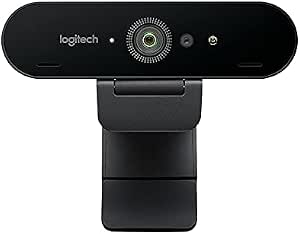
- External webcam (Elgato FaceCam or Logitech Brio 4K Stream Webcam) or webcam software to use your smartphone as webcam (example: Elgato EpocCam)
- Headset - Bluetooth option: Jabra Evolve2 65 Wireless Headset or Wired: Jabra Evolve2 40 Headset.
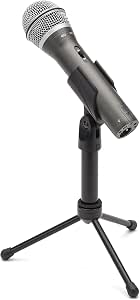
- External USB microphone - Elgato Wave 3 Microphone with integrated stand or Samson Q2UHD Microphone which comes with a mic stand. Alternative: Rode SmartLav Plus lavalier microphone
Ergonomics Equipment
- Adjustable office chair - My current chair: Songmics height adjustable office chair with arm rests. Also IKEA has a few good choices.
- Sit/Stand support - I use the IKEA Nilserik. The IKEA Lidkullen gives you a sturdier option with the same functionality.
- Standing desk mat - just enter the search term in Google or Amazon, there are plenty of choices available.
Additional Home Office Gear
- Microphone boom arm for external microphone (works for example with Samson Q2U). My current boom arm: Rode PSA-1.
- Whiteboard - I use this whiteboard/flipchart easel. Alternative online shop.
- iPad Air 4 + Apple Pencil 2 + Logitech Folio Keyboard Case as versatile digital notepad and for light home office work. And I recommend a draft table to position the iPad next to your monitor.
- Cable management - My current gear: Cable basket (alternative) and adjustable cable duct with two sides (white and black).
Home Office Automation
- Smart bulb - What I use: Philips Hue White Ambiance E27 LED Bulb, Dimmable, All Shades of White
- Light strip - What I use: Philips Hue Light Strip
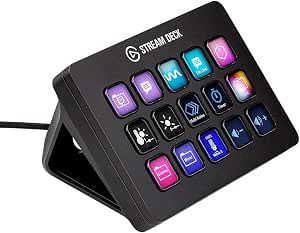
- Elgato Stream Deck - My current device: Elgato Stream Deck MK.2 with 15 LED-lit and programmable buttons
Related content:
- The Productive Innovator blog post: “Boost Your Resilience With Healthy Home Office Routines”
- The Productive Innovator blog post: “Why Flipcharts and Whiteboards are Important for Your Creativity”
- The Productive Innovator podcast episode “TPI001: What is a Productive Innovator and how to find time for your passion?”
DISCLAIMER
Product linkages in the show notes of this or other episodes may contain affiliate links for which I may receive a small commission. However, I don't let that corrupt my perspective and I don't recommend only affiliates. I’d also like to state that I do not have any relationship to companies or affiliates beyond my participation in a generic affiliate program like the ones offered by Amazon or Audible.