This blog post is written by Ryan Doty Solutions Architect , AWS and Vishal Manan Sr. SSA, EC2 Graviton , AWS.
Introduction
AWS customers recognize that Graviton-based EC2 instances deliver price-performance benefits but many are concerned about the effort to port existing applications. Porting code from one architecture to another can result in a substantial investment in time and effort. AWS has worked continuously to improve the migration process for customers. We recently introduced the Porting Advisor for Graviton as a tool to further simplify the migration process. In this blog, we’ll walk you through how to use Porting Advisor for Graviton so that you can learn how to use it.
Porting Advisor for Graviton is an open-source, command-line tool that analyzes source code and generates a report highlighting missing or outdated libraries and code constructs that may require modification and provides a user with alternative recommendations. It helps customers and developers accelerate their transition to Graviton-based Amazon EC2 instances by reducing the iterative process of identifying and resolving source code and library dependencies. This blog post will provide you with a step-by-step implementation on how to use Porting Advisor for Graviton. At the end of the blog, you will be able to run Porting Advisor for Graviton on your source code tree, generating findings that will help simplify the effort required to port your application.
Porting Advisor for Graviton scans for potentially unsupported or non-portable arm64 code in source code trees. The tool only scans source code files for the programming languages C/C++, Fortran, Go 1.11+, Java 8+, Python 3+, and dependency files such as project/requirements.txt file(s). Most importantly the Porting Advisor doesn’t make any code modifications, API-level recommendations, or send data back to AWS.
You can utilize Porting Advisor for Graviton either as a Python script or compiled into a binary and run on x86-64 or arm64 systems. Therefore, it can be easily implemented as part of your build processes.
Expected Results
Porting Advisor for Graviton reports the following issues:
- Inline assembly with no corresponding arm64 inline assembly.
- Assembly source files with no corresponding arm64 assembly source files.
- Missing arm64 architecture detection in autoconf config.guess scripts.
- Linking against libraries that aren’t available on the arm64 architecture.
- Use architecture specific intrinsics.
- Preprocessor errors that trigger when compiling on arm64.
- Usages of old Visual C++ runtime (Windows specific).
Compiler specific code guarded by compiler specific pre-defined macros is detected, but not reported by default. The following cross-compile specific issues are detected, but not reported by default:
- Architecture detection that depends on the host rather than the target.
- Use of build artifacts in the build process.
Skillsets needed for using the tool
Porting Advisor for Graviton is designed to be easy to use. Users though should be versed in the following skills in order to take advantage of the recommendations the tool provides:
- An understanding of the build system – project requirements and dependencies, versioning, etc.
- Basic scripting language skills around Python, PowerShell/Bash.
- Understanding hardware (inline assembly for C/C++) or compiler specific (intrinsic for C/C++) constructs when applicable.
- The ability to follow best practices in the AWS Graviton Technical Guide for code optimization.
How to use Porting Advisor for Graviton
Prerequisites
The tool requires a minimum version of Python 3.10 and Java (8+ to be installed). The installation of Java is also optional and only required if you want to scan JAR files for native method calls. You can run the tool on a Windows/Linux/MacOS machine, or in an EC2 instance. I will show case usage on Windows and Amazon Linux 2(AL2) running on an EC2 instance. It supports both arm64 and x86-64 processors.
You don’t need to be on an arm64-based processor to run the tool.

You can run the tool as a Python script or an executable. The executable requires extra steps to build. However, it can be used on another machine without the need to install Python packages.
You must copy the complete “dist” folder for it to work, as there are libraries that are present in that folder along with the executable.
Porting Advisor for Graviton can be run as a binary or as a script. You must run the script to generate the binaries
./porting-advisor-linux-x86\_64 ~/my/path/to/my/repo --output report.html ./porting-advisor-linux-x86\_64.exe ../test/CppCode/inline\_assembly --output report.html
Running Porting Advisor for Graviton as an executable
The first step is to build the executable.
Building the executable
The first step is to set up the Python Environment. If you run into any errors building the binary, see the Troubleshooting section for more details.
Building the binary on Windows


Building the binary on Linux/Mac


Running the binary
Here you can see how you can run the tool on Linux as a binary for a C++ project.

The “dist” folder will have the executable.
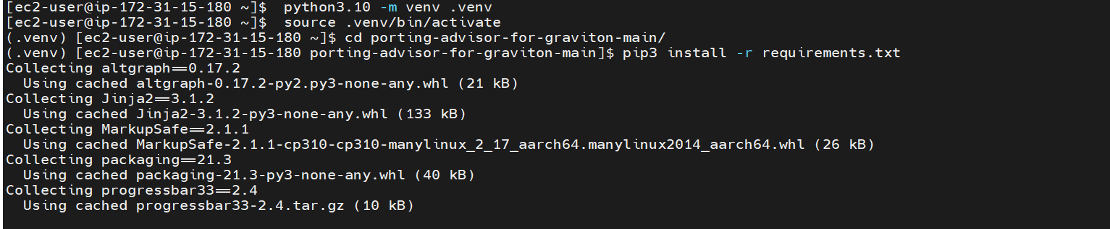
Running Porting Advisor for Graviton as a script
Enable the Python environment for the following:
Linux/Mac:
$. python3 -m venv .venv$. source .venv/bin/activate
PowerShell:
PS> python -m venv .venvPS> .\.venv\Scripts\Activate.ps1
The following shows how the tool would work on Windows when run as a script:

Running the Porting Advisor for Graviton on Linux as a Script

Output of the Porting Advisor for Graviton
The Porting Advisor for Graviton requires the directory parameter to point to the folder where your source code lives. If there are multiple locations, then you can run the tool as part of the script.
If no output file is supplied only standard output will be produced. The following is the output of the tool in HTML format. The first line shows the total files scanned.
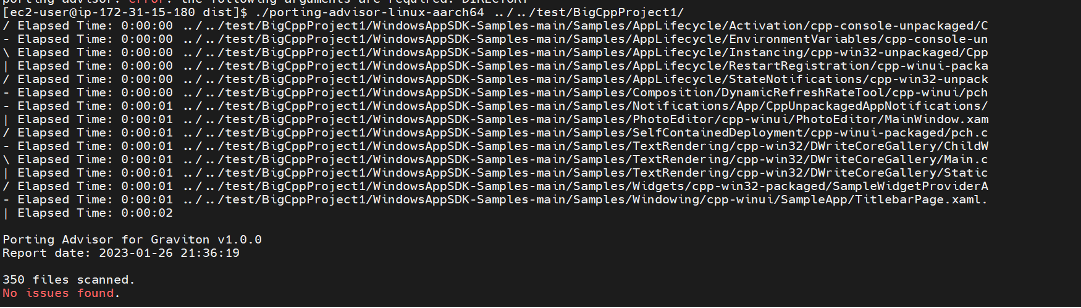
- If no issues are found, then you’ll see an output like the following:

- With x86-64 specific intrinsics, such as \_bswap64, you’ll see it flagged. arm64 specific intrinsics won’t be flagged. Therefore, if your code has arm64 specific intrinsics, then the porting advisor will only flag x86-64 to arm64 and not vice versa. The primary goal of the tool is determining the arm64 readiness of your code.

- The scanner typically looks for source code files only, but it can also look for assembly files with *.s extensions. An example of a file with the C++ code with inline assembly code is as follows:
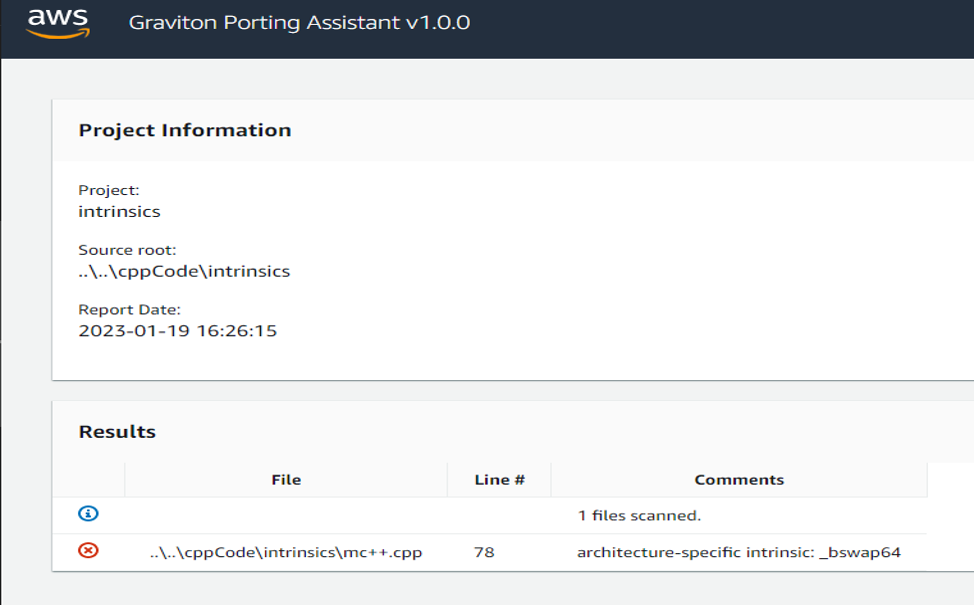
- The tool has pointed out errors such as a preprocessor error and architecture-specific intrinsic usage errors.

Next steps
If you don’t see any issues reported by the tool, then you are in good shape for doing the port. If no issues are reported it does not guarantee that it will work as port. Porting Advisor for Graviton is a tool used best as a helper. Regardless of the issues reported by the tool, we still highly suggest testing the application thoroughly.
As a good practice, we recommend that you use the latest version of your libraries.
Based on the issue, you can consider further actions. For Compiler intrinsic errors, we recommend studying Intel and arm64 intrinsics.
Once you’ve migrated your code and are using Gravition, you can start to look at taking steps to optimize your performance. If you’re interested in doing that please look at our Getting Started Guide.
If you run into any issues, then see our CONTRIBUTING file.
FAQs
- How fast is the tool? The tool is able to scan 4048 files in 1.18 seconds.
On an arm64 Based Instance:

- False Positives?
This tool scans all files in a source tree, regardless of whether they are included by the build system or not. Therefore, it may misreport issues in files that appear in the source tree but are excluded by the build system. Currently, the tool supports the following languages/dependencies: C/C++, Fortran, Go 1.11+, Java 8+, and Python 3+.
For example: You may have legacy code using Python version 2.7 that is in the source tree but isn’t being used. The tool will scan the code base and point out issues in that particular codebase even though you may not be using that piece of code. To mitigate, either remove that folder from the source code or ignore the error pointed by the tool.
- I see mention of Ruby and .Net in the Open source tool, but they don’t work on my tool.
Ruby and .Net haven’t been implemented yet, but please consider contributing to it and open an issue requesting support. If you need support then see our CONTRIBUTING file.
Troubleshooting
Errors that you may encounter while building the tool binary:
PyInstaller needs a shared version of libraries.
- Python 3.10+ not having shared libraries for use by the PyInstaller tool.


The fix for this is to build your version of Python(3.10+) with the right flags:
./configure --enable-optimizations --enable-shared
If the two flags don’t work together, try doing the build with each flag enabled sequentially.

- Incorrect Python version (version less than 3.10).If you aren’t on the correct version of Python:
You will get errors similar to the ones here:

If you want to run the tool in an EC2 instance on Amazon Linux 2(AL2), then you could try upgrading/installing Python 3.10 as pointed out here.
If you run into any issues, then see our CONTRIBUTING file.

If you want to run the tool in an EC2 instance on Amazon Linux 2(AL2), then you could try upgrading/installing Python 3.10 as pointed out here.
If you run into any issues, then see our CONTRIBUTING file.
Conclusion
Porting Advisor for Graviton helps customers quantify the amount of work that is required to port an application. It accelerates your ability to transition to Graviton-based Amazon EC2 instances by reducing the iterative process of identifying and resolving source code and library dependencies.
Resources
To learn how to migrate your workloads to Graviton-based instances, see the AWS Graviton Technical Guide GitHub Repository and AWS Graviton Transition Guide. To get started with Graviton-based Amazon EC2 instances, see the AWS Management Console, AWS Command Line Interface (AWS CLI), and AWS SDKs.
Some other resources include:
- Porting Advisor for Graviton: https://github.com/aws/porting-advisor-for-graviton/
- Graviton Customer Testimonials https://aws.amazon.com/ec2/graviton/customers/
- AWS services supported on Graviton – https://aws.amazon.com/ec2/graviton
- Intrinsics – Arm Developer
- How To Install Python 3.10 on Amazon Linux 2 – TechViewLeo