This blog is written by Poornima Chand, Senior Solutions Architect, Strategic Accounts and Giedrius Praspaliauskas, Senior Solutions Architect, Serverless.
AWS Lambda functions allow both synchronous and asynchronous invocations, which both have different function behaviors and error handling:
When you invoke a function synchronously, Lambda returns any unhandled errors in the function code back to the caller. The caller can then decide how to handle the errors. With asynchronous invocations, the caller does not wait for a response from the function code. It hands off the event to the Lambda service to handle the process.
As the caller does not have visibility of any downstream errors, error handling for asynchronous invocations can be more challenging and must be implemented at the Lambda service layer.
This post explains the error behaviors and approaches for handling errors in Lambda asynchronous invocations to build reliable serverless applications.
Overview
AWS services such as Amazon S3, Amazon SNS, and Amazon EventBridge invoke Lambda functions asynchronously. When you invoke a function asynchronously, the Lambda service places the event in an internal queue and returns a success response without additional information. A separate process reads the events from the queue and sends those to the function.
You can configure how a Lambda function handles the errors either by implementing error handling within the code and using the error handling features provided by the Lambda service. The following diagram depicts the solution options for observing and handling errors in asynchronous invocations.
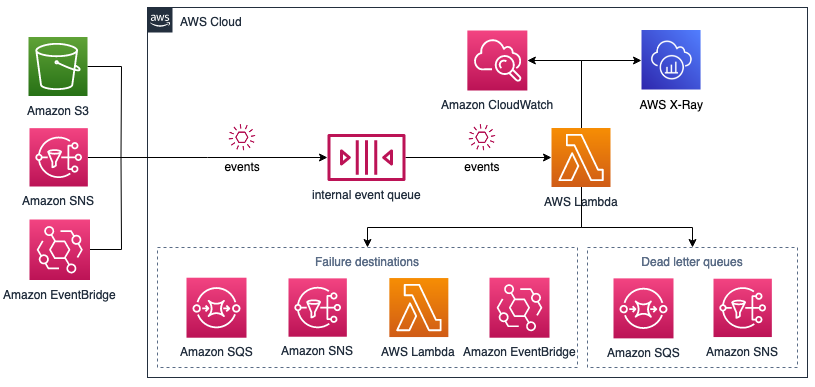
Architectural overview
Understanding the error behavior
When you invoke a function, two types of errors can occur. Invocation errors occur if the Lambda service rejects the request before the function receives it (throttling and system errors (400-series and 500-series)). Function errors occur when the function’s code or runtime returns an error (exceptions and timeouts). The Lambda service retries the function invocation if it encounters unhandled errors in an asynchronous invocation.
The retry behavior is different for invocation errors and function errors. For function errors, the Lambda service retries twice by default, and these additional invocations incur cost. For throttling and system errors, the service returns the event to the event queue and attempts to run the function again for up to 6 hours, using exponential backoff. You can control the default retry behavior by setting the maximum age of an event (up to 6 hours) and the retry attempts (0, 1 or 2). This allows you to limit the number of retries and avoids retrying obsolete events.
Handling the errors
Depending on the error type and behaviors, you can use the following options to implement error handling in Lambda asynchronous invocations.
Lambda function code
The most typical approach to handling errors is to address failures directly in the function code. While implementing this approach varies across programming languages, it commonly involves the use of a try/catch block in your code.
Error handling within the code may not cover all potential errors that could occur during the invocation. It may also affect Lambda error metrics in CloudWatch if you suppress the error. You can address these scenarios by using the error handling features provided by Lambda.
Failure destinations
You can configure Lambda to send an invocation record to another service, such as Amazon SQS, SNS, Lambda, or EventBridge, using AWS Lambda Destination. The invocation record contains details about the request and response in JSON format. You can configure separate destinations for events that are processed successfully, and events that fail all processing attempts.
With failure destinations, after exhausting all retries, Lambda sends a JSON document with details about the invocation and error to the destination. You can use this information to determine re-processing strategy (for example, extended logging, separate error flow, manual processing).
For example, to use Lambda destinations in an AWS Serverless Application Model (AWS SAM) template:
ProcessOrderForShipping: Type: AWS::Serverless::Function Properties: Description: Function that processes order before shipping Handler: src/process\_order\_for\_shipping.lambda\_handler EventInvokeConfig: DestinationConfig: OnSuccess: Type: SQS Destination: !GetAtt ShipmentsJobsQueue.Arn OnFailure: Type: Lambda Destination: !GetAtt ErrorHandlingFunction.ArnDead-letter queues
You can use dead-letter queues (DLQ) to capture failed events for re-processing. With DLQs, message attributes capture error details. You can configure a standard SQS queue or standard SNS topic as a dead-letter queue for discarded events. For dead-letter queues, Lambda only sends the content of the event, without details about the response.
This is an example of using dead-letter queues in an AWS SAM template:
SendOrderToShipping: Type: AWS::Serverless::Function Properties: Description: Function that sends order to shipping Handler: src/send\_order\_to\_shipping.lambda\_handler DeadLetterQueue: Type: SQS TargetArn: !GetAtt OrderShippingFunctionDLQ.Arn Design considerations
There are a number of design considerations when using DLQs:
- Error handling within the function code works well for issues that you can easily address in the code. For example, retrying database transactions in the case of failures because of disruptions in network connectivity.
- Scenarios that require complex error handling logic (for example, sending failed messages for manual re-processing) are better handled using Lambda service features. This approach would keep the function code simpler and easy to maintain.
- Even though the dead-letter queue’s behavior is the same as an on-failure destination, a dead-letter queue is part of a function’s version-specific configuration.
- Invocation records sent to on-failure destinations contain more information about the failure than DLQ message attributes. This includes the failure condition, error message, stack trace, request, and response payloads.
- Lambda destinations also support additional targets, such as other Lambda functions and EventBridge. This allows destinations to give you more visibility and control of function execution results, and reduce code.
Gaining visibility into errors
Understanding of the behavior and errors cannot rely on error handling alone.
You also want to know why errors address the underlying issues. You must also know when there is elevated error rate, the expected baseline for the errors, other activities in the system when errors happen. Monitoring and observability, including metrics, logs and tracing, brings visibility to the errors and underlying issues.
Metrics
When a function finishes processing an event, Lambda sends metrics about the invocation to Amazon CloudWatch. This includes metrics for the errors that happen during the invocation that you should monitor and react to:
- Errors – the number of invocations that result in a function error (include exceptions that both your code and the Lambda runtime throw).
- Throttles – the number of invocation requests that are throttled (note that throttled requests and other invocation errors don’t count as errors in the previous metric).
There are also metrics specific to the errors in asynchronous invocations:
- AsyncEventsDropped – the number of events that are dropped without successfully running the function.
- DeadLetterErrors – the number of times that Lambda attempts to send an event to a dead-letter queue (DLQ) but fails (typically because of mis-configured resources or size limits).
- DestinationDeliveryFailures – the number of times that Lambda attempts to send an event to a destination but fails (typically because of permissions, mis-configured resources, or size limits).
CloudWatch Logs
Lambda automatically sends logs to Amazon CloudWatch Logs. You can write to these logs using the standard logging functionality for your programming language. The resulting logs are in the CloudWatch Logs group that is specific to your function, named /aws/lambda/<function name>. You can use CloudWatch Logs Insights to query logs across multiple functions.
AWS X-Ray
AWS X-Ray can visualize the components of your application, identify performance bottlenecks, and troubleshoot requests that resulted in an error. Keep in mind that AWS X-Ray does not trace all requests. The sampling rate is one request per second and 5 percent of additional requests (this is non-configurable). Do not rely on AWS X-Ray as an only tool while troubleshooting a particular failed invocation as it may be missing in the sampled traces.
Conclusion
This blog post walks through error handling in the asynchronous Lambda function invocations using various approaches and discusses how to gain observability into those errors.
For more detail on the topics covered, visit:
- Using Amazon SQS dead-letter queues to replay messages
- Introducing AWS Lambda Destinations
- Introducing new asynchronous invocation metrics for AWS Lambda
- Operating Lambda: Using CloudWatch Logs Insights
For more serverless learning resources, visit Serverless Land.