This post is written by Daniel Lorch, Senior Consultant and David Mbonu, Senior Solutions Architect.
Amazon Simple Notification Service (Amazon SNS), a messaging service that provides high-throughput, push-based, many-to-many messaging between distributed systems, microservices, and event-driven serverless applications, now supports active tracing with AWS X-Ray.
With AWS X-Ray active tracing enabled for SNS, you can identify bottlenecks and monitor the health of event-driven applications by looking at segment details for SNS topics, such as resource metadata, faults, errors, and message delivery latency for each subscriber.
This blog post reviews common use cases where AWS X-Ray active tracing enabled for SNS provides a consistent view of tracing data across AWS services in real-world scenarios. We cover two architectural patterns which allow you to gain accurate visibility of your end-to-end tracing: SNS to Amazon Simple Queue Service (Amazon SQS) queues and SNS topics to Amazon Kinesis Data Firehose streams.
Getting started with the sample serverless application
To demonstrate AWS X-Ray active tracing for SNS, we will use the Wild Rydes serverless application as shown in the following figure. The application uses a microservices architecture which implements asynchronous messaging for integrating independent systems.

This is how the sample serverless application works:
- An Amazon API Gateway receives ride requests from users.
- An AWS Lambda function processes ride requests.
- An Amazon DynamoDB table serves as a store for rides.
- An SNS topic serves as a fan-out for ride requests.
- Individual SQS queues and Lambda functions are set up for processing requests via various back-office services (customer notification, customer accounting, and others).
- An SNS message filter is in place for the subscription of the extraordinary rides service.
- A Kinesis Data Firehose delivery stream archives ride requests in an Amazon Simple Storage Service (Amazon S3) bucket.
Deploying the sample serverless application
Prerequisites
Deployment steps using AWS SAM
The sample application is provided as an AWS SAM infrastructure as code template.
This demonstrative application will deploy an API without authorization. Please consider controlling and managing access to your APIs.
- Clone the GitHub repository:
git clone https://github.com/aws-samples/sns-xray-active-tracing-blog-source-codecd sns-xray-active-tracing-blog-source-code - Build the lab artifacts from source:
sam build - Deploy the sample solution into your AWS account:
export AWS\_REGION=$(aws --profile default configure get region)sam deploy \--stack-name wild-rydes-async-msg-2 \--capabilities CAPABILITY\_IAM \--region $AWS\_REGION \--guidedConfirm SubmitRideCompletionFunction may not have authorization defined, Is this okay? [y/N]: with yes.
- Wait until the stack reaches status CREATE\_COMPLETE.
See the sample application README.md for detailed deployment instructions.
Testing the application
Once the application is successfully deployed, generate messages and validate that the SNS topic is publishing all messages:
- Look up the API Gateway endpoint:
export AWS\_REGION=$(aws --profile default configure get region)aws cloudformation describe-stacks \--stack-name wild-rydes-async-msg-2 \--query 'Stacks[].Outputs[?OutputKey==`UnicornManagementServiceApiSubmitRideCompletionEndpoint`].OutputValue' \--output text - Store this API Gateway endpoint in an environment variable:
export ENDPOINT=$(aws cloudformation describe-stacks \--stack-name wild-rydes-async-msg-2 \--query 'Stacks[].Outputs[?OutputKey==`UnicornManagementServiceApiSubmitRideCompletionEndpoint`].OutputValue' \--output text) - Send requests to the submit ride completion endpoint by executing the following command five or more times with varying payloads:
curl -XPOST -i -H "Content-Type\:application/json" -d '{ "from": "Berlin", "to": "Frankfurt", "duration": 420, "distance": 600, "customer": "cmr", "fare": 256.50 }' $ENDPOINT - Validate that messages are being passed in the application using the CloudWatch service map:
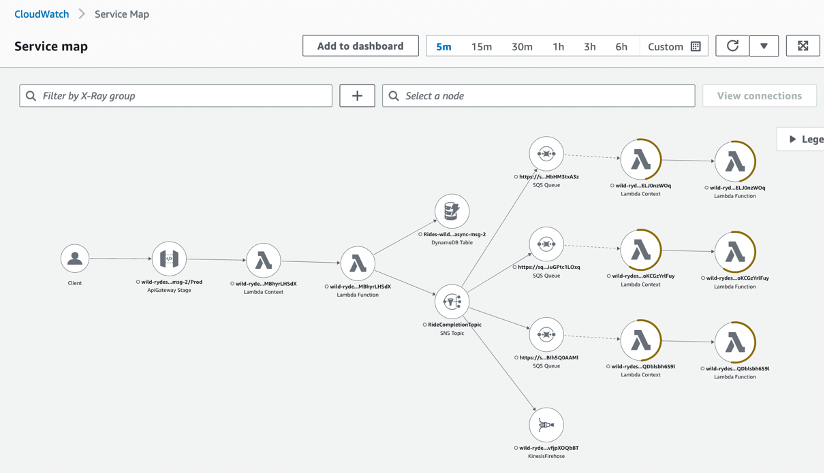
See the sample application README.md for detailed testing instructions.
The sample application shows various use-cases, which are described in the following sections.
Amazon SNS to Amazon SQS fanout scenario
A common application integration scenario for SNS is the Fanout scenario. In the Fanout scenario, a message published to an SNS topic is replicated and pushed to multiple endpoints, such as SQS queues. This allows for parallel asynchronous processing and is a common application integration pattern used in event-driven application architectures.
When an SNS topic fans out to SQS queues, the pattern is called topic-queue-chaining. This means that you add a queue, in our case an SQS queue, between the SNS topic and each of the subscriber services. As messages are buffered in a persistent manner in an SQS queue, no message is lost should a subscriber process run into issues for multiple hours or days, or experience exceptions or crashes.
By placing an SQS queue in front of each subscriber service, you can leverage the fact that a queue can act as a buffering load balancer. As every queue message is delivered to one of potentially many consumer processes, subscriber services can be easily scaled out and in, and the message load is distributed over the available consumer processes. In an event where suddenly a large number of messages arrives, the number of consumer processes has to be scaled out to cope with the additional load. This takes time and you need to wait until additional processes become operational. Since messages are buffered in the queue, you do not lose any messages in the process.
To summarize, in the Fanout scenario or the topic-queue-chaining pattern:
- SNS replicates and pushes the message to multiple endpoints.
- SQS decouples sending and receiving endpoints.

With AWS X-Ray active tracing enabled on the SNS topic, the CloudWatch service map shows us the complete application architecture, as follows.

Prior to the introduction of AWS X-Ray active tracing on the SNS topic, the AWS X-Ray service would not be able to reconstruct the full service map and the SQS nodes would be missing from the diagram.
To see the integration without AWS X-Ray active tracing enabled, open template.yaml and navigate to the resource RideCompletionTopic. Comment out the property TracingConfig: Active, redeploy and test the solution. The service map should then show an incomplete diagram where the SNS topic is linked directly to the consumer Lambda functions, omitting the SQS nodes.
For this use case, given the Fanout scenario, enabling AWS X-Ray active tracing on the SNS topic provides full end-to-end observability of the traces available in the application.
Amazon SNS to Amazon Kinesis Data Firehose delivery streams for message archiving and analytics
SNS is commonly used with Kinesis Data Firehose delivery streams for message archival and analytics use-cases. You can use SNS topics with Kinesis Data Firehose subscriptions to capture, transform, buffer, compress and upload data to Amazon S3, Amazon Redshift, Amazon OpenSearch Service, HTTP endpoints, and third-party service providers.
We will implement this pattern as follows:
- An SNS topic to replicate and push the message to its subscribers.
- A Kinesis Data Firehose delivery stream to capture and buffer messages.
- An S3 bucket to receive uploaded messages for archival.

In order to demonstrate this pattern, an additional consumer has been added to the SNS topic. The same Fanout pattern applies and the Kinesis Data Firehose delivery stream receives messages from the SNS topic alongside the existing consumers.
The Kinesis Data Firehose delivery stream buffers messages and is configured to deliver them to an S3 bucket for archival purposes. Optionally, an SNS message filter could be added to this subscription to select relevant messages for archival.
With AWS X-Ray active tracing enabled on the SNS topic, the Kinesis Data Firehose node will appear on the CloudWatch service map as a separate entity, as can be seen in the following figure. It is worth noting that the S3 bucket does not appear on the CloudWatch service map as Kinesis does not yet support AWS X-Ray active tracing at the time of writing of this blog post.

Prior to the introduction of AWS X-Ray active tracing on the SNS topic, the AWS X-Ray service would not be able to reconstruct the full service map and the Kinesis Data Firehose node would be missing from the diagram. To see the integration without AWS X-Ray active tracing enabled, open template.yaml and navigate to the resource RideCompletionTopic. Comment out the property TracingConfig: Active, redeploy and test the solution. The service map should then show an incomplete diagram where the Kinesis Data Firehose node is missing.
For this use case, given the data archival scenario with Kinesis Delivery Firehose, enabling AWS X-Ray active tracing on the SNS topic provides additional visibility on the Kinesis Data Firehose node in the CloudWatch service map.
Review faults, errors, and message delivery latency on the AWS X-Ray trace details page
The AWS X-Ray trace details page provides a timeline with resource metadata, faults, errors, and message delivery latency for each segment.
With AWS X-Ray active tracing enabled on SNS, additional segments for the SNS topic itself, but also the downstream consumers (AWS::SNS::Topic, AWS::SQS::Queue and AWS::KinesisFirehose) segments are available, providing additional faults, errors, and message delivery latency for these segments. This allows you to analyze latencies in your messages and their backend services. For example, how long a message spends in a topic, and how long it took to deliver the message to each of the topic’s subscriptions.

Enabling AWS X-Ray active tracing for SNS
AWS X-Ray active tracing is not enabled by default on SNS topics and needs to be explicitly enabled.
The example application used in this blog post demonstrates how to enable active tracing using AWS SAM.
You can enable AWS X-Ray active tracing using the SNS SetTopicAttributes API, SNS Management Console, or via AWS CloudFormation. See Active tracing in Amazon SNS in the Amazon SNS Developer Guide for more options.
Cleanup
To clean up the resources provisioned as part of the sample serverless application, follow the instructions as outlined in the sample application README.md.
Conclusion
AWS X-Ray active tracing for SNS enables end-to-end visibility in real-world scenarios involving patterns like SNS to SQS and SNS to Amazon Kinesis.
But it is not only useful for these patterns. With AWS X-Ray active tracing enabled for SNS, you can identify bottlenecks and monitor the health of event-driven applications by looking at segment details for SNS topics and consumers, such as resource metadata, faults, errors, and message delivery latency for each subscriber.
Enable AWS X-Ray active tracing for SNS to gain accurate visibility of your end-to-end tracing.
For more serverless learning resources, visit Serverless Land.