This post is written by Chetan Makvana, Sr. Solutions Architect.
Customers use modular architectural patterns and serverless operational models to build more sustainable, scalable, and resilient applications in modern application development. AWS Lambda is a popular choice for building these applications.
If customers have invested in container tooling for their development workflows, they deploy to Lambda using the container image packaging format for workloads like machine learning inference or data intensive workloads. Using functions deployed as container images, customers benefit from the same operation simplicity, automation scaling, high availability, and native integration with many services.
Containerized applications often have several distinct environments and accounts, such as dev, test, and prod. An application has to go through a process of deployment and testing in these environments. One common pattern for deploying containerized applications is to have a central AWS create a single container image, and carry out deployment across other AWS accounts. To achieve automated deployment of the application across different environments, customers use CI/CD pipelines with familiar container tooling.
This blog post explores how to use AWS Serverless Application Model (AWS SAM) Pipelines to create a CI/CD deployment pipeline and deploy a container-based Lambda function across multiple accounts.
Solution overview
This example comprises three accounts: tooling, test, and prod. The tooling account is a central account where you provision the pipeline, and build the container. The pipeline deploys the container into Lambda in the test and prod accounts using AWS CodeBuild. It also requires the necessary resources in the test and prod account. This consists of an Identity and Access Management (IAM) role that trusts the tooling account and provides the required deployment-specific permissions. AWS CodeBuild assumes this IAM role in the tooling account to carry out deployment.
The solution uses AWS SAM Pipelines to create CI/CD deployment pipeline resources. It provides commands to generate the required AWS infrastructure resources and a pipeline configuration file that CI/CD system can use to deploy using AWS SAM. Find the example code for this solution in the GitHub repository.
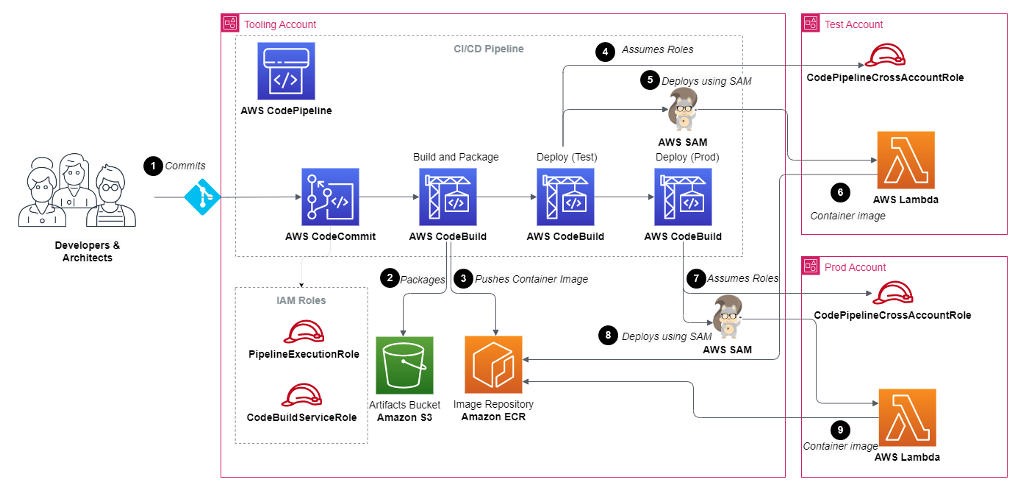
Full solution architecture
AWS CodePipeline goes through these steps to deploy the container-based Lambda function in the test and prod accounts:
- The developer commits the code of Lambda function into AWS CodeCommit or other source control repositories, which triggers the CI/CD workflow.
- AWS CodeBuild builds the code, creates a container image, and pushes the image to the Amazon Elastic Container Registry (ECR) repository using AWS SAM.
- AWS CodeBuild assumes a cross-account role for the test account.
- AWS CodeBuild uses AWS SAM to deploy the Lambda function by pulling image from Amazon ECR.
- If deployment is successful, AWS CodeBuild deploys the same image in prod account using AWS SAM.
Deploying the example
Prerequisites
- An AWS account. The IAM user that you use must have sufficient permissions to make necessary AWS service calls and manage AWS resources.
- AWS CLI installed and configured.
- Git installed.
- AWS SAM installed.
- Setup .aws/credentials named profiles for tooling, test and prod accounts so you can run CLI and AWS SAM commands against them.
- Set the TOOLS\_ACCOUNT\_ID, TEST\_ACCOUNT\_ID, and PROD\_ACCOUNT\_ID env variables:
export TOOLS\_ACCOUNT\_ID=<Tooling Account Id>export TEST\_ACCOUNT\_ID=<Test Account Id>export PROD\_ACCOUNT\_ID=<Prod Account Id>
Creating a Git Repository and pushing the code
Run the following command in the tooling account from your terminal to create a new CodeCommit repository:
aws codecommit create-repository --repository-name lambda-container-repo --profile toolingInitialize the Git repository and push the code.
cd ~/environment/cicd-lambda-containergit init -b maingit add .git commit -m "Initial commit"git remote add origin codecommit://lambda-container-repogit push -u origin mainCreating cross-account roles in test and prod accounts
For the pipeline to gain access to the test and production environment, it must assume an IAM role. In cross-account scenario, the IAM role for the pipeline must be created on the test and production accounts.
Change directory to the directory templates and run the following command to deploy roles to test and prod using respective named profiles.
Test Profile
cd ~/environment/cicd-lambda-container/templatesaws cloudformation deploy --template-file crossaccount\_pipeline\_roles.yml --stack-name codepipeline-crossaccount-roles --capabilities CAPABILITY\_NAMED\_IAM --profile test --parameter-overrides ToolAccountID=${TOOLS\_ACCOUNT\_ID}aws cloudformation describe-stacks --stack-name codepipeline-crossaccount-roles --query "Stacks[0].Outputs" --output json --profile testOpen the codepipeline\_parameters.json file from the root directory. Replace the value of TestCodePipelineCrossAccountRoleArn and TestCloudFormationCrossAccountRoleArn with the CloudFormation output value of CodePipelineCrossAccountRole and CloudFormationCrossAccountRole respectively.
Prod Profile
aws cloudformation deploy --template-file crossaccount\_pipeline\_roles.yml --stack-name codepipeline-crossaccount-roles --capabilities CAPABILITY\_NAMED\_IAM --profile prod --parameter-overrides ToolAccountID=${TOOLS\_ACCOUNT\_ID}aws cloudformation describe-stacks --stack-name codepipeline-crossaccount-roles --query "Stacks[0].Outputs" --output json --profile prodOpen the codepipeline\_parameters.json file from the root directory. Replace the value of ProdCodePipelineCrossAccountRoleArn and ProdCloudFormationCrossAccountRoleArn with the CloudFormation output value of CodePipelineCrossAccountRole and CloudFormationCrossAccountRole respectively.
Creating the required IAM roles and infrastructure in the tooling account
Change to the templates directory and run the following command using tooling named profile:
aws cloudformation deploy --template-file tooling\_resources.yml --stack-name tooling-resources --capabilities CAPABILITY\_NAMED\_IAM --parameter-overrides TestAccountID=${TEST\_ACCOUNT\_ID} ProdAccountID=${PROD\_ACCOUNT\_ID} --profile toolingaws cloudformation describe-stacks --stack-name tooling-resources --query "Stacks[0].Outputs" --output json --profile toolingOpen the codepipeline\_parameters.json file from the root directory. Replace value of ImageRepositoryURI, ArtifactsBucket, ToolingCodePipelineExecutionRoleArn, and ToolingCloudFormationExecutionRoleArn with the corresponding CloudFormation output value.
Updating cross-account IAM roles
The cross-account IAM roles on the test and production account require permission to access artifacts that contain application code (S3 bucket and ECR repository). Note that the cross-account roles are deployed twice. This is because there is a circular dependency on the roles in the test and prod accounts and the pipeline artifact resources provisioned in the tooling account.
The pipeline must reference and resolve the ARNs of the roles it needs to assume to deploy the application to the test and prod accounts, so the roles must be deployed before the pipeline is provisioned. However, the policies attached to the roles need to include the S3 bucket and ECR repository. But the S3 bucket and ECR repository don’t exist until the resources deploy in the preceding step. By deploying the roles twice, once without a policy so their ARNs resolve, and a second time to attach policies to the existing roles that reference the resources in the tooling account.
Replace ImageRepositoryArn and ArtifactBucketArn with output value from the above step in the below command and run it from the templates directory using Test and Prod named profiles.
Test Profile
aws cloudformation deploy --template-file crossaccount\_pipeline\_roles.yml --stack-name codepipeline-crossaccount-roles --capabilities CAPABILITY\_NAMED\_IAM --profile test --parameter-overrides ToolAccountID=${TOOLS\_ACCOUNT\_ID} ImageRepositoryArn=<ImageRepositoryArn value> ArtifactsBucketArn=<ArtifactsBucketArn value>Prod Profile
aws cloudformation deploy --template-file crossaccount\_pipeline\_roles.yml --stack-name codepipeline-crossaccount-roles --capabilities CAPABILITY\_NAMED\_IAM --profile prod --parameter-overrides ToolAccountID=${TOOLS\_ACCOUNT\_ID} ImageRepositoryArn=<ImageRepositoryArn value> ArtifactsBucketArn=<ArtifactsBucketArn value>Deploying the pipeline
Replace DeploymentRegion value with the current Region and CodeCommitRepositoryName value with the CodeCommit repository name in codepipeline\_parameters.json file.
Push the changes to CodeCommit repository using Git commands.
Replace CodeCommitRepositoryName value with the CodeCommit repository name created in the first step and run the following command from the root directory of the project using tooling named profile.
sam deploy -t codepipeline.yaml --stack-name cicd-lambda-container-pipeline --capabilities=CAPABILITY\_IAM --parameter-overrides CodeCommitRepositoryName=<CodeCommit Repository Name> --profile toolingCleaning Up
- Run the following command in root directory of the project to delete the pipeline:
sam delete --stack-name cicd-lambda-container-pipeline --profile tooling - Empty the artifacts bucket. Replace the artifacts bucket name with the output value from the preceding step:
aws s3 rm s3://<Arifacts bucket name> --recursive --profile tooling - Delete the Lambda functions from the test and prod accounts:
aws cloudformation delete-stack --stack-name lambda-container-app-test --profile testaws cloudformation delete-stack --stack-name lambda-container-app-prod --profile prod - Delete cross-account roles from the test and prod accounts:
aws cloudformation delete-stack --stack-name codepipeline-crossaccount-roles --profile testaws cloudformation delete-stack --stack-name codepipeline-crossaccount-roles --profile prod - Delete the ECR repository:
aws ecr delete-repository --repository-name image-repository --profile tooling --force - Delete resources from the tooling account:
aws cloudformation delete-stack --stack-name tooling-resources --profile tooling
Conclusion
This blog post discusses how to automate deployment of container-based Lambda across multiple accounts using AWS SAM Pipelines.
Navigate to the GitHub repository and review the implementation to see how CodePipeline pushes container image to Amazon ECR, and deploys image to Lambda using cross-account role. Examine the codepipeline.yml file to see how the AWS SAM Pipelines creates CI/CD resources using this template.
For more serverless learning resources, visit Serverless Land.