This post is written by Heeki Park, Principal Solutions Architect, Sachin Doshi, Senior Application Architect, and Jason Enderle, Senior Solutions Architect.
Amazon API Gateway enables developers to create private REST APIs that can only be accessed from within a Virtual Private Cloud (VPC). Traffic to the private API is transmitted over secure connections and stays within the AWS network and specifically within the customer’s VPC, protecting it from the public internet. This approach can be used to address a customer’s regulatory or security requirements by ensuring the confidentiality of the transmitted traffic. This makes private API Gateway endpoints suitable for publishing internal APIs, such as those used by microservices and data APIs.
In microservice architectures, teams often build and manage components in separate AWS accounts and prefer to access those private API endpoints using company-specific custom domain names. Custom domain names serve as an alias for a hostname and path to your API. This makes it easier for clients to connect using an easy-to-remember vanity URL and also maintains a stable URL in case the underlying API endpoint URL changes. Custom domain names can also improve the organization of APIs according to their functions within the enterprise. For example, the standard API Gateway URL format: “https://api-id.execute-api.region.amazonaws.com/stage” can be transformed into “https://api.private.example.com/myservice”.
Overview
This blog post builds on documentation that covers frontend invokes of private endpoints and backend integration patterns and two previously published blog posts.
The first blog post that helps you consume private API endpoints from API Gateway, using a VPC-enabled Lambda function and a container-based application using mTLS. The second post helps you implement private backend integrations to your API microservices that are deployed using AWS Fargate or Amazon EC2. This post extends these, enabling you to simplify access to your API endpoints by implementing custom domain names for private endpoints using an NGINX reverse proxy.
This solution uses NGINX because it acts as a high-performance intermediary, enabling the efficient forwarding of traffic within a private network. A configuration mapping file associates your custom domain with the corresponding private endpoint across AWS accounts. This configuration mapping file can then be source controlled and used for governed deployments into your lower and production environments.
The following diagram illustrates the interactions between the components and the path for an API request. In this use case, a shared services account (Account A) is responsible for centrally managing the mappings of custom domains and creating an AWS PrivateLink connection to private API endpoints in provider accounts (Account B and Account C).
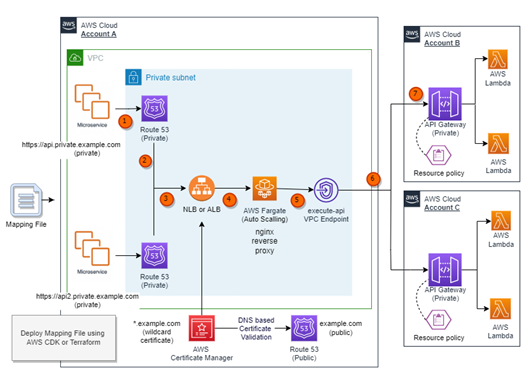
- A request to the API is made using a private custom domain from within a VPC or another device that is able to route to the VPC. For example, the request might use the domain https://api.private.example.com.
- An alias record in Amazon Route 53 private hosted zone resolves to the fully qualified domain name of the private Elastic Load Balancing (ELB). The ELB can be configured to be either a Network Load Balancer (NLB) or an Application Load Balancer (ALB).
- The ELB uses an AWS Certificate Manager (ACM) certificate to terminate TLS (Transport Layer Security) for corresponding custom private domain.
- The ELB listener redirects requests to an associated ELB target group, which in turn forwards the request to an Amazon Elastic Container Service task running on AWS Fargate.
- The Fargate service hosts a container based on NGINX that acts as a reverse proxy to the private API endpoint in one or more provider accounts. The Fargate service is configured to scale using a metric that tracks CPU utilization automatically.
- The Fargate task, forwards traffic to the appropriate private endpoints in provider Account B or Account C through a PrivateLink VPC Endpoint.
- The API Gateway resource policy limits access to the private endpoints based on a specific VPC endpoint, HTTP verbs, and source domain used to request the API.
The solution passes any additional information found in headers from upstream calls, such as authentication headers, content type headers, or custom data headers unmodified to private endpoints in provider accounts (Account B and Account C).
Prerequisites
To use custom domain names, you need two components: a TLS certificate and a DNS alias. This example uses ACM for managing the TLS certificate and Route 53 for creating the DNS alias.
ACM offers various options for integrating a TLS certificate, such as:
- Importing an existing TLS certificate into ACM.
- Requesting a TLS certificate in ACM with Email-based validation.
- Requesting a TLS certificate in ACM with DNS-based validation.
- Requesting a TLS certificate from ACM using your Organization’s Private CA in AWS.
The following diagram illustrates the benefits and drawbacks associated with each option.
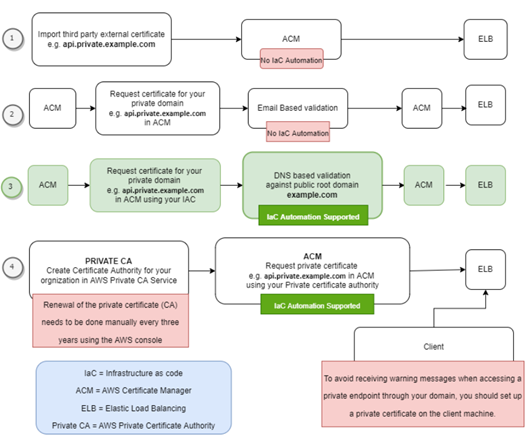
This solution uses DNS-based validation (option #3) to request TLS certificates from ACM. It is assumed that a public hosted zone with a registered root domain (such as example.com) is already deployed in the target account. The solution then uses ACM to validate ownership of the domain names specified in the configuration mapping file during deployment.
With a deployed public hosted zone, private child domains (such as api.private.example.com) can be deployed using DNS validation, which enables infrastructure as code (IaC) deployment to automate certificate validation during deployment of the solution. Additionally, DNS-based validation automatically renews the ACM certificate before it expires.
This solution requires the presence of specific VPC endpoints, namely execute-api, logs, ecr.dkr, ecr.api, and Amazon S3 gateway in a shared services account (Account A). Enabling private DNS on the execute-api VPC endpoint is optional and is not a requirement of the solution. Some customers may choose not to enable private DNS on the execute-api VPC endpoint, as this then allows applications within the VPC to reach the private API endpoints through the NGINX reverse proxy but also resolve public API Gateway endpoints.
Deploying the example
You can use the example AWS Cloud Development Kit (CDK) or Terraform code available on GitHub to deploy this pattern in your own account.
This solution uses a YAML-based configuration mapping file to add, update, or delete a mapping between a custom domain and a private API endpoint. During deployment, the automated infrastructure as code (IaC) script parses the provided YAML file and does the following:
- Create an NGINX configuration file.
- Apply the NGINX configuration file to the standard NGINX container image.
- Parses the mapping file and creates necessary Route 53 private hosted zones in Account A.
- Creates wildcard-based SSL certificates (such as *.example.com) in Account A. ACM validates these certificates using its respective public hosted zone (such as example.com) and attaches them to the ELB listener. By default, an ELB listener supports up to 25 SSL certificates. Wildcards are used to secure an unlimited number of subdomains, making it easier to manage and scale multiple subdomains.
Description of mapping file fields
| Property | Required | Example Values | Description |
| CUSTOM\_DOMAIN\_URL | true | api.private.example.com | Desired custom URL for private API. |
| PRIVATE\_API\_URL | true | https://a1b2c3d4e5.execute-api.us-east-1.amazonaws.com/dev/path1/path2 | Execution URL of targeted private endpoint |
| VERBS | false | [“GET”,” POST”, “PUT”, “PATCH”, “DELETE”, “HEAD”, “OPTIONS”] | This property would be used to create API Gateway resource policies. You can provide one or more verbs as a comma separated list. If this property is not provided, all verbs are permitted. |
Using API Gateway resource policies for private endpoints
To allow access to private endpoints from your VPCs or from VPCs in another account, you must implement a resource policy. Resource policies can be used to restrict access based on specific criteria such as VPC endpoints, API paths, and API verbs. To enable this functionality, follow these steps:
- Complete the infrastructure as code (IaC) deployment.
- Create or update an API Gateway resource policy in the provider accounts (such as Account B and Account C). This policy should include the VPC endpoint id from the shared services account (Account A).
- Deploy your API to apply the changes in provider accounts (such as Account B and Account C).
To update the API Gateway resource policy with code, refer to the documentation and code examples in the GitHub repository.
Deploying updates to the mapping file
To add, update, or delete a mapping between your custom domain and private endpoint, you can update the mapping file and then rerun the deployment using the same steps as before.
Deploying subsequent updates to the mapping file using the existing infrastructure as code pipeline reduces the risk of human error, adds traceability, prevents configuration drift, and allows the deployment process to follow your existing DevOps and governance processes in place.
For example, you could store the configuration mapping file in a separate source control repository and commit each change to that repository. Each change could then trigger a deployment process, which would then check the configuration changes and conduct the appropriate deployment. If required, you could introduce gates to enforce either manual checks or a ticketing process to ensure that change control processes are enforced.
Understanding cost of the solution
Most of the services mentioned in this solution are billed according to usage, which is determined by the number of requests made.
However, there are a few services that incur hourly or monthly costs. These include monthly fees for Route 53 hosted zones, hourly charges for VPC endpoints, Elastic Load Balancing, and the hourly cost of running the NGINX reverse proxy on Fargate. To estimate the cost for these options based on your specific workload, you can utilize the AWS pricing calculator. Here is an example outlining the approximate cost associated with the architecture implemented in this solution.
Conclusion
This blog post demonstrates a solution that allows customers to utilize their private endpoints securely with API Gateway across AWS accounts and within a VPC network by using a reverse proxy with a custom domain name. The solution offers a simplified approach to manage the mapping between private endpoints with API Gateway and custom domain names, ensuring seamless connectivity and security.
For more serverless learning resources, visit Serverless Land.