GNU Guix is different from most other GNU/Linux distributions and perhaps nowhere is thatmore obvious than the organization of the filesystem: Guix does not conform to theFilesystem Hierarchy Standard (FHS). Inpractical terms, this means there is no global /lib containing libraries, /bincontaining binaries,¹ and so on. This is very much at the core of how Guix works and someof the convenient features, like per-user installation of programs (different versions,for instance) and a declarative system configuration where the system is determined from aconfiguration file.
However, this also leads to a difference in how many pieces of software expect their worldto look like, relying on finding a library in /lib or an external tool in /bin. Whenthese are hard coded and not overcome with appropriate build options, we patch code torefer to absolute paths in the store, like/gnu/store/hrgqa7m498wfavq4awai3xz86ifkjxdr-grep-3.6/bin/grep, to keep everythingconsistently contained within the store.
It all works great and is thanks to the hard work of everyone that has contributed toGuix. But what if we need a more FHS-like environment for developing, testing, or runninga piece of software?
To that end, we've recentlyadded (available in Guix 1.4.0)a new option for guix shell(previously called guix environment):--emulate-fhs (or -F). This option is used in conjunction with the--container (or -C)option which creates an isolated, you guessed it, container. The new --emulate-fhsoption will set up an environment in the container that follows FHS expectations, so thatlibraries are visible in /lib in the container, as an example.
Here is a very simple example:
$ guix shell --container --emulate-fhs coreutils -- ls /bin | head[b2sumbase32base64basenamebasenccatcatchsegvchconchgrpand
$ guix shell --container --emulate-fhs coreutils -- ls /lib | headMcrt1.oScrt1.oauditcrt1.ocrti.ocrtn.ogconvgcrt1.old-2.33.sold-linux-x86-64.so.2Contrast that with /bin on a Guix system:
$ ls /bin -ltotal 4lrwxrwxrwx 1 root root 61 Dec 12 09:57 sh -> \ /gnu/store/d99ykvj3axzzidygsmdmzxah4lvxd6hw-bash-5.1.8/bin/sh*and /lib
$ ls /libls: cannot access '/lib': No such file or directoryOr, if you like to see it more in motion, here's a gif (courtesy of Ludovic Courtès):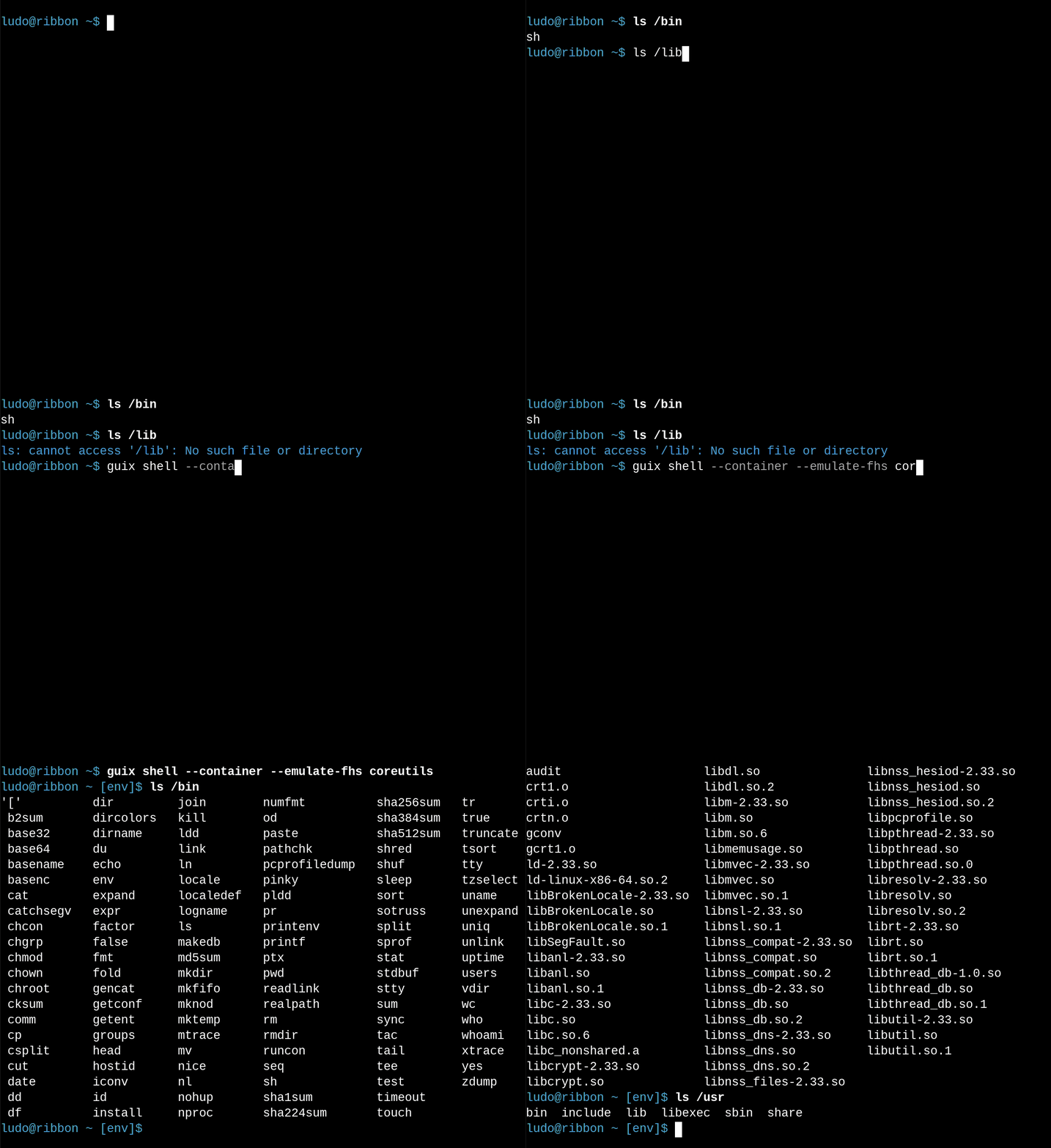
Additionally, for the more technically-minded, the glibc used in thiscontainerwill read from a global cache in /etc/ld.so.cache contrary to the behavior inGuixotherwise. This can help ensure that libraries are found when querying the ld cache orusing the output of ldconfig -p, for example.
There are several uses that spring to mind for such a container in Guix. For developers,or those aspiring to hack on a project, this is a helpful tool when needing to emulate adifferent (non-Guix) environment. For example, one could use this to more easily followbuild instructions meant for a general distribution, say when a Guix package is not (yet)available or easy to write immediately.
Another usage is to be able to use tools that don't really fit into Guix's model, likeones that use pre-built binaries. There are many reasons why this is not ideal and Guixstrives to replace or supplement such tools, but practically speaking they can be hard toavoid entirely. The FHS container helps bridge this gap, providing an isolated andreproducible environment as needed.
Users not interested in development will also find the FHS container useful. For example,there may be software that is free and conforms to the Free System DistributionGuidelines (FSDG) Guixfollows, yet is not feasible to bepackaged by our standards.JavaScript and particularly Electron applications are notyet packaged for Guix due to thedifficulties of a properlysource-based and bootstrapable approach in this ecosystem.
As a more interesting example for this last point, let's dive right into a big one: thepopular VSCodium editor. This is a freelylicensed build of Microsoft'sVS Code editor. This is based on Electron and pre-built AppImagesare available. Downloading and making theAppImage executable (with a chmod +x), we can run it in a container with
guix shell --container --network --emulate-fhs \ --development ungoogled-chromium gcc:lib \ --preserve='^DISPLAY$' --preserve='^XAUTHORITY$' --expose=$XAUTHORITY \ --preserve='^DBUS\_' --expose=/var/run/dbus \ --expose=/sys/dev --expose=/sys/devices --expose=/dev/dri \ -- ./VSCodium-1.74.0.22342.glibc2.17-x86\_64.AppImage --appimage-extract-and-runThe second line is a handy cheat to get lots of libraries often needed for graphicalapplications (development inputs of the package ungoogled-chromium) though it can beoverkill if the AppImage does actually bundle everything (they don't!). The next line isfor display on the host's X server, the one after for DBus communication, and lastlyexposing some of the host hardware for rendering. This last part may be different ondifferent hardware. That should do it, at least to see basic functionality of VSCodium.Note that we can't run an AppImage without the --appimage-extract-and-run option as itwill want to use FUSE tomount the image which is not possible from the container.²
The FHS container is also useful to be able to run the exact same binary as anyone else,as you might want to for privacy reasons with the TorBrowser. While there is a long-standing set ofpatches to build the Tor Browser from source, with acontainer we can run the official build directly. Afterdownloading, checking thesignature, andunpacking, we can launch the Tor Browserfrom the root of the unpacked directory with:
guix shell --container --network --emulate-fhs \ --preserve='^DISPLAY$' --preserve='^XAUTHORITY$' --expose=$XAUTHORITY \ alsa-lib bash coreutils dbus-glib file gcc:lib \ grep gtk+ libcxx pciutils sed \ -- ./start-tor-browser.desktop -vHere we've used a more minimal set of package inputs, rather than the ungoogled-chromiumtrick above. Usually this is found through some trial and error, looking at log output,maybe tracing, and sometimes from documentation. Though documentation of needed packagesoften has some assumptions on what is already available on typical systems. (Thanks to JimNewsome for pointing out this example on the guix-devel mailinglist.)
Another example is to get the latest nightly builds of Rust, via rustup.
$ mkdir ~/temphome$ guix shell --network --container --emulate-fhs \ bash coreutils curl grep nss-certs gcc:lib gcc-toolchain \ pkg-config glib cairo atk pango@1.48.10 gdk-pixbuf gtk+ git \ --share=$HOME/temphome=$HOME~/temphome [env]$ curl --proto '=https' --tlsv1.2 -sSf <https://sh.rustup.rs> | shFirst we created a ~/temphome directory to use as $HOME in the container and thenincluded a bunch of libraries in the container for the next example.
This will proceed without problem and we'll see
info: downloading installerWelcome to Rust!This will download and install the official compiler for the Rustprogramming language, and its package manager, Cargo....Rust is installed now. Great!To get started you may need to restart your current shell.This would reload your PATH environment variable to includeCargo's bin directory ($HOME/.cargo/bin).To configure your current shell, run:source "$HOME/.cargo/env"After updating the shells environment as instructed, we can see it all worked
~/temphome [env]$ rustc --versionrustc 1.65.0 (897e37553 2022-11-02)as Guix's current Rust is at 1.61.0 and we didn't even include Rust in thecontainer, of course.
Finally, we can build a Rust project of desktop widgets, ElKowars wacky widgets(eww), following theirdirections. Ultimately this uses just the standard cargo build --release and builds after downloading all the needed libraries.
~/temphome/eww [env]$ git clone https://github.com/elkowar/eww...~/temphome/eww [env]$ cd eww~/temphome/eww [env]$ cargo build --releaseinfo: syncing channel updates for 'nightly-2022-08-27-x86\_64-unknown-linux-gnu'info: latest update on 2022-08-27, rust version 1.65.0-nightly (c07a8b4e0 2022-08-26)...Finished release [optimized] target(s) in 2m 06sWith this being a fresh container, you will need to make some directories that normallyexist, like ~/.config and ~/.cache in this case. For basic display support, it isenough to add --preserve='^DISPLAY$' --preserve='^XAUTHORITY$' --expose=$XAUTHORITY tothe container launch options and run the first example widget in thedocumentation.
As we can see, with containers more generally we have to provide the right inputs andoptions as the environment is completely specified at creation. Once you want to runsomething that needs hardware from the host or to access host files, the container becomesincreasingly porous for more functionality. This is certainly a trade-off, but one whichwe have agency with a container we wouldn't get otherwise.
The FHS option provides another option to make a container in Guix to produce otherenvironments, even those with a vastly different philosophy of the root filesystem! Thisis one more tool in the Guix toolbox for controlled and reproducible environments thatalso let's us do some things we couldn't (easily) do otherwise.
Notes
¹ Other than a symlink for sh from the bashpackage, for compatibility reasons.
² Actually, one can use flatpak-spawn fromflatpak-xdg-utils to launch somethingon the host and get the AppImage to mount itself. However, it is not visible from the samecontainer. Or, we can use a normal mountingprocessoutside of the container to inspect the contents, but AppImages will have an offset. Wecan use the FHS container option to get this offset and then mount in one line with mount VSCodium-1.74.0.22342.glibc2.17-x86\_64.AppImage <mountpoint> -o offset=$(guix shell --container --emulate-fhs zlib -- ./VSCodium-1.74.0.22342.glibc2.17-x86\_64.AppImage --appimage-offset)
About GNU Guix
GNU Guix is a transactional package manager andan advanced distribution of the GNU system that respects userfreedom.Guix can be used on top of any system running the Hurd or the Linuxkernel, or it can be used as a standalone operating system distributionfor i686, x86\_64, ARMv7, AArch64, and POWER9 machines.
In addition to standard package management features, Guix supportstransactional upgrades and roll-backs, unprivileged package management,per-user profiles, and garbage collection. When used as a standaloneGNU/Linux distribution, Guix offers a declarative, stateless approach tooperating system configuration management. Guix is highly customizableand hackable through Guileprogramming interfaces and extensions to theScheme language.