Total Ipad: Recent Episodes

The new version of Nintendo’s hit Switch console is just different enough to justify itself, but hardly a must-buy for any of the millions who bought the launch version. With a bigger, brighter and better screen, it’s a good choice for someone buying now who intends to use it mostly as a handheld — but if you’re planning or already using your Switch primarily as a stationary console, there’s pretty much no reason to upgrade. All the same, there will probably be a lot of units moving this holiday season.
Even at the best of times it can be hard to tell what Nintendo’s hardware strategy is, or whether there is indeed a strategy at all. The $350 Switch OLED provides a perfect example of this: At a time when rivals Sony and Microsoft are striving to show that their next-gen console is the most powerful, Nintendo releases an almost identical version of a console that was underpowered when it came out five years ago. Is it faltering? Or is it just that confident?
Signs point to neither — the rumor being that a new new Switch, with upgraded internals and a new screen but identical form factor, was planned for this year but the pandemic and chip shortage rendered this impossible. Making the best of the situation — or so the story goes — Nintendo slapped the OLED screens on the original hardware and is selling it as a minor quality-of-life update, the way it iterated on the 3DS for years. Nintendo has denied pretty much all accounts and speculation, but this story (again, just rumors) has the right smell.
It’s hard to know what to say about the result; on one hand, it’s plainly better than the original. On the other, it’s only better by a small amount, and for some people, no amount at all.
The screen itself is obviously the biggest improvement. I had the pleasure of playing Metroid: Dread on it, and the game’s fast-moving, colorful, high-contrast environments looked fantastic on it. The darker darks of the OLED screen made the light areas and colors pop more (though measurements have shown peak brightness is actually lower), and the additional screen real estate, while it looks minimal in photos, does in fact matter in person, making details, UI and text that much more comprehensible.
Oh, and the dust it attracts really stands out on that all-black frontage.
Image Credits: Darrell Etherington
The clarity seems improved in motion by the OLED’s faster individual pixel refresh rate, leaving less of a feeling of one frame blurring into the next. The original Switch’s screen is just fine, to be clear, but it’s clearly outmatched here.
The color has a different cast to it than the original’s LCD, but in games most people won’t notice: a shift toward the green where the old one tends toward magenta to my eye. Interestingly there are “vivid” and “standard” options on the OLED model deep in the settings; “vivid” was pre-selected and I certainly found it pleasant, giving a bit more saturation to the image but not to the point where it’s bothersome.
Image Credits: Darrell Etherington
In addition to this, the build quality feels better in general. The flimsy kickstand has been made far more beefy and adjustable, and the whole thing feels better put together. Although there are no significant changes to the internals, a slightly improved thermal profile should mean it runs a little cooler and uses the fans more sparingly. The speakers have supposedly been improved, but are still pretty much a last resort.
The Switch OLED comes with 64 GB of internal space, which is a nice upgrade from the 32 on the original. Of course everyone is going to put a micro SD card in there anyway, but the system volume is preferred and now there’s just that much less need to archive old games.
If you’re someone who plays their Switch games primarily on the device itself, or plans to, the Switch OLED is simply a superior device. I would not say it’s worth paying full price again to upgrade, but it’s definitely worth the $50 extra should you need to buy a new console after gifting or selling your first. (It’s $150 more than the handheld-only Lite, but to me the tradeoff of no TV mode has always been too much to justify.)
Image Credits: Darrell Etherington
Of course, if you — like me — tend to keep the Switch in its dock at all times except when traveling, almost nothing will change. There is technically a new dock, a bit more solid feeling as well and featuring an ethernet connection for those who love wires, but pretty much everything else will be the same for you.
It’s beyond question that the Switch OLED is the best way to play Switch games right now, but even so no one should feel the need to upgrade. Who knows when the next generation of Nintendo consoles will arrive? I think even Nintendo isn’t quite sure on that. So for now hold onto your cash unless your existing Switch is beat up or would do more good in someone else’s hands.
The post Nintendo Switch OLED is a boon to handheld users but skippable as a home console update – TechCrunch first appeared on Total Ipad.
Has your Telegram app started lagging while you are using it? Is it consuming too much device space? It might be because too many files have been accumulated by the app over time. Unlike WhatsApp, Telegram allows you to send and receive files up to 2GB in size. Accumulation of such files over time results in more consumption of the device’s storage and contributes to unresponsiveness. In this article, you will learn the 3 best ways to free up space in Telegram. Additionally, you can also disable auto media downloads on Telegram.
Also, Read| 2 Ways to Stop People From Adding you to Telegram Groups
3 Best Ways to Free Up Space in Telegram Clear all Cache Files in Telegram Telegram allows you to quickly exchange files between multiple chats by storing the data locally on your device. It offers to send and receive files up to 2GB in size. All of these files get stored and accumulated inside the device’s storage as cache data-consuming resources and making the app sluggish over time.
Fortunately, Telegram lets you clear this data with the help of its clear cache feature. Follow these simple steps to do the same-
- Open the Telegram app on your device.
- Tap on the hamburger menu on the top left corner of the screen.
-
Choose Settings.
-
Tap on Data and Storage under the Settings tab.
- On the next page, pick Storage Used.
- Tap on Clear Telegram Cache to clear all the cache files.
Disable Automatic Playback Feature Like Instagram, Telegram also offers to automatically play all the downloaded media files such as videos and gifs that are present in the chats. These media files get automatically downloaded as cache files to your device’s storage hence, increasing the space consumed by the app. Follow these simple steps to disable this feature to save space on your device.
- Open the Telegram app on your device.
- Tap on the hamburger menu on the top left corner of the screen.
-
Select Settings.
-
Tap on Data and Storage.
- Scroll and Navigate to Auto-Play Media Section.
- Turn off the auto-play media button for GIFs and videos.
Prevent Telegram to Auto-Download Chat Data Telegram just like any other instant messaging app offers to auto-download the chat data. This comprises attachments including all kinds of media files such as images, videos, gifs, and stickers. These downloaded files will increase the size of cache files making the app slower to use.
To prevent this from happening, Telegram offers you to disable auto-download for all media files. Follow these simple steps to do the same-
- Open the Telegram app on your device.
- Tap on the hamburger menu on the top left corner of the screen.
-
Choose Settings.
-
Select Data and Storage.
- Turn off buttons for automatic media download.
Additionally, if you are on your mobile data, turning off these settings will save you a significant amount of data from consumption.
Wrapping Up In this article, you have learned 3 ways to free up space consumed by the telegram app on your device. If you find this article helpful, don’t forget to hit the like button and also share this among your friends to help them be aware of these features. As always, stay tuned for more articles like this.
You can also follow us for instant tech news at Google News or for tips and tricks, smartphones & gadgets reviews, join GadgetsToUse Telegram Group* or for the latest review videos subscribe GadgetsToUse Youtube Channel.***
The post 3 Best Ways to Free Up Space in Telegram on Your Mobile first appeared on Total Ipad.
The Gadgeteer is supported by readers like you! If you buy something through links on our site, we may earn an affiliate commission. Thank you! Learn more.

REVIEW – Even in uneventful times everyone should own or have access to a good first aid kit. In many emergencies being able to respond quickly with the appropriate gear is one of the few ways to prevent catastrophe. Having worked briefly as a first responder, I know that having the right resources available in an emergency is just as important as having the right training. My Medic addresses half of that equation with their Recon and MyFAK First Aid Kits. These pre-built kits aren’t cheap, $249.95 for the Recon Standard and $119.96 for the MyFAK Standard, but they contain high-quality materials in well-thought-out quantities all loaded into two very durable packs that could help save the day.
What is it? The My Medic Recon and MyFAK are pre-loaded, self-contained first aid kits designed for response to a variety of medical situations or emergencies. I reviewed the Standard versions of both kits.

What’s in the box? Both the Standard Recon and Standard MyFAK kits have a ton of items included in the packs. The Pro versions, which are significantly more expensive, contain additional items, like sutures and scalpels, geared toward response by a medical professional or someone with advanced training.

Recon Contents * Recon Pack * Bleeding Aid + 5 Liquid Skin 5 g + 5 Gauze Pad 2 in. x 2 in. + 5 Gauze Pad 4 in. x 4 in. + 2 Secure Strips 0.25 in. x 3 in. x 3 per pack + 1 Dyna Stopper Bandage 9 in. x 5.5 in. + 1 Gauze Roll Conforming Stretch 3 in. x 12.3 ft. + 5 Curad Performance Series Antibacterial Bandage 2 in. x 4 in. + 5 Curad Performance Series Antibacterial Knuckle Bandage 1.5 in. x 3 in. + 5 Curad Performance Series Antibacterial Fingertip Bandage 1.75 in. x 2 in. + 5 Curad Performance Series Antibacterial Knee Elbow Bandage 3 in. x 3 in. + 10 Curad Performance Series Antibacterial Bandage 1 in. x 3.25 in. * Burning Aid * Airway Aid * Sprain & Fracture Aid + 2 Elastic Bandage 3 in. + 1 Sensi-Wrap 2 in. x 5 ft. + 1 Triangular Bandage Woven + 1 ActiSplint Roll 4 in. x 36 in. + 2 ActiSplint Finger 1.75 in. x 3.75 in. * Topical Aid + 2 Vaseline + 2 Lube + 5 Sunscreen + 5 Lip Guard Chapstick + 5 BZK Wipes Antiseptic + 5 Medicaine Sting + Bite Relief + 5 Alcohol Prep Pads Medium + 5 Oral Pain Relief Generic Orajel + 5 P.A.W.S. Hand Sanitizing Wipes + 5 Triple Antibiotic Generic Neosporin + 5 Hydrocortisone Cream Skin Irritations + Allergies * Medication + 3 Benadryl Allergies 25 mg x2 + 5 Pepto-Bismol Upset Stomach Antacid + 5 Advil Pain + Fever + Inflammation 200 mg x2 + 5 Tylenol Extra Strength Headache + Fever + Pain 500 mg x2 * Adventure & Survival Aid + 1 Rescue Whistle + 3 Survival Rescue Blanket + 3 Moleskin Blister Protection * Specialty Items + 1 Pen Light + 2 Oval Eye Pad + 1 EMT Shears 7.25 in. + 1 Thermometer Digital + 1 Cold Pack 5 in. x 9 in. + 3 Nitrile Gloves Large + 1 Tweezers Stainless + Non-Magnetic + 1 Clear Surgical Tape 1 in. x 30 ft. + 1 Eye Wash 4 oz. Medi-First

MyFAK Contents * MyFAK Pack * Bleeding Aid + 2 Liquid Skin 5 g + 1 Dyna Stopper Bandage 9 in. x 5.5 in. + 1 Gauze Roll 3 in. x 12.3 ft. + 4 Gauze Pad 2 in. x 2 in. + 4 Gauze Pad 4 in. x 4 in. + 3 Secure Strips 0.25 in. x 3 in. + 2 Curad Performance Series Antibacterial Bandage 2 in.x 4 in. + 2 Curad Performance Series Antibacterial Knuckle Bandage 1.5 in. x 3 in. + 2 Curad Performance Series Antibacterial Fingertip Bandage 1.75 in. x 2 in. + 2 Curad Performance Series Antibacterial Knee/Elbow Bandage 3 in. x 3 in. + 4 Curad Performance Series Antibacterial Bandage 1 in. x 3.25 in. * Burning Aid * Airway Aid * Sprain & Fracture Aid + 1 Acti-Splint Finger + 1 Triangular Bandage Woven + 1 Elastic Bandage Velcro 2 in. x 5 ft. * Topical Aid + 1 Vaseline + 2 Sunscreen + 2 Lip Guard-Chapstick + 2 BZK Wipes Antiseptic + 2 Alcohol Prep Pads-Large + 2 Medicaine Sting + Bite Relief + 2 Oral Pain Relief-Generic Orajel + 2 P.A.W.S. Hand Sanitizing Wipes + 2 Triple Antibiotic Generic Neosporin + 2 Hydrocortisone Cream Skin Irritations + Allergies + 2 SALJET Bullet 30 ml Sterile Saline Topical Solution * Medication + 2 Tylenol Extra Strength Headache + Fever + Pain 500 mg x2 + 1 Benadryl Allergies 25 mg x2 + 2 Pepto-Bismol Upset Stomach Antacid + 3 Advil Pain + Fever + Inflammation 200 mg x2 * Adventure & Survival Aid + 1 Survival Rescue Blanket + 1 Rescue Whistle * Specialty Items + 1 Pen Light + 1 Thermometer Digital + 1 EMT Shears 7.25 in. + 2 Moleskin Blister Protection + 2 Nitrile Gloves Large + 1 Tweezers-Stainless + Non-Magnetic + 1 Waterproof Tape 1 in. x 2.5 yds
 Hardware specs
Recon
* Pack Material: Nylon Cordura
* Height: 12.5 in.
* Width: 8.5 in.
* Depth: 7.25 in.
* Weight: 4.6-6.3 lbs
* People Covered: 4-6
Hardware specs
Recon
* Pack Material: Nylon Cordura
* Height: 12.5 in.
* Width: 8.5 in.
* Depth: 7.25 in.
* Weight: 4.6-6.3 lbs
* People Covered: 4-6
MyFAK * Pack Material: Nylon Cordura * Height: 7.5 in. * Width: 6.5 in. * Depth: 5 in. * Weight: 2.1-2.8 lbs * People Covered: 1-2

Design and features My Medic has done a great job of designing first aid kits that were made for use in high-stress situations. The design of both the Recon and MyFAK packs make intuitive sense, with pouches and compartments placed where you would instinctively reach for them. The large shoulder bag style of the Recon is sensible for a kit that can support 4-6 people and might be carried over terrain. The small trifold design of the MyFAK is ideal for a more compact kit that can be stashed in easy-to-access places. I go into more detail about the Recon and MyFAK design and features separately.
Recon

The Recon pack itself is the selling point of this kit for me. The pack comes in four colors and is made of heavy-duty nylon Cordura. This sturdy pack is covered in MOLLE straps, compartments, and attachment points.

MOLLE straps are a web attachment system currently used by the military that allows you to securely add more components to the outside of the bag.

The compartment zippers on the pack are oversized with large zipper pulls attached. There are seven compartments in total on the Recon.

In addition to the compartments, there are three pouches attached to the MOLLE straps on either side of the pack.

These pouches are perfect for adding extra items to the Recon allowing you to personalize it for your own needs. This kind of design feature is one reason why the Recon is worth the premium price.

On top of the Recon pack is a Velcro patch and an elastic adjustable daisy-chained cord that allows for further customization. There are also two heavyweight polymer D-rings that can be used to hang the pack from carabiners or similar attachments.

There’s another large D-ring on the back of the pack that snaps closed over the compartment where a cushioned shoulder strap is stored.

The shoulder strap is perfect if you have to carry the kit over a distance and while wearing it you’re still able to access all of the compartments.

The strap’s compartment can also be used to store additional supplies if needed.

The Recon has a main compartment that’s cavernous for the pack’s size. Plenty of room in there for extra preparedness items.

The top and bottom of the pack have quick access compartments for items you might need to grab quickly.

Underneath the pack there are more MOLLE straps and a few drain/air holes.

The rear of the Recon has a soft cushioned pad that provides comfort when being carried or could double as a headrest in a pinch.

I’m all about Morale Patches and I love that My Medic includes one with the Recon and gives you space to personalize the pack further with your own patches.

My Medic has not only gone above and beyond on the outside of the pack, they also didn’t skimp at all on what goes into the pack.

With most budget pre-loaded first aid kits, the quality of the supplies is where they fall short. Often these are low-quality items that you should never rely on in an emergency.

Where My Medic shines is their use of brand-name items in the Recon along with high-quality tools, like the included EMT shears. Even the My Medic branded items are higher quality than you’d find in most first aid kits.

Aside from the quality of the first aid items My Medic has done a really good job of including items to cover a variety of emergency situations. Included in the Recon are finger splints, cold packs, sting relief, and smelling salts to name a few, all items you might not think to add if you were building your own kit from scratch.

Keep in mind though that even the best supplies need to frequently be checked for expiration dates. Inspecting the pack’s contents every few months is vital to its effectiveness.

MyFAK

The MyFAK, which stands for My First Aid Kit, is kind of the little brother to the Recon. This is a smaller more compact first aid kit with a tri-fold design perfect for supporting 1-2 people.

The MyFAK pack is just as strong and durable as the Recon with plenty of attachment points, Velcro patches, and MOLLE straps. The MyFAK comes in six different colors, I like the red for this kit because it is easily identifiable by anyone as a first aid kit.

The front of the pack is one whole Velcro section which is perfect for affixing Morale Patches or securing other supplies.

The back of the MyFAK has two large MOLLE straps for attaching to any compatible connection. What’s great about these MOLLE straps is that the panel they are on tears completely away thanks to a large Velcro pad.

This allows you to secure the MyFAK to something like the back of a car’s headrest and when needed you can just pop the latch and pull the whole pack away from the Velcro pad quickly.

The convenient carry handle sewn into the top of the MyFAK is perfect for those quick grabs in an emergency.

Like the Recon, the zippers on the MyFAK are huge with extra-large zipper pulls.

The stitching on the seams of the pack and the zipper is doubled up and I appreciate this attention to detail.

The tri-fold design of the MyFAK allows you to spread the whole pack open for easy access to the supplies

Strong elastic bands sewn into the pack keep all the supplies secure and organized.

The mesh compartment on the end of the MyFAK can be removed easily and used as a smaller on-the-go first aid kit.

Again, the thought that went into designing the MyFAK in such a way increases its versatility further justifying the higher price point.

As with the Recon, I emptied the whole kit and repacked it to my liking. It’s also good practice to cycle through the contents of a first aid kit to make sure everything is secure, preventing a failure during an emergency.

The MyFAK doesn’t have as much extra room for your own additions as the Recon, but there are still plenty of compartments to fill.

The My Medic Morale Patch on the front of the MyFAK pulls double duty by keeping the buckle and strap securely in place.

The contents of the MyFAK closely mirror those of the Recon, just in a smaller quantity.

You’ll still find high-quality tools like the EMT shears, thermometer, and penlight along with plenty of aid items.

For as small as the MyFAK pack is, I was impressed with how many items were included in the kit. The Recon had space to spare, but every inch of the MyFAK is put to good use.

Performance The thing with first aid kits is that you hope you’ll never have to use them, but you need them to be ready in case you do. Luckily, I didn’t have to respond to an emergency using either pack but in a few run-throughs I was able to quickly access everything I might have needed in a typical first response situation. This was after I repacked the bags in a way that made sense for me. The other option is to practice using the kits as they come until you can easily remember where things are located. What’s great about the My Medic kits is that when you do reach for them in an emergency you know they most likely will have everything you need.

What I like * Well thought out design * Quality name brand contents * Ability to customize
What needs to be improved * Expensive * Should include a contents card and a basic First Aid Manual * Kits are a bit bulky
Final thoughts There’s no doubt that you could build your own first aid kits cheaper than the My Medic Recon and MyFAK. The question is, how effective would those self-made kits be in a real emergency. The My Medic kits have items I most likely would not have thought to include, and in an emergency that can make all the difference. At $249.95 for the Recon Standard kit and $119.95 for the MyFAK Standard, you’re paying a premium for the My Medic kits, but they’re worth it especially since someone’s life could literally depend on them. Of course, all the gear in the world isn’t useful if you don’t know how to properly use it, so it’s important to get as much training as possible. There are plenty of first aid online courses and videos, the Red Cross is a good place to start.
Price: Recon Standard: $249.95 MyFAK Standard: $119.95
Where to buy: Amazon or My Medic.
Source: The sample of this product was provided by My Medic.
Support The Gadgeteer: The Gadgeteer is supported by readers like you! If you buy something through the links on our site, we may earn a small affiliate commission. Thank you! Learn more. The post My Medic Recon & MyFAK First Aid Kits review – Always be prepared! first appeared on Total Ipad.
Back in 2020, the Trump government threatened to crack down on TikTok while pushing Microsoft to buy out the company. First, TikTok was forced by then-US President Donald Trump to split its U.S. version from its Chinese parent ByteDance. Microsoft then suggested a plan to buy a portion of the service and cutting off from the parent company, Bytedance. Later, TikTok rejected Microsoft’s offer while accepting Oracle’s proposal for the app.
In Microsoft’s version of the agreement, TikTok would have been completely cut off from Europe and Asia, while Oracle’s version keeps it substantially intact. Having Oracle take over TikTok’s U.S. hosting solves just a minor problem. It means China can’t immediately access user data, something it couldn’t before due to the app’s U.S. headquarters because Oracle wasn’t changing TikTok’s algorithm or managing moderation. Instead of being a subsidiary, Oracle will be a contractor.
While speaking at the Code Conference, the CEO of Microsoft, Satya Nadella, shed more light on the Microsoft-TikTok failed deal saying that it was the “strangest thing I’ve ever worked on.” He said they were working on introducing Microsoft’s security, child safety, and cloud expertise to TikTok.
During an on-stage interview, Nadella described the event as “unbelievable.” He also mentioned that he had learned a lot about different topics from a lot of different individuals.
According to him, TikTok approached Microsoft seeking a partner for cloud and security to help it pilot the delicate political landscape between China and the U.S. While talking about the deal, Nadella added that he thought that TikTok was a good fit since it is a cloud-based service and Microsoft is also a leader in cloud-based services in the U.S. “It is an interesting product,” he added. The CEO of Microsoft said that the Trump administration had a particular point of view, and at some point, he felt that they had a set of requirements, but later they disappeared.
“President Trump, I think had sort of a particular point of view on what he was trying to get done there, and then just dropped off,” he said. “I mean, it was interesting. There was a period of time when I felt that the [administration] had some particular set of requirements, and then they just disappeared.”
After taking charge of the office, U.S. President Joe Biden later issued an executive order lifting the Trump government’s ban on TikTok and WeChat. Instead, Biden instructed the commerce secretary to look into applications linked to foreign adversaries that might threaten American data privacy or national security.
TikTok has reached 1 billion active monthly users worldwide, confirming the short-form video app’s continuous growth. The site, privately held and operated by Chinese business ByteDance, has seen a significant increase in users in recent years, with a substantial portion of its U.S. audience joining during the Covid-19 pandemic.
The post CEO Microsoft, Satya Nadella reacts to failed TikTok deal first appeared on Total Ipad.

THE BIRTH OF LENOVO
Can you name 5 brands that are from the ’80s and still going strong? Bet Lenovo would be on that list.
Three decades ago, Lenovo was born with the idea of crafting personal devices that are user-friendly and become popular among the masses to enable a culture where more people aspire to join. Also, Lenovo aimed to establish an enduring, trustworthy business that is well respected globally. This makes Lenovo older than many technology brands, including HTC (1997) and Huawei (1987), which are more common to consumers today.
Lenovo, with ten engineers at $30,000 or 200,000 Chinese yuan, was established on 1 November 1984 by Liu Chuanzhi. The company employees – 11 of them all – had their entire names in the very uninspired name of New Technology Developer, Inc. during that initial meeting with the Chinese Government to receive the approval for incorporation. They hadn’t luckily kept the name for a long time.
|
|
|
|

|
|
THE EVOLUTION OF LENOVO
A few years after the start of the venture, the name changed from New Technology Developer, Inc. to Legend. Lenovo’s first successes came under this new label. However, in 2003 when the company adopted the name by which it is now known, the company had another name change. Working under the name Legend, after the first Legend-branded personal computer was released in 1990, Lenovo started to develop its popularity. In the Chinese and other Asian markets, the Legend PC was a big success.
Lenovo has evolved into a multinational application company (sales) with its own packaging plants in more than seven countries and partnership plants in a number of others, granting local businesses business licenses and distribution contracts. Lenovo is also a big multinational company (in terms of sales), with manufacturing facilities in seven countries and goods sold in nearly 80 countries.
The company has made a number of acquisitions since it was founded to enter the global market. In 2005, IBM purchased a personal computer business from the American information technology corporation. This acquisition has made Lenovo by volume the world’s third largest device manufacturer. In 2014, the company purchased the IBM Intel server business to become the largest server manufacturer in the world. In 2014, the company proposed the acquisition of Google’s $2.91 billion Mobility service. The offer included the Moto and Droid mobile ranges from Motorola.
|
|
|
|

|
||
LENOVO’S PRODUCTS
Lenovo is a successful computer brand since they have a wide range of laptops available. Because of its slim aluminum frame, lively display, and good overall performance, the Yoga C930 is a fantastic choice. Lenovo decided to apply the Yoga concept to the Chromebook C630 because it continues to be a crowd-pleaser.
Moreover, Lenovo is selected by top companies in the United States and around the world because they are dependable, rugged, and high-performing. Other Lenovo highlights include the latest Legion brand, which consistently produces reliable gaming machines – the company broke into this market with the Legion Y7000, an inexpensive rig with a sleek design and vibrant display.
Lenovo also provides a suite of applications and services in addition to its laptops, smartphones, earphones, and other PC accessories. These include REACHit, the wireless data transmission tool SHAREit, the handwriting recognition devices WRITEit, the mobile security apps SECUREit, the backup service SYNCit, SNAPit, and the SEEit smartphone gallery. The firm also has a Lenovo Connect wireless roaming service. It operates in China, Europe, West Asia, and Africa through devices, networks, and international borders.
Lenovo earphones are designed to look and sound like a fashion accessory, making them ideal for those who want to listen in style. For a timeless aesthetic, all components have the same color scheme, allowing you to make a bold fashion statement wherever you go. On the other hand, Lenovo Bluetooth headphones feature composite diaphragms and 10mm dynamic drivers. The sleek design guarantees a pleasant listening experience with no exhaustion.
|
|
|
|

|
||
LOGO ENHANCEMENT
The former Lenovo logo was viewed as uninspiring, particularly when compared to competitors’ strong imagery. Lenovo debuted its latest logo in 2015, with the slogan “Innovation never stands still.” The logo was designed to be flexible, web-friendly, and adaptable to various contexts, according to the company’s chief marketing officer. Since the logo’s versatility can satisfy almost all preferences and desires, it’s also meant to embody the company’s customer-centric philosophy.
|
|
|
|

|
||
LENOVO IN THE MARKET
The following three variables are heavily weighted in Lenovo’s marketing strategy: Take a look at the high-end, middle, and high-end market positioning approaches in particular. Consider, for example, Lenovo’s personal computer. According to market research, Lenovo’s refrigerators are mostly targeted at the middle and high end of the market. Lenovo has a 70 percent market share in high-end products, a 40-50 percent market share in the middle, and a market share of less than 10% in low-end products.
|
|
|
|

|
||
STRATEGIC PRICING
Lenovo has illustrated most vividly in the price war with the growth of IT sectors and goods. Although Lenovo’s corporate image improved, revenue increased, and market share increased, the successful price strategy allowed Lenovo to outperform in the economy of excess power. Lenovo created different prices for different levels of customers by developing differentiated goods to satisfy different target segments, resulting in differential price discrimination.
Lenovo’s pricing strategy can be based on product performance in terms of physical value, brand value, service value, and other forms of value. This has allowed Lenovo to create an independent cognitive value in the eyes of customers, which can serve as the basis for Lenovo product pricing and achieve a relatively independent cognitive value system. This understanding of the value system is not set up in such a way that the prices can be simply imitated. The Lenovo model’s independent value and price are based on years of accumulated brand and service definition. This boosted Lenovo’s core competitiveness, and the company remains unstoppable in the face of fierce competition.
|
|
|
|

|
||
AN EVER GROWING LEGACY
Lenovo’s strategic marketing strategy has been a success in general; from its inception in 1988 with 14 million Yuan in liabilities to its global sales of 13.9 billion Yuan in 2008. Lenovo’s marketing has grown from a small factory to one of the world’s most popular ten brands, exporting to over 100 countries and regions, and thus is competitive in terms of strategic thinking or strategic impact.
Lenovo’s success lies in its culture of diversity as well as fostering an ambiance of inclusivity. Recognizing the technological needs of today, Lenovo is truly a brand that keeps reinventing itself.
|
|
|
|
______________________________
|
|
|
|
Related The post All About Lenovo – A Brand That Keeps Reinventing Itself first appeared on Total Ipad.
Habits are hard wired into our psyche, and can often get hard to break. Even though working with good habits is in our favor, the greyer ones can at times prove to be limiting.
Since long term habits take both time and repetition to manifest, they eventually become the sum of who you are. However, with the New Year comes a fresh wave of vigor, propelling you to once again discard those retched patterns and incorporate better, sustainable action.
This 2021, take charge of your lifestyle by riding yourself of such constant deviants. From rising early, never being late at an appointment, to incorporating smart wearables to cut down binge eating, and motivating yourself to let go of procrastinating; usher into 2021 and re-discover a more productive you.
Humble beginnings It takes time for something to turn habitual; hence it will take its time to break existing bad habits. A slow, incremental approach will work better in a long run, than a drastic move made in a moment of passion. Patience has never been more virtuous.
If you are often accused of being a couch potato, you cannot sustain a full-blown active overhaul to your daily schedule. You may endure it for a few days, but habits reign supreme. Instead of forcing a change, go through the motions with routinely planned activities in your days, which incorporate you having to step outside. Indoors, a Bluetooth smartwatch with sedentary reminders can come in handy to nudge you to walk around every few hours.
Sustaining progress This is often the most challenging part of breaking any bad habit. Once you have made the commitment and are actively putting the daily work in, it is time to sustain the new routine. Both mentally and physically give your body the time to get accustomed to the changes.
You may be trying to cut down on sweets or forgo smoking; however it most likely will not happen overnight. Make peace with the present reduction, and channel your will power to sustain it. You may feel the urge to gorge on those chocolates or light up another one, but settling with the moderation is the true first step. You can count the number of calories you consume on the daily, and monitor your intake with reliable smart gear such as the Noise ColorFit Pro 2 with a calorie tracker.
Replacing the negatives Habits often don’t cease to exist without exacting a price. Finding better alternatives to replace your bad habits can reduce your dependence gradually. Replace old habits with new, favorable activities to yank you out of your previous routine.
If you stress eat or bite your nails when nervous, try to find another way to calm your nerves and relax. Meditation and deep breathing, both serve as great ways to alleviate stress and rejuvenate the mind and body. Just burst out a quick 30 second to 1 minute breathing session wherever you are during a stressful situation. You can make use of the dedicated Breathe Mode on select Noise watches, which can assist you via guided meditation. Doubling down as a fitness tracker, such a watch can help you uncover your mental and physical health.
Rewarding yourself Creating your own personal reward system for making certain milestones is the key to sustaining prolonged motivation. If you are committed to lose weight and have been following a diet plan, it is essential to reward yourself every few weeks for your efforts. Incorporate a cheat day when you reach a certain milestone to keep your interests vested. The right smartwatch or fitness band can help you take charge of your health, by monitoring calorie intake and prompting you to hydrate periodically.
Since weight loss is often accompanied with exercise; serving as a health assistant, a GPS smartwatch can further aid your fitness regime. Get access to detailed reports on your progress and monitor your daily regime. You can even create flexible milestones, which when conquered can be replaced with new ones. Reward yourself on achieving such commitments and leave behind bad habits.
Keep your distance Dependent on how well you are coping, it may be wise to distance yourself from all stimuli that can put you back in your old regime. Identifying the triggers and ensuring that you stay at a distance from them is important for any kind of progress.
If you spend too much time on social media or playing games, set a curfew and keep your smart phone away from you beyond a deadline. Lying in your bed for hours, scrolling through your feeds cannot be stopped if your smartphone is sitting, invitingly next to your pillow. Similarly during study or work, constant smartphone notifications can be distracting. Switch to airplane or turn on only essential notifications to reduce the amount of distractions.
With a simple yet smart approach you can eliminate all bad habits and foster healthier ones this 2021.
The post 5 essential steps to curb bad habits this 2021 – Noise first appeared on Total Ipad.
Kai-Fu Lee’s Sinovation Ventures has its eyes on a niche market targeting software developers. In April, the venture capital fund led a $10 million angel round in Jingling, a Chinese startup developing Linux-based tablets and laptops, TechCrunch has learned. Other investors in the round included private equity firm Trustbridge Partners.
Jingling was founded only in June 2020 but has quickly assembled a team of 80 employees hailing from the likes of Aliyun OS, Alibaba’s Linux distribution, Thunder Software, a Chinese operating system solution provider, and China’s open source community.
The majority of the startup’s staff are working on its Linux-based operating system called JingOS in Beijing, with the rest developing hardware in Shenzhen, where its supply chain is located.
“Operating systems are a highly worthwhile field for investment,” Peter Fang, a partner at Sinovation Ventures, told TechCrunch. “We’ve seen the best product iteration for work and entertainment through the combination of iPad Pro and Magic Keyboard, but no tablet maker has delivered a superior user experience for the Android system so far, so we decided to back JingOS.”
“The investment is also in line with Sinovation’s recognition and prediction in ARM powering more mobile and desktop devices in the future,” the investor added.
Jingling’s first device, the JingPad A1 tablet based on the ARM architecture, has already shipped over 500 units in a pre-sale and is ramping up interest through a crowdfunding campaign. Jingling currently uses processors from Tsinghua Unigroup but is looking into Qualcomm and MediaTek chipsets for future production, according to Liu.
On the software end, JingOS, which is open sourced on GitHub, has accumulated over 50,000 downloads from users around the world, most of whom are in the United States and Europe.
But how many people want a Linux tablet or laptop? Liu Chengcheng, who launched Jingling with Zhu Rui, said the demand is big enough from the developer community to sustain the startup’s early-phase growth. Liu is known for founding China’s leading startup news site 36Kr and Zhu is an operating system expert and a veteran of Motorola and Lenovo.
Targeting the Linux community is step one for Jingling, for “it’s difficult to gain a foothold by starting out in the [general] consumer market,” said Liu.
“The Linux market is too small for tech giants but too hard for small startups to tackle… aside from Jingling, Huawei is the only other company in China building a mobile operating system, but HarmonyOS focuses more on IoTs.”
Launching a new operating system is surely an audacious move and has been done before. Linux laptops have been around for years, but Jingling wanted to offer something different by enabling both desktop and mobile experiences on one device. That’s why Jingling made JingOS compatible with both Linux desktop software like WPS Office and Terminal as well as the usual Android apps on smartphones. The JingPad A1 tablet comes with a detachable keyboard that immediately turns itself into a laptop, a setup similar to Apple’s Magic Keyboard for iPad.
“It’s like a gift to programmers, who can use it to code in the Linux system but also use Android mobile apps on the run,” said Liu.
Jingling aspires to widen its user base and seize the Chromebook market about two from now, Liu said. The success of Chromebooks, which comprised 10.8% of the PC market in 2020 and have been increasingly eating into Microsoft’s dominance, is indicative of the slowing demand for Windows personal computers, the founder observed.
The JingPad A1 is sold at a starting price of $549, compared to Chrome’s wide price range roughly between $200 and $550 depending on the specs and hardware providers. Tablets, along with PCs, got a bump in sales during the pandemic, thanks to more people working and learning remotely, but in the long term, Jingling will have to get its pricing right and pin down where it sits in the market.
The post Kai-Fu Lee’s Sinovation bets on Linux tablet maker Jingling in $10M round – TechCrunch first appeared on Total Ipad.
Do you remember TikTok? Yeah! The app that introduced under 60 seconds shorts video to this world, and ruined it. The idea was brilliant, but it’s us the users who totally ruined it along with the platform, by creating cringy, below-the-belt content (why? because “some people” like it). As this idea made Tiktok popular every other platform copied it and integrated it into their own platform, be it Instagram Reels, Snapchat’s Spotlight, or Youtube Shorts.
Also, Read | How to Stop YouTube Videos From Auto Playing While Scrolling on Phone
All this made the experience worse, as no matter which platform you are on, these short videos will keep haunting in front of you. What’s worse, the most popular video platform, Youtube, has been pushing it lately and replaced the explore tab, for it. If you are someone, who hates this then don’t worry we understand your concern, and are here to help get rid of this at least on Youtube.
Also, Read | These 3 New YouTube Features Will Make Your Video Search Better
4 Ways to Get Rid of YouTube Shorts YouTube Introduced YouTube Shorts in September 2020, starting with India, which later expanded to the US in March 2021, and globally in July 2021. Later in August 2021, YouTube announced the $100 Million Shorts Fund, which gave this air to this forest fire, capable enough to blow up the entire forest. Today I’ll be sharing 4 ways to save you from all this.
Remove Shorts Videos from Youtube Home The easiest way to get rid of Shorts Video from the Home Tab is to just simply clicking the 3 dots, and marking every video as Not Interested. Repeat it till all the videos disappear, once done they won’t reappear even after refreshing the home feed.
Use YouTube in Browser Another way to get rid of shorts videos on YouTube is to visit the YouTube website on any browser be it a mobile browser or desktop browser. As currently, the browser version of YouTube doesn’t contain the Shorts Tab.
Also, Read | 3 Ways to Play YouTube Video With Screen Off on Android
Downgrading the YouTube App If your want to get rid of the Shorts Tab, which has taken the place of Explore tab in the YouTube App. This can be done by downgrading the YouTube App version to 14.12.56, or by uninstalling the App updates from phone settings:
This will bring back the Explore Tab next to the Home Tab, removing the Shorts Tab, all this will make the experience a lot better just like before.
Also, Read | [Working] How To Get YouTube Premium Family Plan Hidden By YouTube In India
Use YouTube Vanced The last method to get rid of YouTube Shorts is to use the Vanced version, which is a modded version of YouTube with some premium features like disabling ads, YouTube shorts, YouTube stories, and sponsored content in YouTube.
Note: To disable Youtube short button itself, Go to layout settings and turn on comments location ( alpha ). This will remove the annoying Youtube button on the bottom navigation.
Also, Read | Youtube App Not Playing Videos on Android? 8 Ways to Fix This
With these 4 Ways, you can get rid of the shorts videos from your YouTube, making it a better YouTube experience, and enjoy regular videos for which you’ve joined the platform. What do you think about the race about short videos, for which every platform has gone mad? Do let us in the comments.
You can also follow us for instant tech news at Google News or for tips and tricks, smartphones & gadgets reviews, join GadgetsToUse Telegram Group* or for the latest review videos subscribe GadgetsToUse Youtube Channel.***
The post 4 Ways to Get Rid of YouTube Shorts – Gadgets To Use first appeared on Total Ipad.
The Gadgeteer is supported by readers like you! If you buy something through links on our site, we may earn an affiliate commission. Thank you! Learn more.
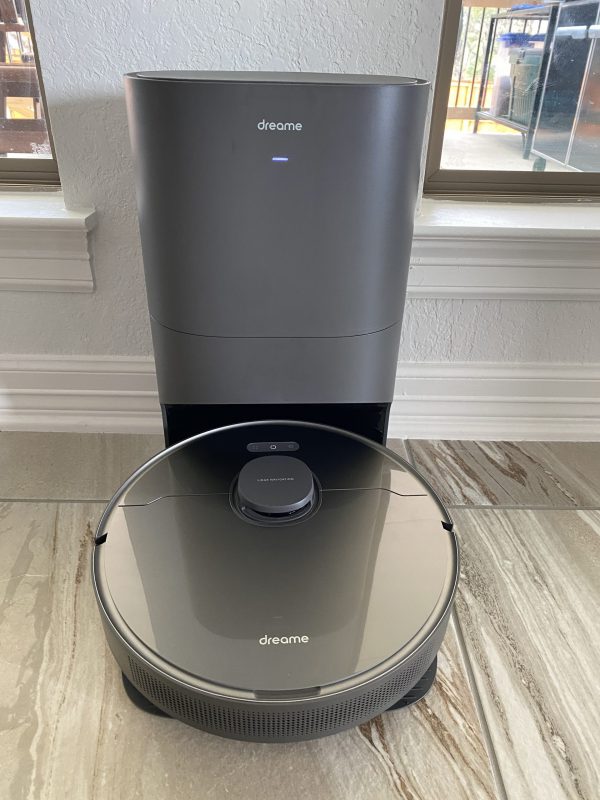
REVIEW – We recently moved from a two story home with a game room to a single story home with no game room but the same amount of space. I rarely went upstairs unless we were hosting a party and using the game room. Now that we are on a single story, we have a ton of room and it all seems to need cleaning at once. I easily get my recommended steps per day searching for where I put my phone down. That being said, trying to vacuum all of that space is extremely time consuming. I had reviewed a robot vacuum several years ago when they first came out and was not impressed. With the space this new house has and the improved technology, I was the first to jump at a chance to review the new Dreame Bot Z10 Pro Auto-Empty vacuum. Let’s see how it worked out for me and if it is something I will be using going forward.
What is it? The Dreame Bot Z10 Auto-Empty robot vacuum (let’s call it the Z10 from here on out) is an advanced robot vacuum with Lidar for its ‘radar’ and self empties into a large canister that can hold up to four liters of dust/hair.
What’s in the box? I wanted to make sure I posted pictures of how well this vacuum and canister were packaged. They did come all the way from China and had no damage. At the very top of the box, I found the attachment for the mop.
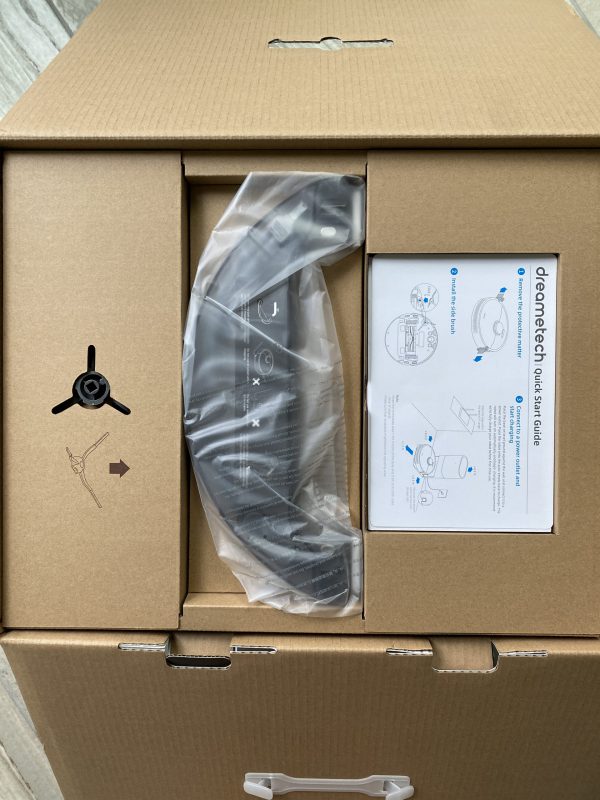
Removing one layer of thick cardboard revealed the robot vacuum. It was wrapped in plastic with its power cord tucked into a box on the side.
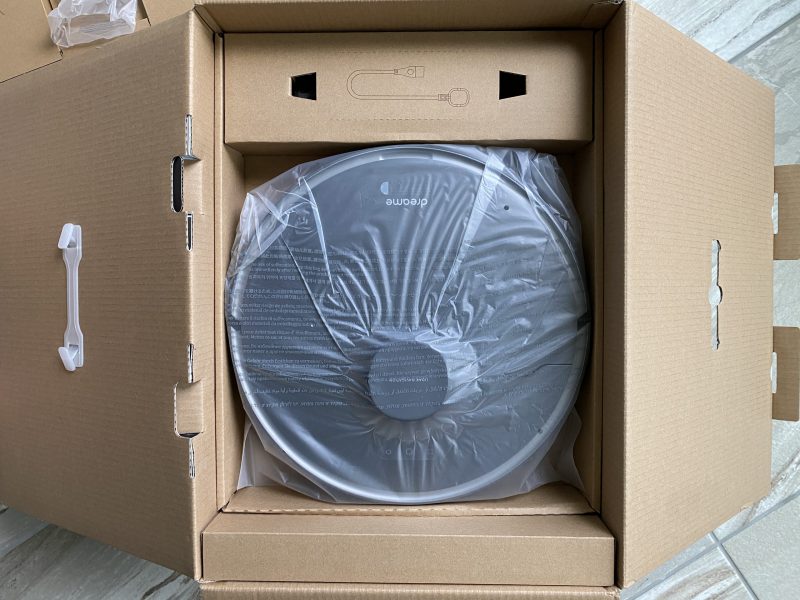
Removing the next layer of cardboard revealed the dust canister. It was held securely in place by a piece of cardboard inserted where the robot would go.
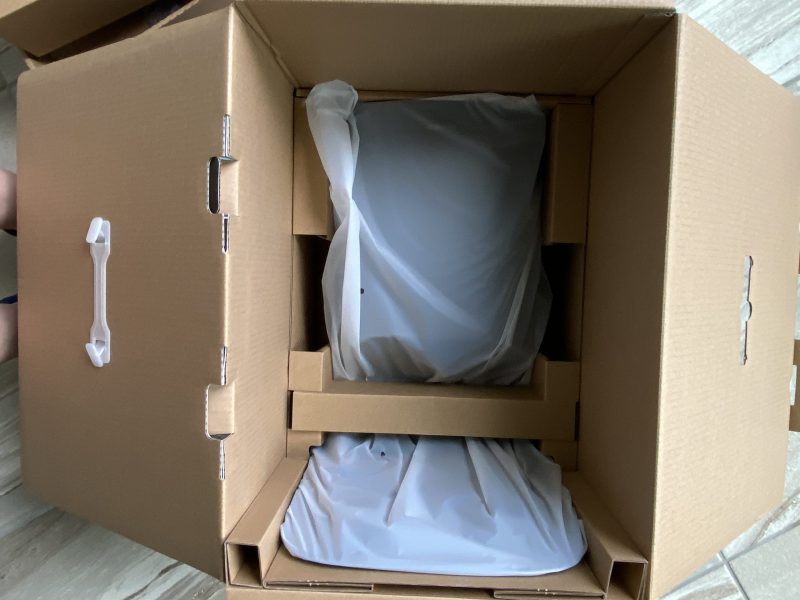
Next I have a couple of pictures showing the contents of the box.
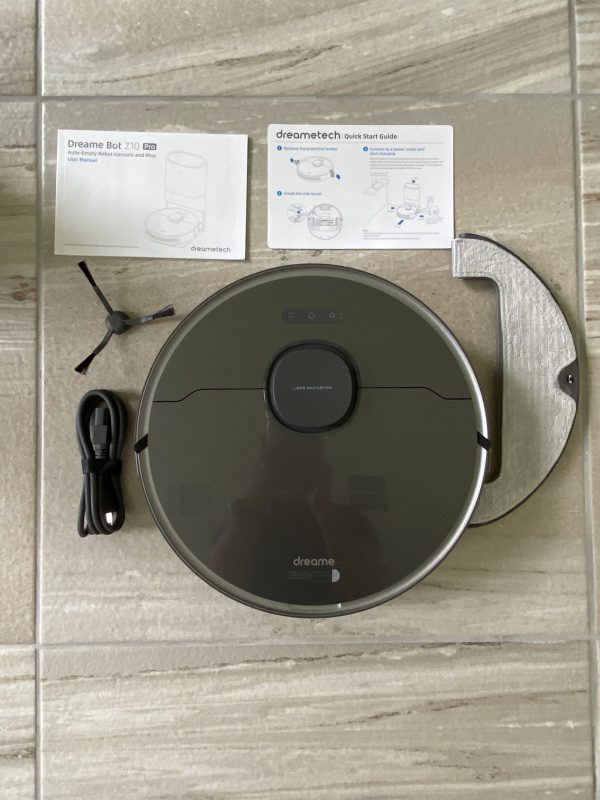
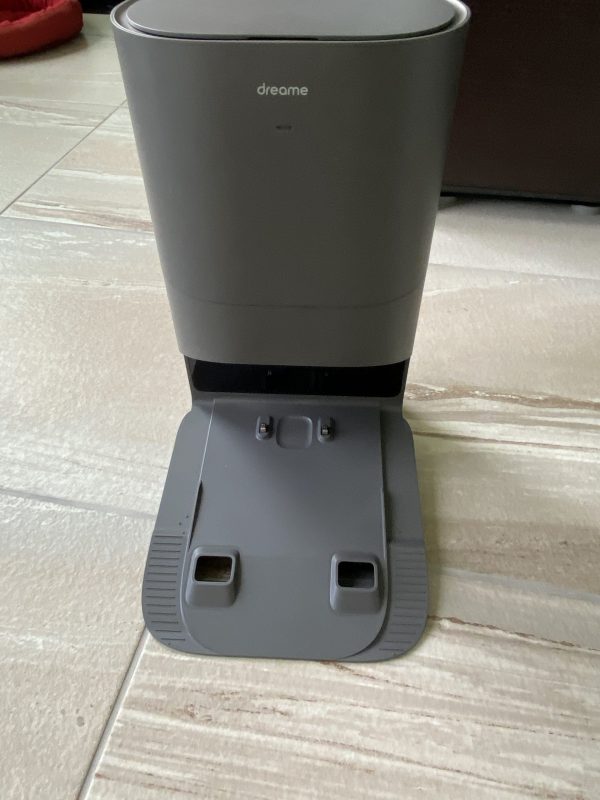
- Instruction Book
- Quick Start Guide
- One side sweep brush
- power cord
- vacuum
- mop attachment
- self-emptying canister – it had two vacuum bags inside.
Hardware specs Dimensions: 353 x 350 x 96.8mm or 13.89 x 13.78 x 3.81 inches
- Rated power: 46W
- Suction power: 4000 Pa
- Battery Capacity : 5,200mAh
- Robot dustbin capacity: 400ml
- Water tank capacity: 150ml
- Battery life: 150 min
- Lidar scanner
- 3D obstacle avoidance sensors
- The self-empty base station:
- Rated Power: 800W
- Dust bag duration: 65 days
- Dust bag capacity: 4L
Design and features/Setup
The first thing I did was to open up the dust canister. It is large and can hold up to 4 liters of dust. In the picture below you can see the hole on the bottom right of the picture where the dust gets blown in. That is also where the dust bag is slid into place.
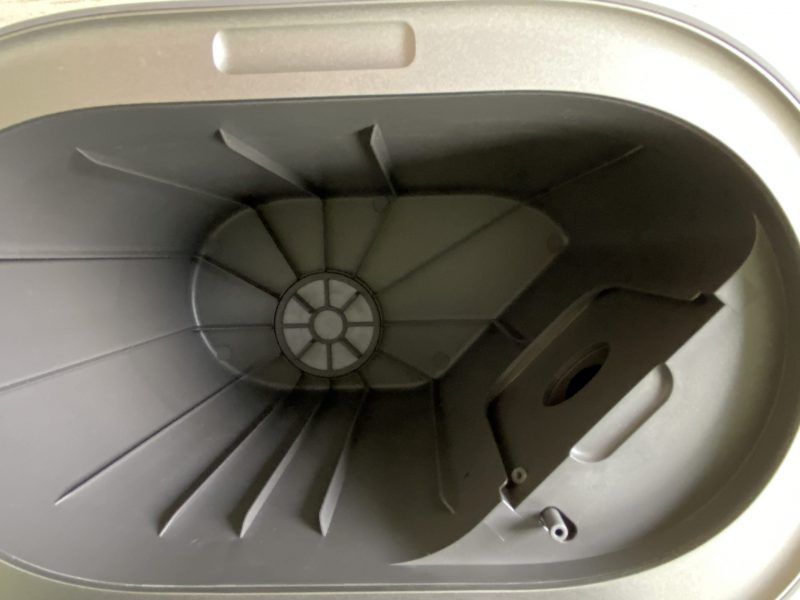
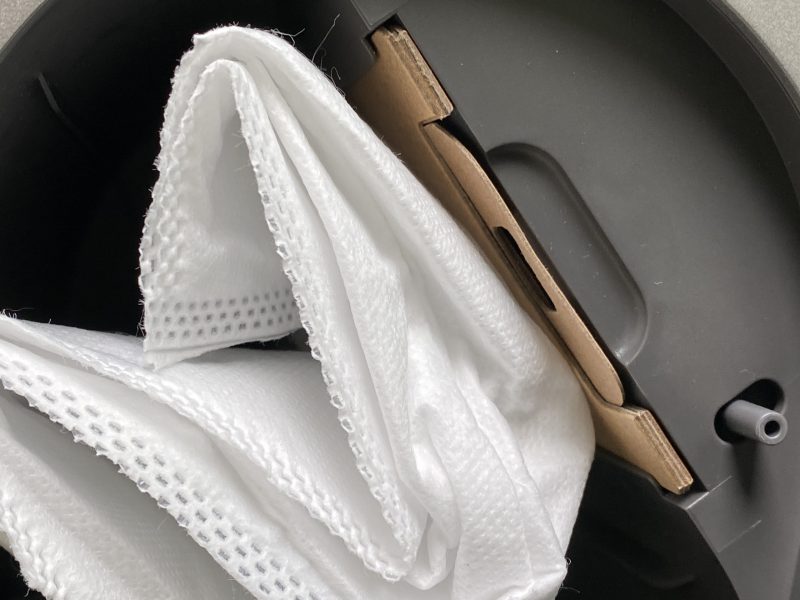
Here is a picture of one of the two dust bags I was provided. It is a sturdy bag that is designed not to let dust get out. As you pull the bag out of the slot, the tab on top pulls out first and blocks the hole in the bag keeping the dust inside the bag.
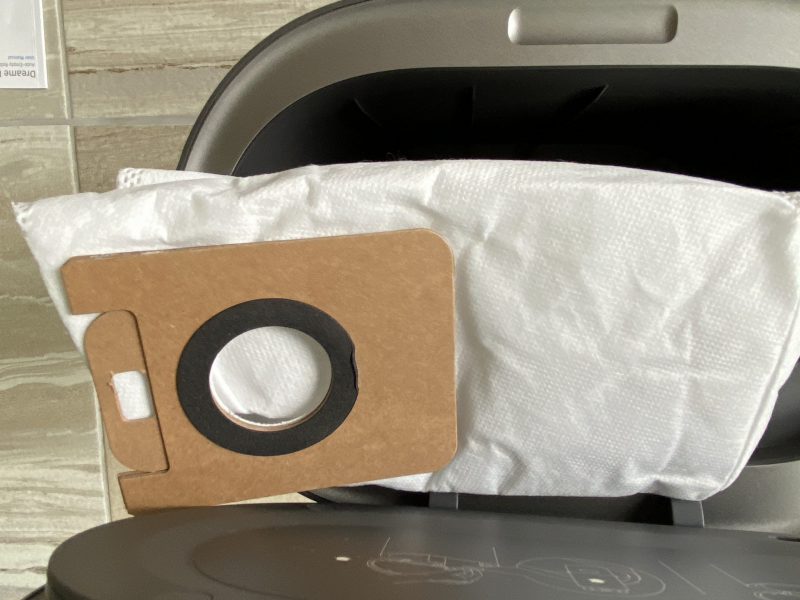
Here is a picture of the bag inserted and ready to fill.
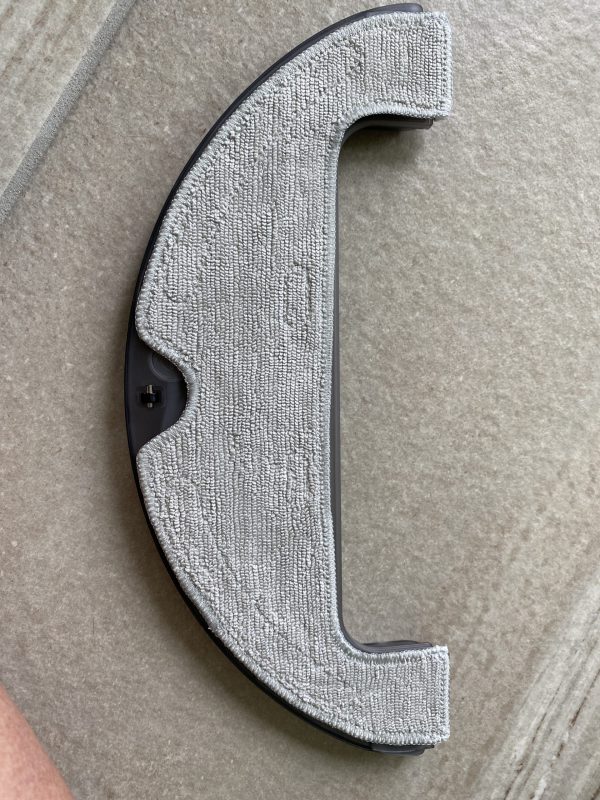
This is a picture of the mop attachment. The pad attaches to the base of the water canister via velcro tabs. I never used the mopping feature. I own a mopping robot that will scrub the mop head back and forth rather than drag it along like most robot vacuum mop robots.
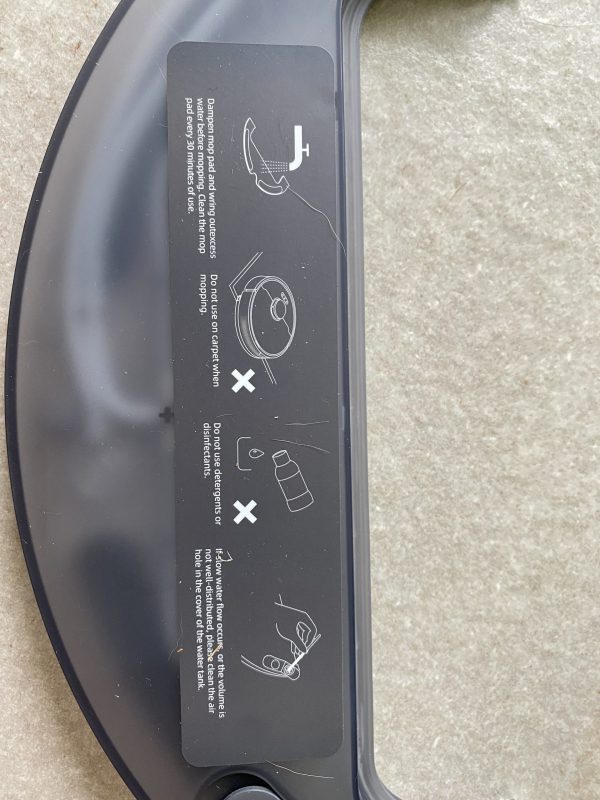
This is a picture of the top of the mop attachment. Basically you fill it with water. You should not use any other chemicals with it.
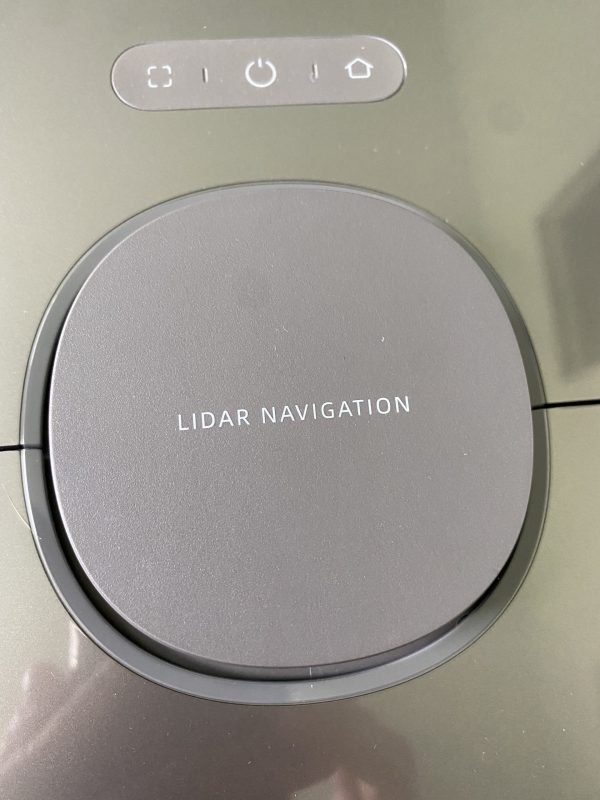
This picture shows a closeup of the buttons on top of the vacuum and the Lidar system. The middle button is the power button and the right button if pressed will force the vacuum to return to the home base. Pressing the left and home buttons will force the wifi to reset.
Next, I have a picture of the back of the vacuum. It has nice sturdy rubber wheels which allow it to grip and roll over some pretty extreme obstacles. The two holes in front allow one side for air to blow in and the other to blow out the dirt from the vacuum into the canister. Below those two holes are the roller brush. On either side of the two holes there are slots where the mop attachment goes. When the mop is attached the Z10 says ‘Mop attached’. When removing it, it says ‘Mop detached’.
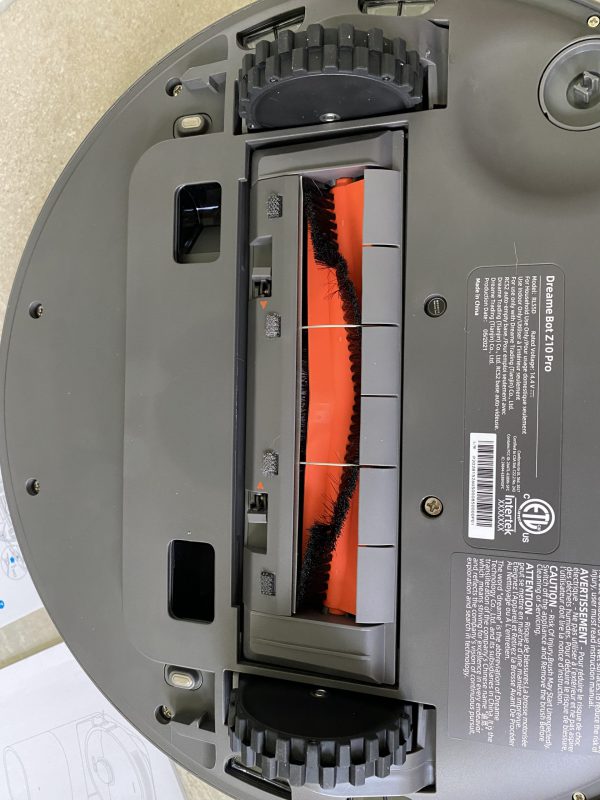
Below the roller brush, you will find the place to attach the single sweeper brush, the middle wheel and the two charging plates.
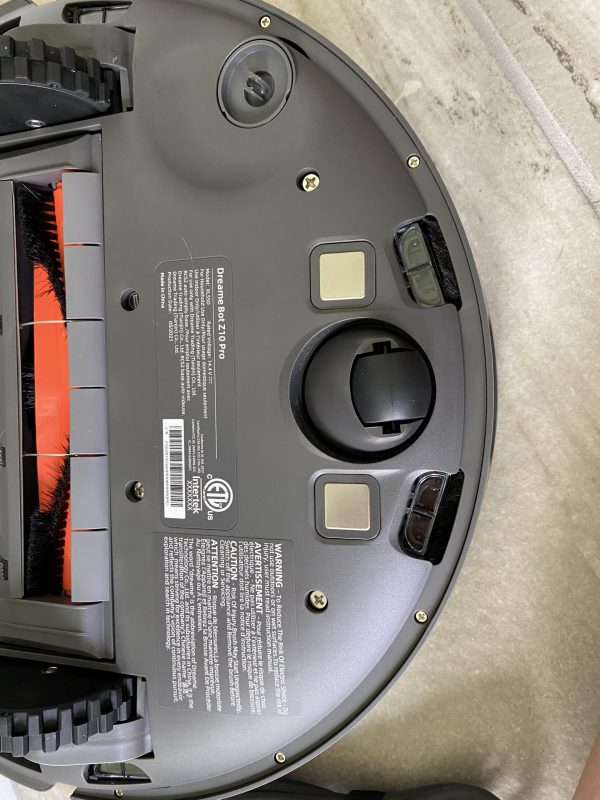
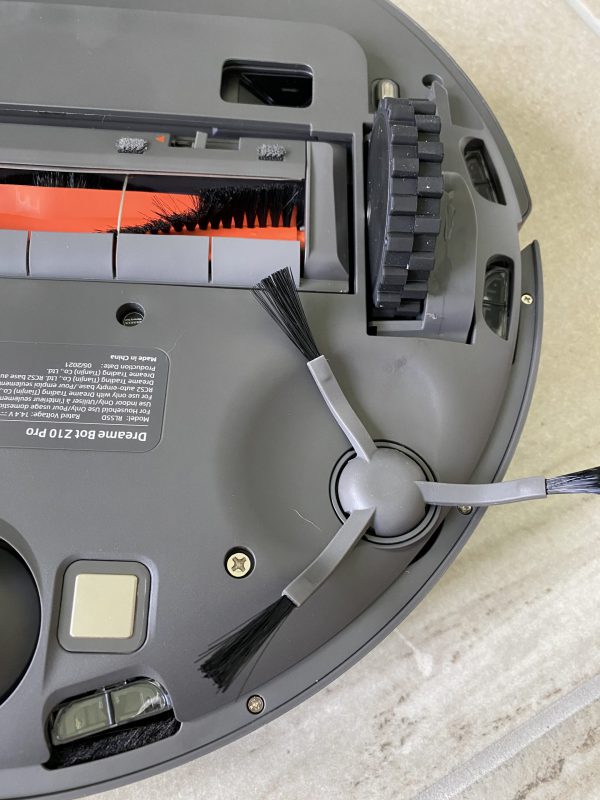
I snapped in place the sweeper brush and took a picture. It was very easy to do.
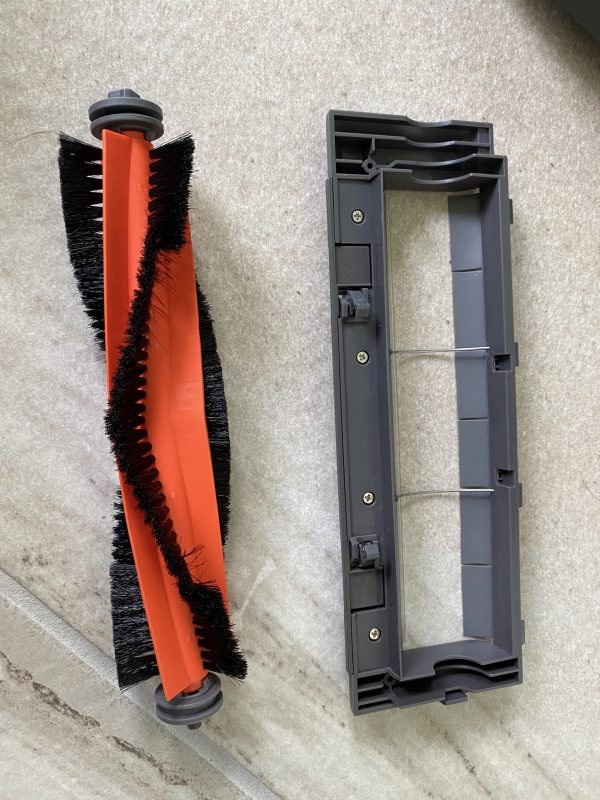
You can easily remove the roller brush by pressing in the two clips marked with red arrows on the above pictures. This will let you clean out long hair and other items that might get tangled. Fortunately for me, no one, not even my dog has long hair.
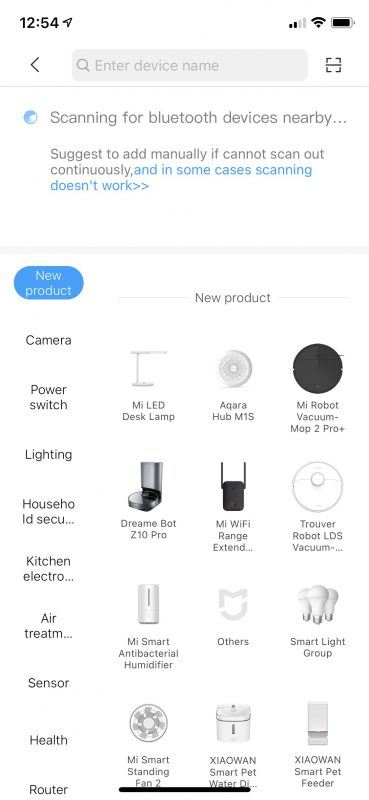
I plugged in the home base, inserted the dust bag and got the Z10 charging. There is a light on the front of the home base canister that blinks on and off when it is charging. The Z10 lets you know you have it mounted properly to charge by announcing ‘Charging’. When the light was no longer blinking and steady I proceeded to hook it up the Mi Home app on my iPhone 11 Pro. The first thing the app asks is for you to create an account. They have a ton of devices. After creating an account I selected ‘Add a device’ and selected the Z10 Pro below.
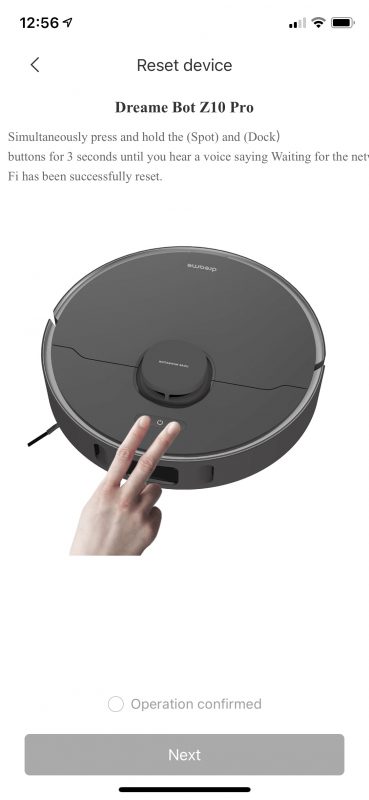
This next screen popped up asking me to press the square and the home button to get the Wifi on the Z10 to reset.
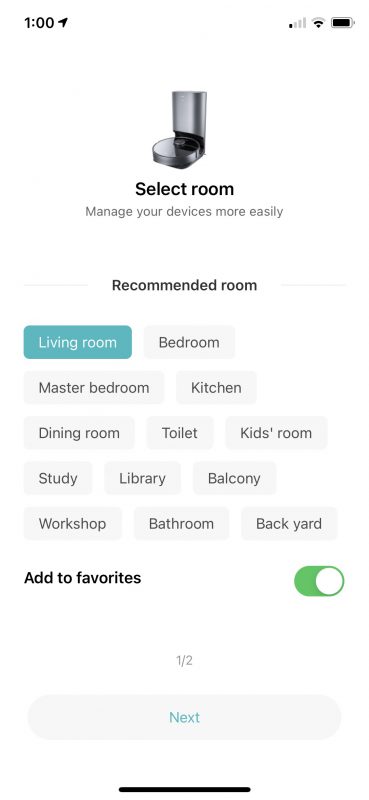
After connecting my phone to the Z10, I added it to my WiFi. I was then given the opportunity to say what room the Z10 would reside. This helps you to know which vacuum you are controlling if you own multiple.
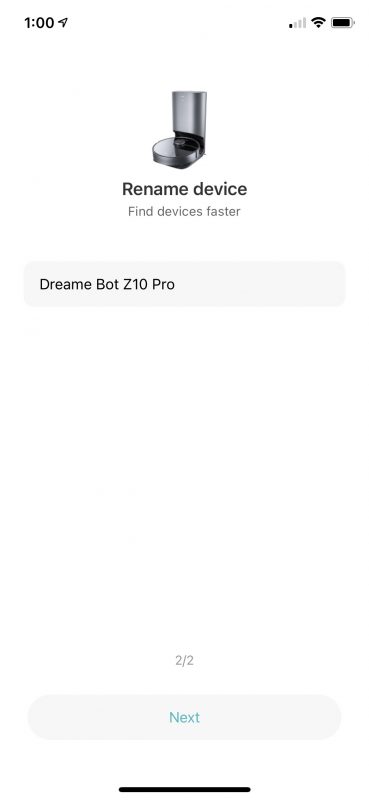
I was also given the opportunity to rename the Z10. I left it as it came.
There is also a sharing feature available that I did not use.
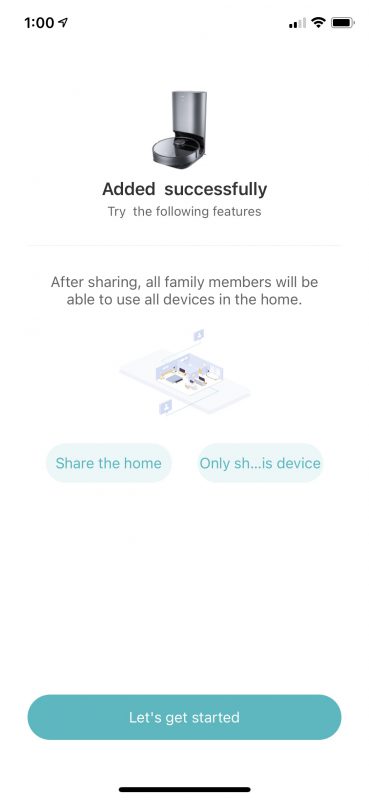
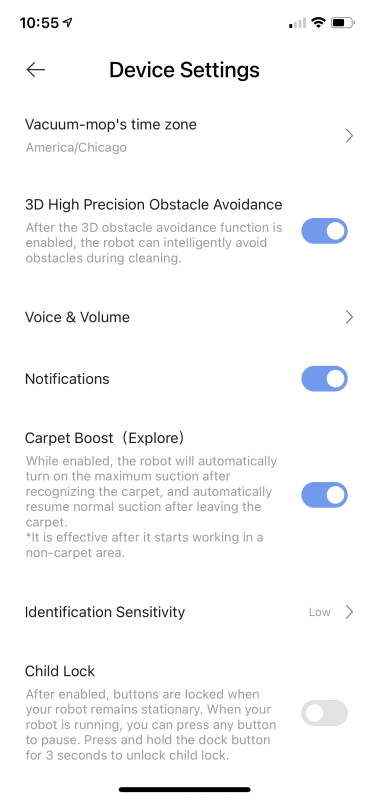
Next, I have some screenshots of the various settings. The time zone was set once connected to my WiFi. I left everything as standard, except I did turn on the carpet boost feature. This makes the Z10 the loudest it can get, but it also allows it to pick up a ton of stuff out of the carpet. On hard floors, the Z10 backs off the suction and is a relatively quiet vacuum. It is certainly quieter than my Dyson V10.
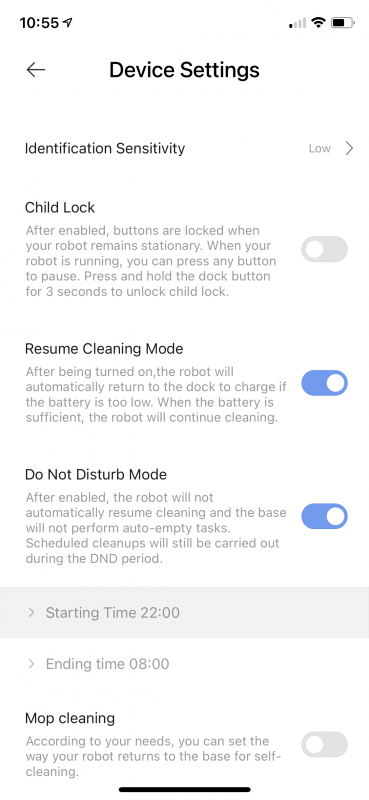
I did also set a do not disturb time period. Our house is large enough that it cannot clean all of the rooms in a single session. The Z10 will run for just over 120 minutes. It will then return to the charging base and recharge. Then if it is outside the do not disturb time period, it will go back and finish what it had not cleaned. I found it interesting that it did not go back to where it left off. It may hit some other room it had yet to clean, but it did eventually go back and get every room.
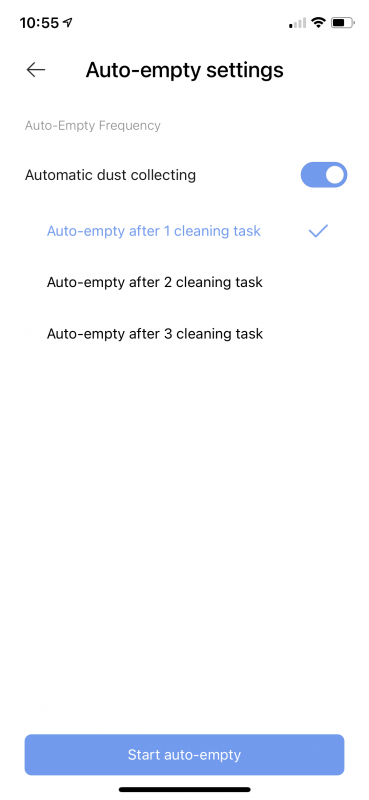
There are several auto-empty settings. Due to our having a mighty shedding puppy from heck (yes, pictures are below) I chose to have it empty after every session. Note, that if it has to go back and recharge in the middle of the session, it will still wait till it has completely vacuumed all of the rooms before attempting to empty. The emptying function has to be the loudest sound the Z10 makes. I would say that is along the sound level of my Dyson at a mid to high level.
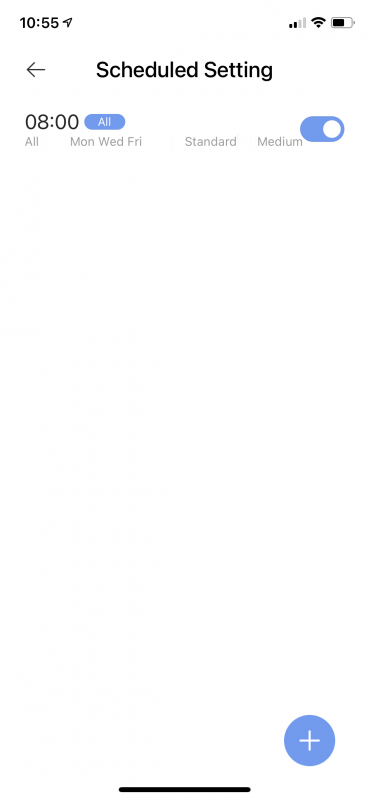
I work from home so I schedule the Z10 to run every M, W, F at 8am. Even if I tell it to vacuum all rooms, if I need to close my office door due to a meeting it will skip my room for that particular session.
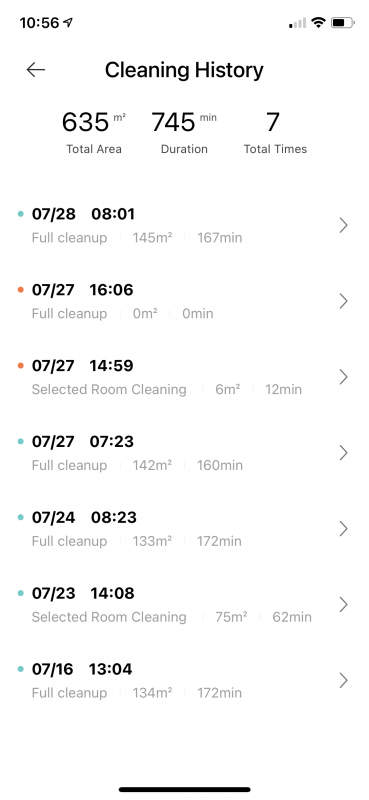
It also keeps a rolling history of all of its cleaning events. You will notice the last full cleanup was shorter than the rest of the full cleanups. That is because I chose to have a few of the rooms shut off for various reasons.
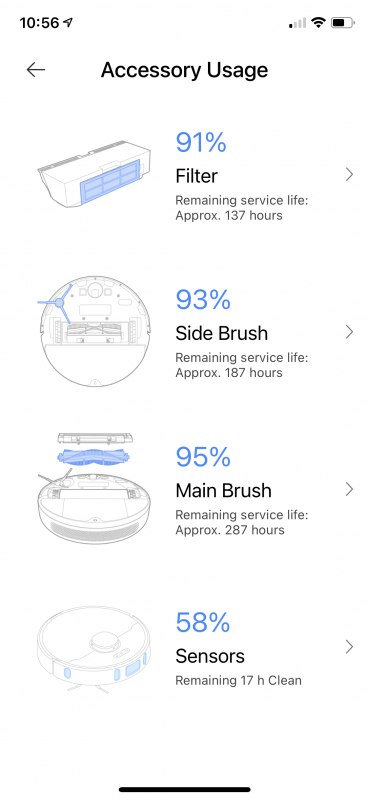
There is also this nice feature showing you the status of your Z10 and its accessories. The sensors at the bottom only need cleaning with a soft rag and do not need to be replaced.
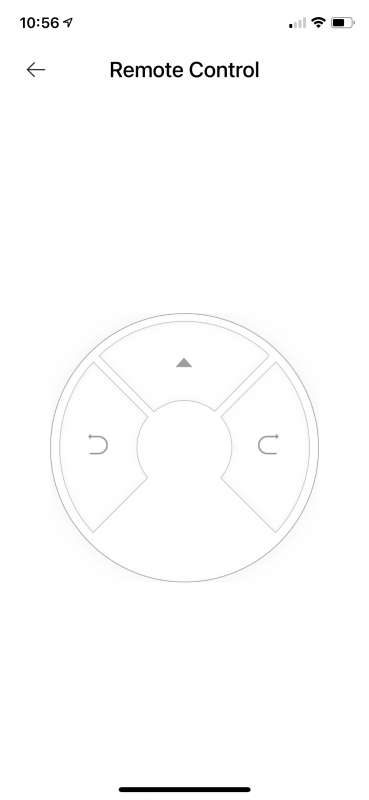
Finally, the Z10 offers a remote control feature. This is just like driving a remote-controlled car. I don’t ever see myself using this feature. By the time I manually move the slow-moving Z10 to where I need it, I could have whipped my Dyson out and had it done.
Performance I am pretty happy with the Z10’s performance. Yes, there were times when the Z10 got stuck and I will explain below. However, the Z10 did a great job of trying to cover the full area of my house. There were a few glitches where it seemed to skip some floor area, but that was mostly due to the large area rugs we have in place.
The picture below shows what the Z10 saw of my house during its first 21 minutes of cleaning. I have the Z10 stationed against the back wall of my living room. This is a large room with furniture that opens directly to a full eight person dining room and two island kitchen. Let’s just say I hate having to manually vacuum this room myself.
You can see the long couch and the smaller loveseat making an L shape in the room. I found it strange that the Z10 left the big open space in front of them alone. It eventually came back and cleaned the area, but it sure looked strange for a while. As it rolled along, the Z10 tries to map out what it sees in other areas.
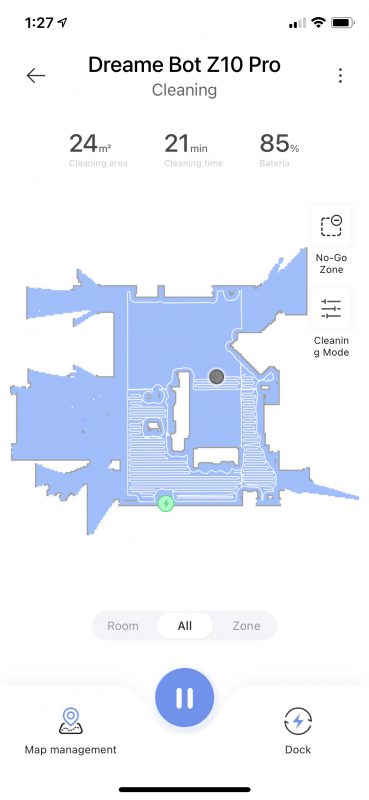
This is a picture of how far the Z10 got before it had to go back to the home base to charge. It did not take the full 120 minutes because it got stuck in our master bathroom. I made the mistake of leaving a couple of fuzzy rugs we use right outside the open walk-in shower. The Z10 got on the rug, but missed the one-inch ledge right after it and got hung up. It sat there for about 10 minutes until I happened to notice I had a notification from the Mi Home app that the Z10 was stuck. It uses up a lot of battery if it gets stuck.
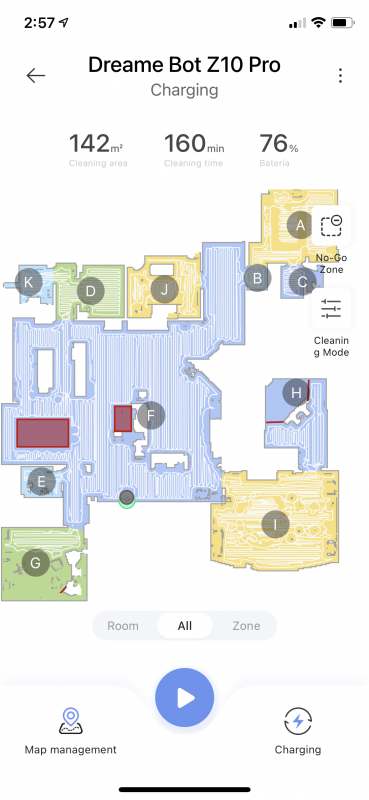
In the picture below, I ended up drawing virtual walls (red lines) indicating that the Z10 should not go in that shower area. The room below the master bathroom is our master bedroom. It has a large circular area rug on the left part of the room. That causes the Z10 to do a few loopy things.
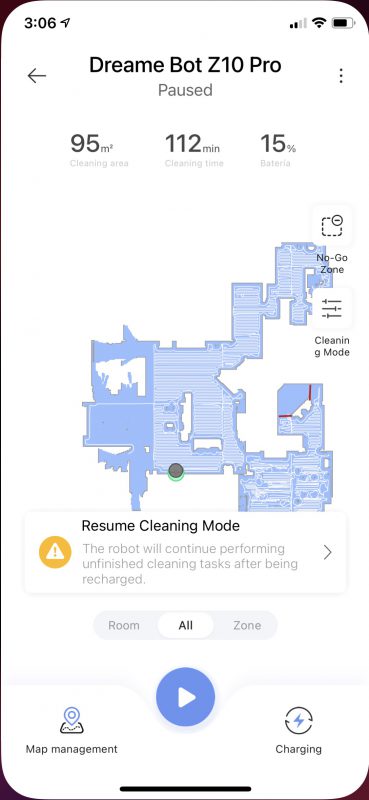
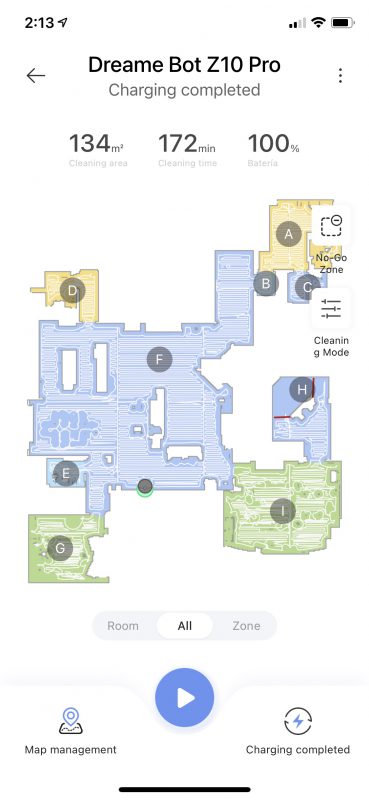
This is the final map the Z10 had after completing our house. I did not have all of the rooms open yet at that time. We had storage boxes in one room and I will never have it clean the gym due to the layers of mats in the area.
Look closely at the area above room E. That is our dining room.
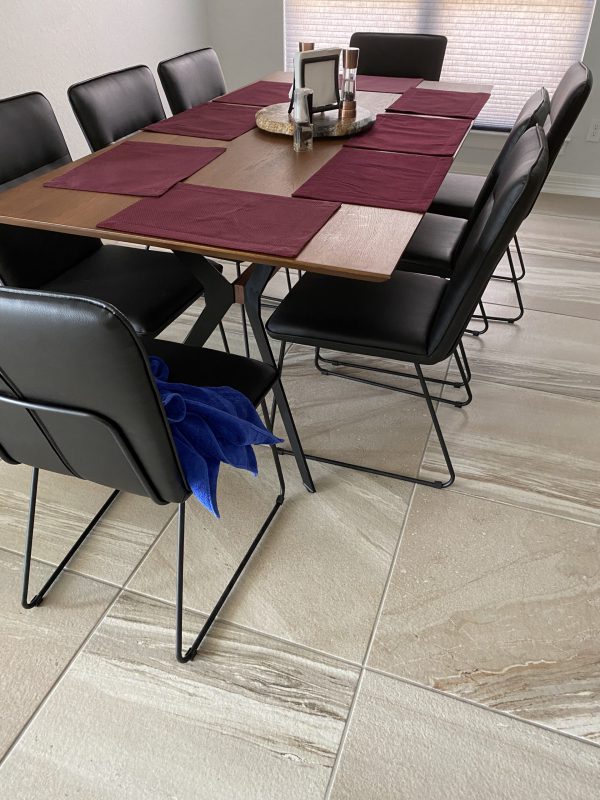
Here is a picture of our dining room. I am amazed that with all of the trouble the Z10 had with rugs, it had no issue rolling over those chair legs. It acted like an army tank and never got stuck once. I ended up marking that as a no-go zone in my final map because I was afraid it would get stuck one day.
I hate to admit this, but when I kicked off the Z10, we had been in the house for about a week and a half. I had vacuumed manually, but I knew there was a lot of dust and dog hair accumulation. When the Z10 finished its first clean, I heard the self-empty sound kick in. However, when I checked under the vacuum, I could see the wad of dog fur that was still in the Z10.
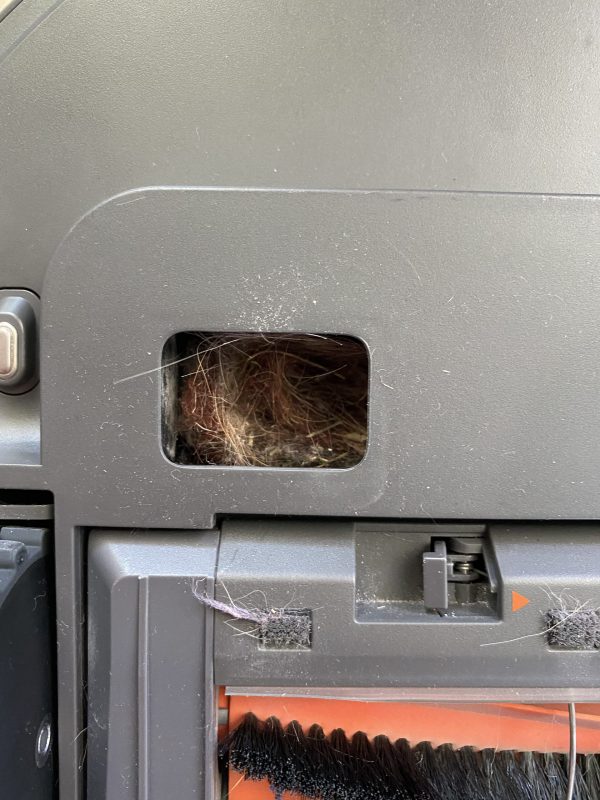
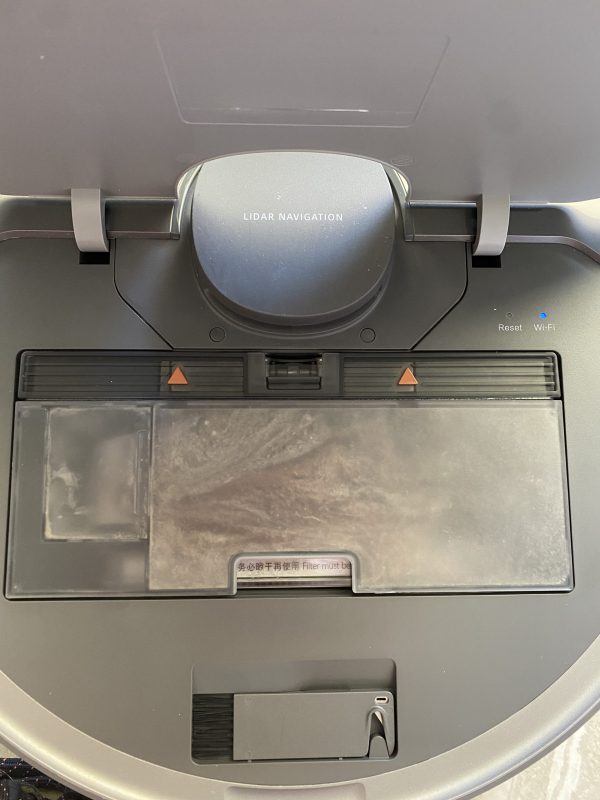
Lifting the cover to access the filter area, I could see the container was virtually stuffed!
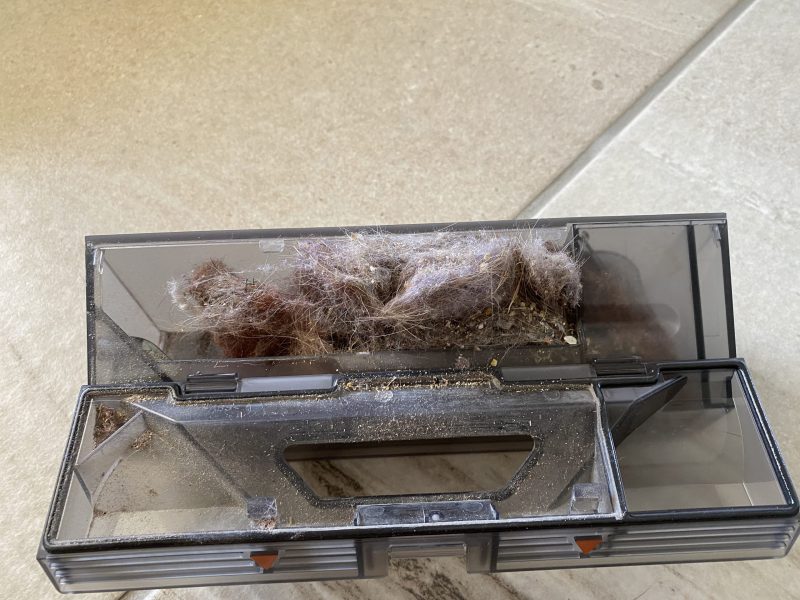
For your viewing pleasure, enjoy the wad of dog fur, carpet residue, and dust accumulation! I don’t blame the Z10 for not being able to get rid of such a big wad of debris. After that initial clean, I scheduled the Z10 to run every M, W, and F. Since then it has always emptied successfully.
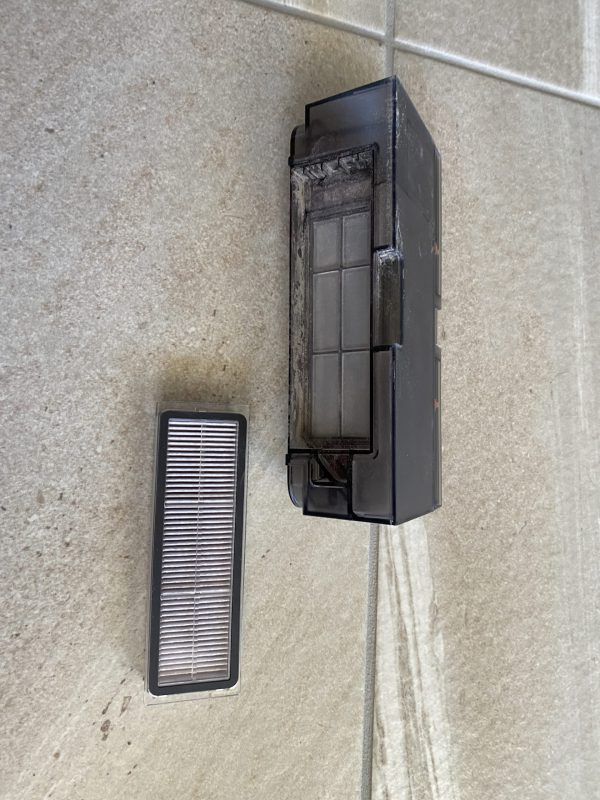
As you can see, the filter itself comes out of the vacuum canister. It can be hand rinsed.
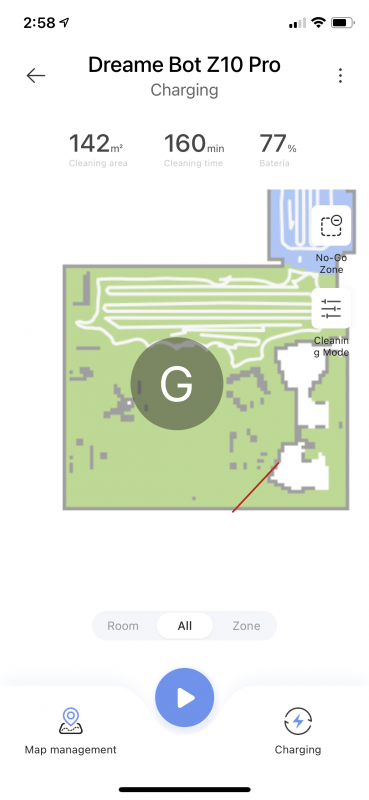
There were a few times the Z10 got stuck. This is the map of my husband’s office. His office is carpet, but he also has a thick area rug on top of it. The rug is right about where the G is in the picture. I ended up drawing another virtual wall for this room.
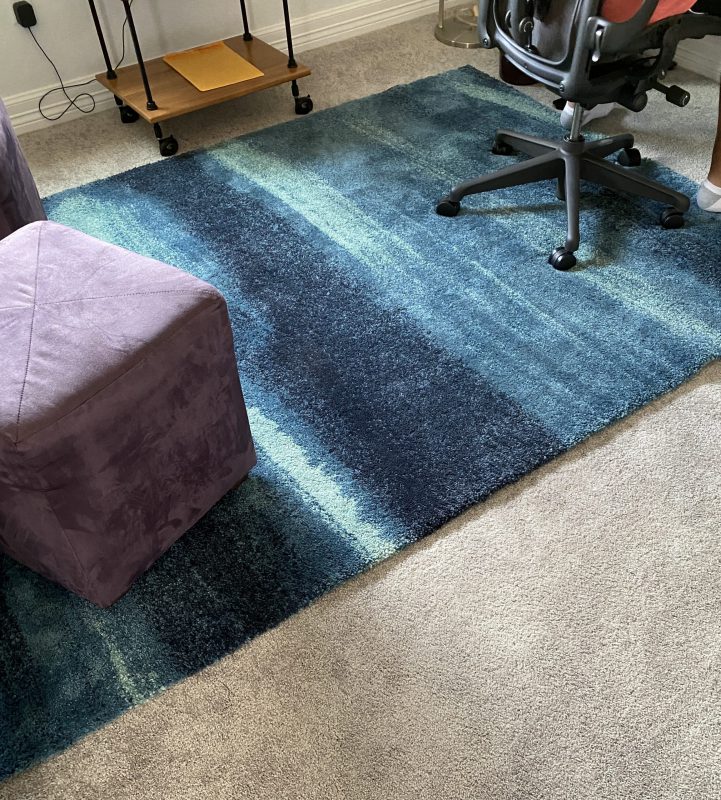
Here is a picture of the rug in my husband’s office. You can see it is pretty thick.
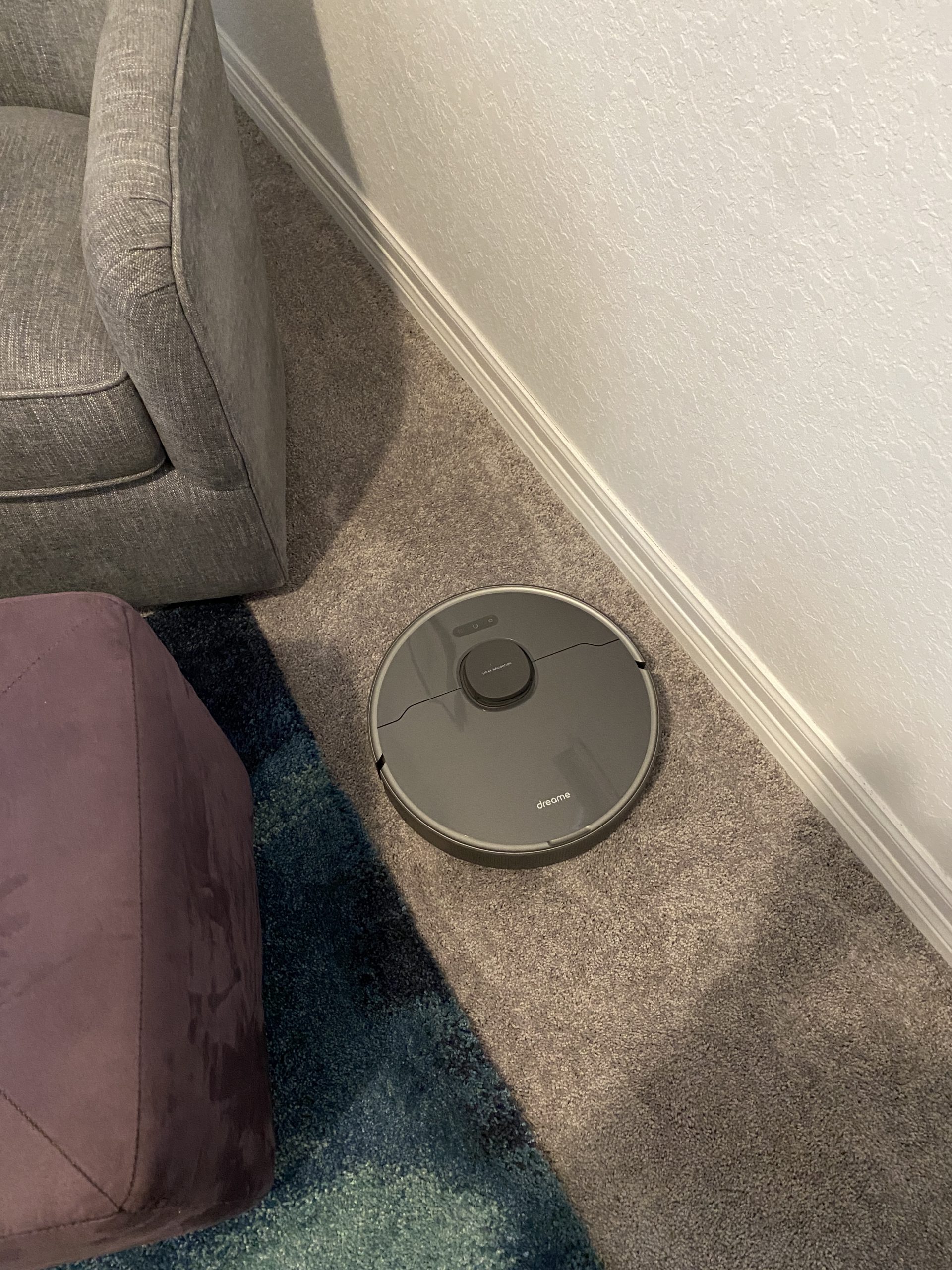
Here is where the robot got stuck. It could get up the rug just fine when it had momentum on its side. When it got in that nitch between an ottoman and the wall, it could not manage to get back up on top of the rug. So I drew a wall from the ottoman to the wall to keep it out of that area.
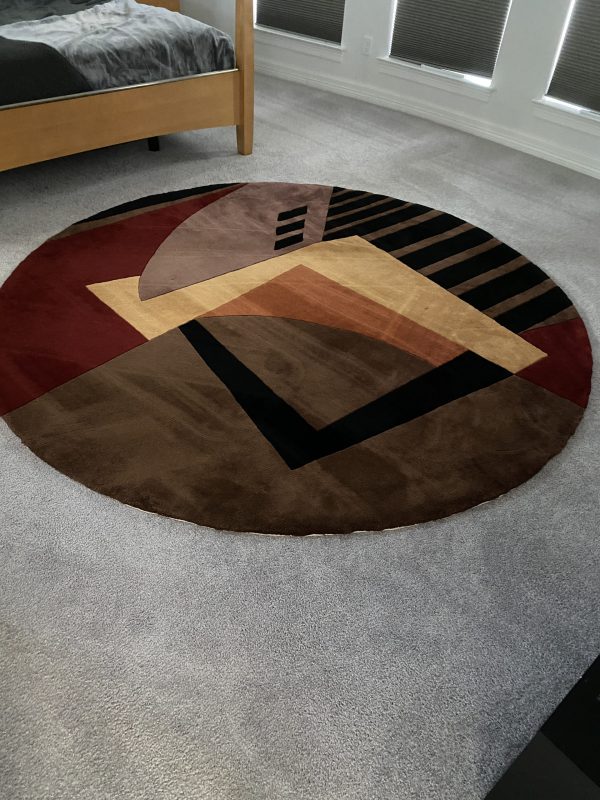
Here is a picture of the rug in our master bedroom. Something about the rug makes the Z10 get a little goofy in its cleaning pattern. You can see some of the random swirls that are not the norm for the Z10. Behind the rug, you can see a very uniform vacuum pattern.
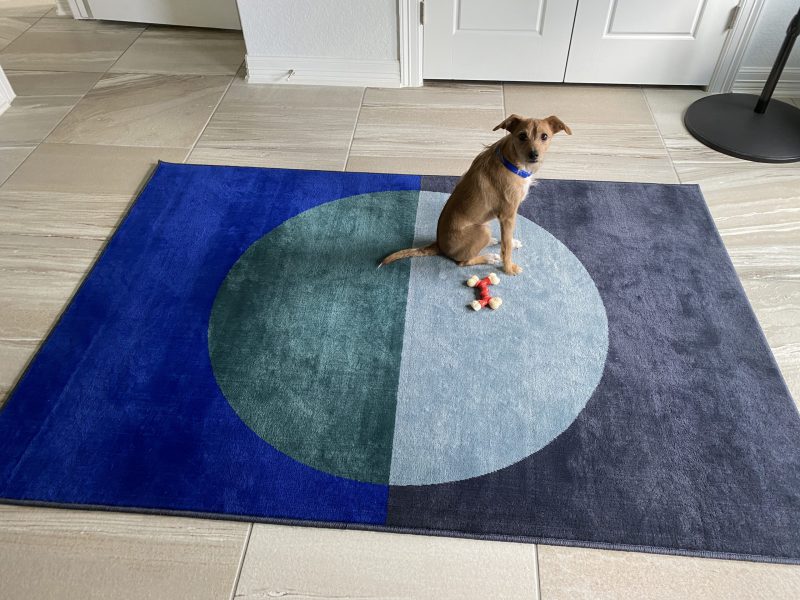
I am happy to say that as I got rooms unpacked and opened doors, the Z10 found them and added them to the map. In the picture below it added rooms D and J. Room A is my office. That room is tile with a thinner Ikea rug in it. You can see that the rug does make the Z10 miss what could be a few sweeps up and down, left and right.
Here is a picture of that rug and my little shedder Peanut. He is looking at me and wondering why I got lazy and am not vacuuming myself anymore!
What I like * It does not bump into things. It sees them before it hits them. * Awesome mapping feature. It finds new rooms and leaves existing alone with the close of a door. * It does a great job of vacuuming. * The main canister is very large and will hold a lot of debris. * It does well repositioning itself after getting stuck. * I love that it goes back, recharges itself, then resumes cleaning. * I can direct it to clean any room. * It is much quieter than my previous robot vacuum and my Dyson * Self-emptying works well as long as you don’t overload the canister. * Competitively priced compared to IRobot and Shark * Easy to set up virtual walls or no-go zones. * It talks to you letting you know when it is going back for a recharge, it is stuck or beginning to clean.
What needs to be improved * Area rugs do tend to cause it to miss vacuuming some areas. * When the vacuum is stuck, it tends to still use a lot of battery. * No idea where to find vacuum bags and filter replacements.
Final thoughts The Dreame Bot Z10 Pro has been a boon to my life in my new home. Having everything on one floor lets me set the Z10 to task and not worry about vacuuming as much as I used to. I know the spots it does not like to do and I can hit them easily with my cordless Dyson. Keeping a regular schedule lets the self-empty function work as it should. Like any robot vacuum, you have to make sure cords are out of the way or make them no-go zones. It is very easy to set those up in the app. The Z10 has officially become a regular member of the household. Even Peanut gives it a paws up and pretty much ignores it now.
Price: $683.59
Where to buy: AliExpress
Source: The sample of this product was provided by Dreame.
Support The Gadgeteer: The Gadgeteer is supported by readers like you! If you buy something through the links on our site, we may earn a small affiliate commission. Thank you! Learn more. The post Dreame Bot Z10 Pro auto-empty robot vacuum review first appeared on Total Ipad.
Remember the indestructible Nokia 3310? The rough and tough phone was known for durability in the old days. Well, HMD Global announces its brother to the masses for the modern world. Nokia XR20 is a rugged smartphone with MIL-STD-810H compliance and three years of promised OS updates promised by the company.
Looking at the specs of the XR20 phone, it doesn’t seem new at all. In fact, it borrows most of its specs from the Nokia X20. The new specifications include IP68 rating, MIL-STD-810H compliance, Gorilla Glass Victus, and a few more. In addition, Nokia says that this phone has the toughest screen yet on their smartphones.
Speaking of the MIL-STD-810H compliance, it is the test standard most commonly used to determine if a product can withstand the effects of difficult environmental conditions. Version H represents the eighth version of this military test standard. Even though MIL-810H is a military standard, many commercial products are tested for it. You can read learn more about it here.
Nokia XR20 / via HMD Global Unlike Nokia X20, the phone comes with only two rear camera sensors, a 48MP main sensor, and a 13MP ultrawide sensor, both with individual LED flash. For selfies, there’s an 8MP front-facing camera with fixed focus. Nokia X20 has a depth sensor and a macro lens which is missing from this phone.
Nokia’s “rugged” smartphone has a battery of 4,630mAh which promises to provide juice to the phone for up to two days. For charging, you can either use an 18W wired or a 15W wireless charger.
The ruggedized casing of the Nokia XR20 enables the phone with IP68 water and dust resistance and can withstand a 1.8 meters drop. Nokia uses Gorilla Glass Victus for protection, and the screen can be used with gloves or wet fingers. The 6.67-inch is using IPS LCD technology with 550 nits of brightness levels. The phone supports 5G and has two storage options. A 6GB RAM and 128GB storage variant will be available in the US for $549; however, a 4GB RAM and 64GB variant will be available in the UK for £399. The phone storage can be expandable via microSD.
Speaking of the operating system, Nokia promises to deliver three years of OS updates to an already installed Android 11. In addition, the company also promises to deliver four years of monthly security updates. Just like in Nokia X20, XR20 uses a side-mounted fingerprint sensor. In addition, there’s another button on top of the phone which is customizable with any action or app with the user’s choice.
Nokia XR20 is available in Granite Grey and Ultra Blue for $549 in the US. The phone will be available on August 24, 2021.
Specs of Nokia XR20:
| Display | 6.67-inch FHD IPS screen with1080p resolution | | Memory | 6GB RAM / 128GB storage (4GB/64GB variant for UK) | Expandable via microSD | | Chipset | Snapdragon 480 | 5G connectivity | | Battery | 4,630mAh | Supports Qi wireless | | Camera | 48MP main sensor, 13MP ultrawide (two LED flash) | 8MP selfie camera | | Operating System | Android 11 (3 years of OS updates from Nokia) | | Special Features | IP68 Rating, Ability to withstand extreme temperatures, Gorilla Glass Victus | | Availability | August 24, 2021 | | Price | $549 | | Colors | Ultra Blue, Granite Grey |
Other than Nokia XR20, HMD Global also announces Nokia 6310, Nokia C30, and audio accessories.
The post HMD Global announces military-grade, “life-proof” Nokia XR20 smartphone first appeared on Total Ipad.