In this post, we show how to use Amazon QuickSight and Amazon Athena Federated Query to build dashboards and visualizations on data that is stored in Microsoft Azure Synapse databases.
Organizations today use data stores that are best suited for the applications they build. Additionally, they may also continue to use some of their legacy data stores as they modernize and migrate to the cloud. These disparate data stores might be spread across on-premises data centers and different cloud providers. This presents a challenge for analysts to be able to access, visualize, and derive insights from the disparate data stores.
QuickSight is a fast, cloud-powered business analytics service that enables employees within an organization to build visualizations, perform ad hoc analysis, and quickly get business insights from their data on their devices anytime. Amazon Athena is a serverless interactive query service that provides full ANSI SQL support to query a variety of standard data formats, including CSV, JSON, ORC, Avro, and Parquet, that are stored on Amazon Simple Storage Service (Amazon S3). For data that isn’t stored on Amazon S3, you can use Athena Federated Query to query the data in place or build pipelines that extract data from multiple data sources and store it in Amazon S3.
Athena uses data source connectors that run on AWS Lambda to run federated queries. A data source connector is a piece of code that can translate between your target data source and Athena. You can think of a connector as an extension of Athena’s query engine. In this post, we use the Athena connector for Azure Synapse analytics that enables Athena to run SQL queries on your Azure Synapse databases using JDBC.
Solution overview
Consider the following reference architecture for visualizing data from Azure Synapse Analytics.
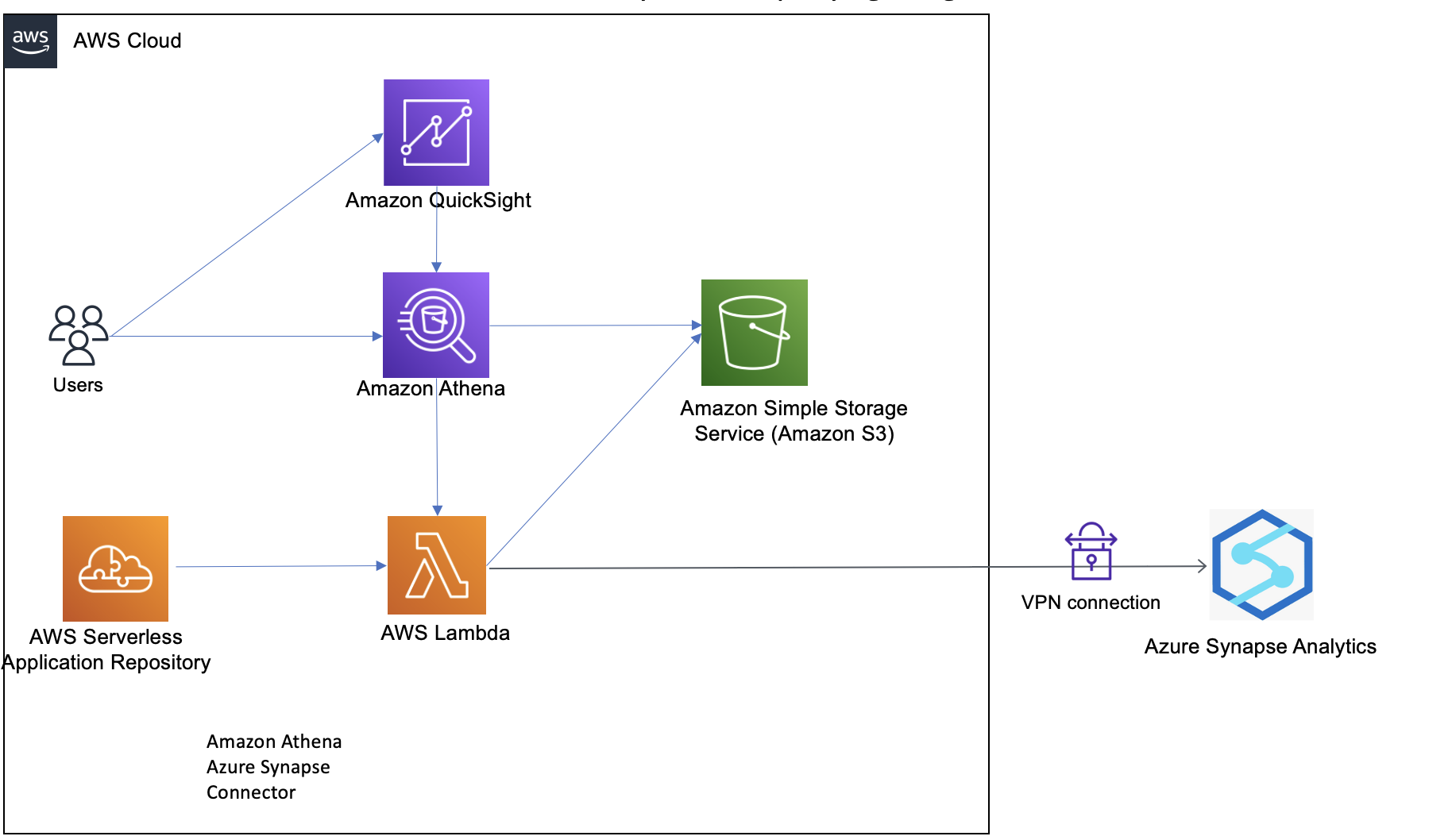
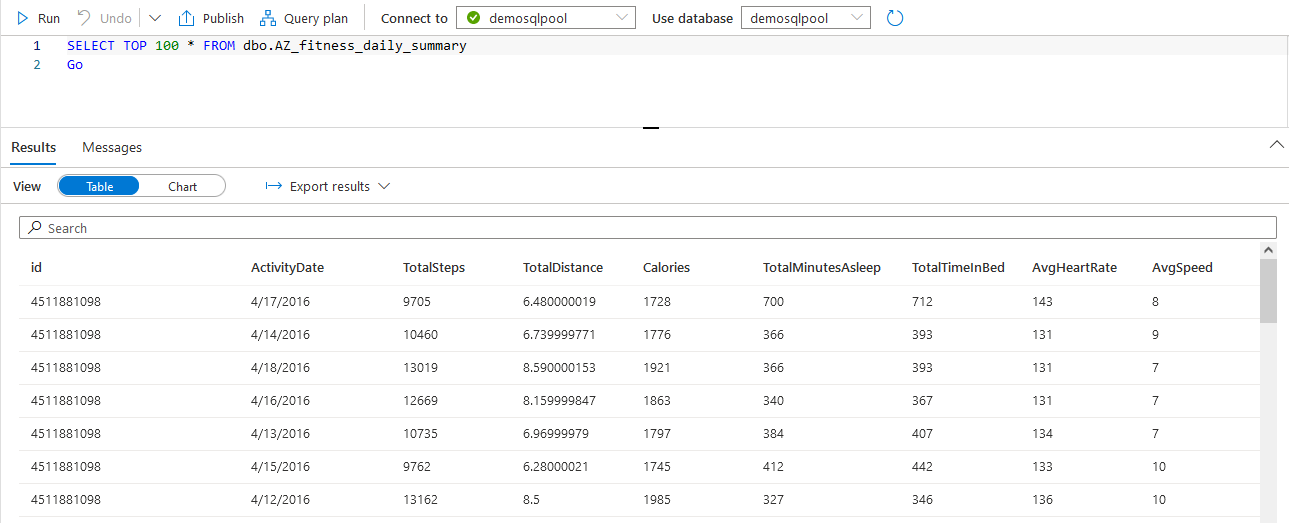
In order to explain this architecture, let’s walk through a sample use case of analyzing fitness data of users. Our sample dataset contains users’ fitness information like age, height, and weight, and daily run stats like miles, calories, average heart rate, and average speed, along with hours of sleep.
We run queries on this dataset to derive insights using visualizations in QuickSight. With QuickSight, you can create trends of daily miles run, keep track of the average heart rate over a period of time, and detect anomalies, if any. You can also track your daily sleep patterns and compare how rest impacts your daily activities. The out-of-the-box insights feature gives vital weekly insights that can help you be on top of your fitness goals. The following screenshot shows sample rows of our dataset stored in Azure Synapse.
Prerequisites
Make sure you have the following prerequisites:
- An AWS account set up with QuickSight enabled. If you don’t have a QuickSight account, you can sign up for one. You can access the QuickSight free trial as part of the AWS Free Tier option.
- An Azure account with data pre-loaded in Synapse. We use a sample fitness dataset in this post. We used a data generator to generate this data.
- A virtual private connection (VPN) between AWS and Azure.
Note that the AWS resources for the steps in this post need to be in the same Region.
Configure a Lambda connector
To configure your Lambda connector, complete the following steps:
- Load the data.
In the Azure account, the sample data for fitness devices is stored and accessed in an Azure Synapse Analytics workspace using a dedicated SQL pool table. The firewall settings for Synapse should allow for access to a VPC through a VPN. You can use your data or tables that you need to connect QuickSight to in this step.

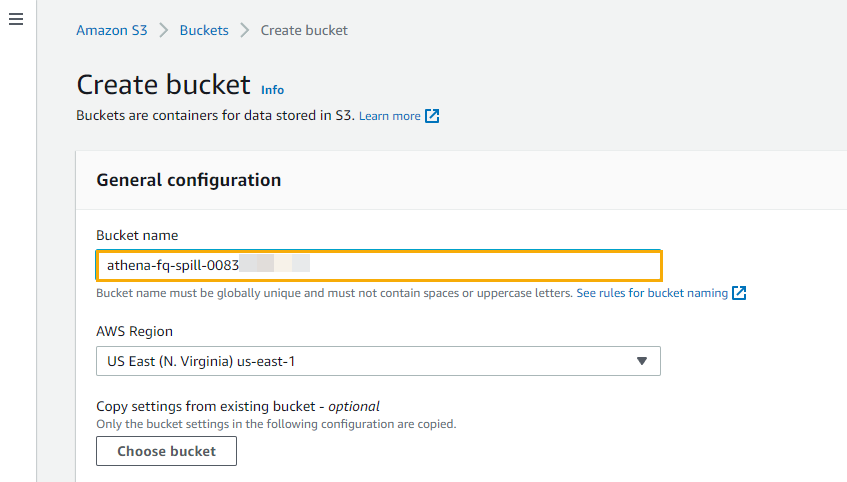
- On the Amazon S3 console, create a spillover bucket and note the name to use in a later step.
This bucket is used for storing the spillover data for the Synapse connector.
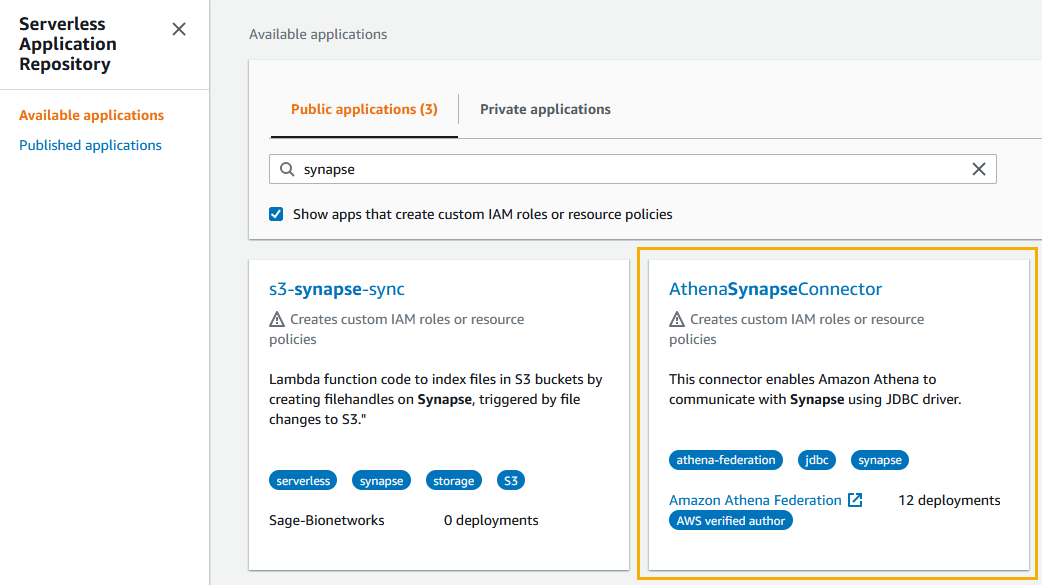
- On the AWS Serverless Application Repository console, choose Available applications in the navigation pane.
- On the Public applications tab, search for
synapseand choose AthenaSynapseConnector with the AWS verified author tag.
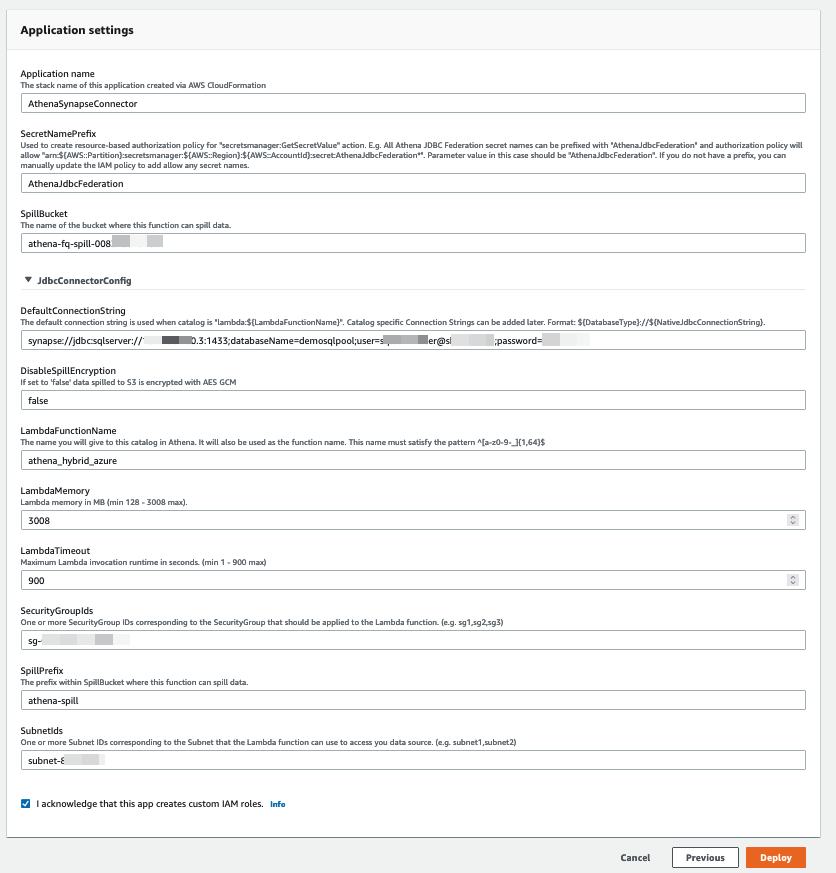
- Create the Lambda function with the following configuration:
- For Name, enter
AthenaSynapseConnector. - For SecretNamePrefix, enter
AthenaJdbcFederation. - For SpillBucket, enter the name of the S3 bucket you created.
- For DefaultConnectionString, enter the JDBC connection string from the Azure SQL pool connection strings property.
- For LambdaFunctionName, enter a function name.
- For SecurityGroupIds and SubnetIds, enter the security group and subnet for your VPC (this is needed for the template to run successfully).
- Leave the remaining values as their default.
- For Name, enter
- Choose Deploy.
- After the function is deployed successfully, navigate to the
athena\_hybrid\_azurefunction. - On the Configurations tab, choose Environment variables in the navigation pane.
- Add the key
azure\_synapse\_demo\_connection\_stringwith the same value as the default key (the JDBC connection string from the Azure SQL pool connection strings property).
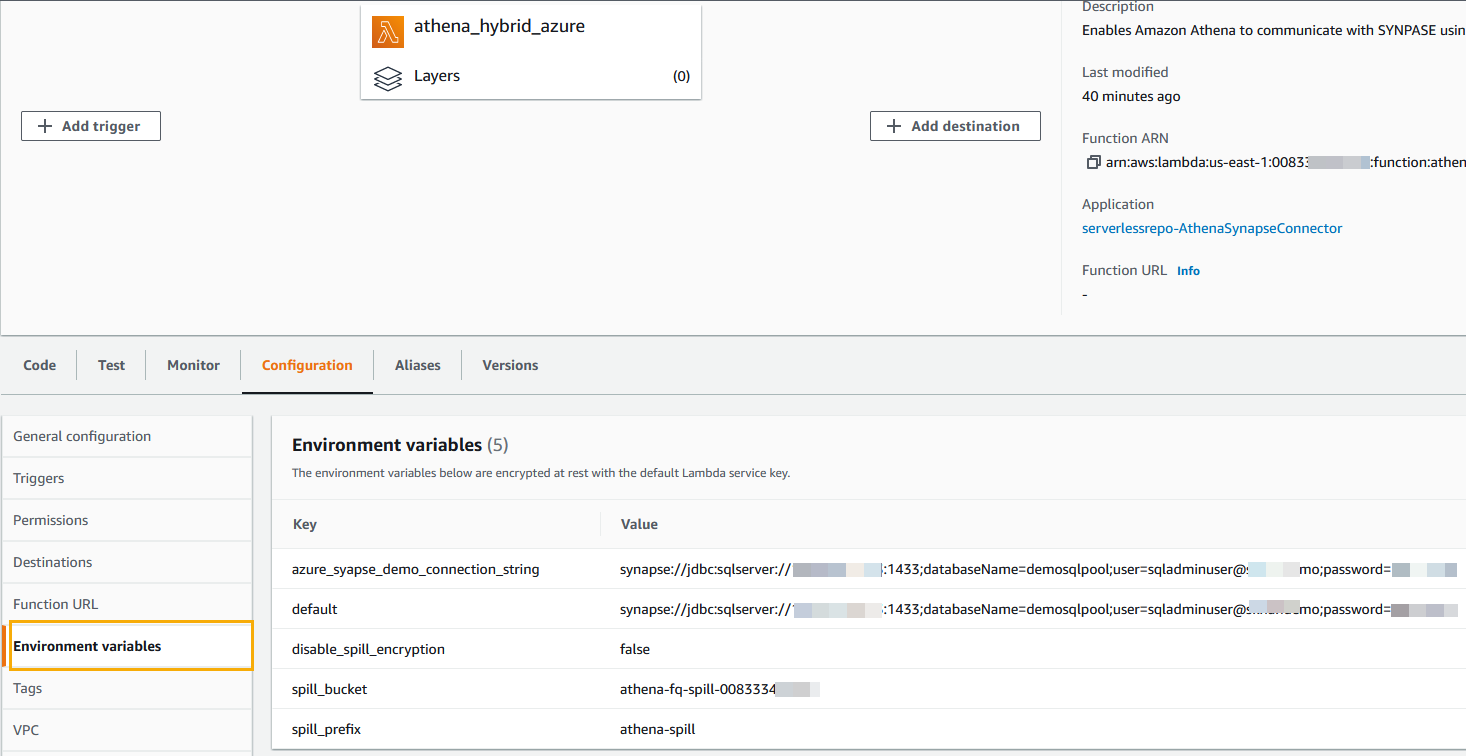
For this post, we removed the VPC configuration. - Choose VPC in the navigation pane and choose None to remove the VPC configuration.
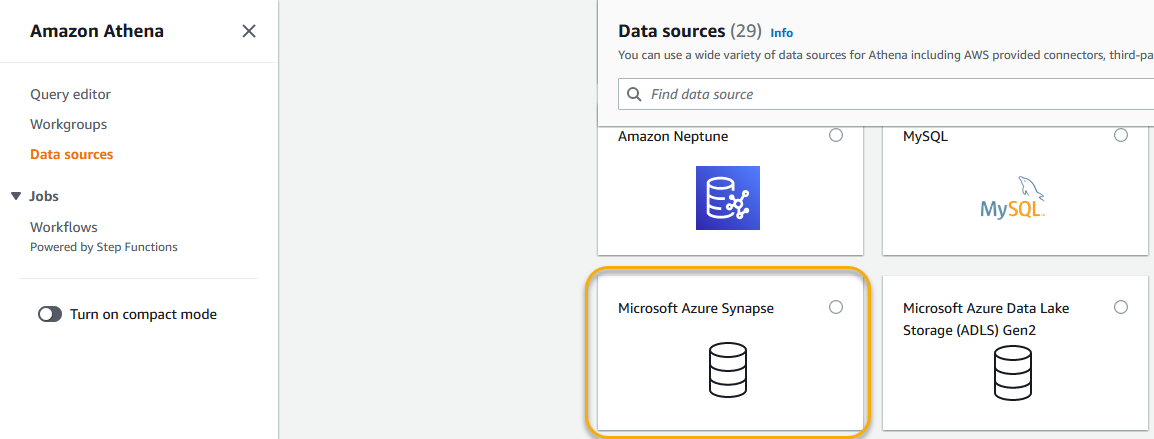
Now you’re ready to configure the data source. - On the Athena console, choose Data sources in the navigation pane.
- Choose Create data source.
- Choose Microsoft Azure Synapse as your data source.
- Choose Next.
- Create a data source with the following parameters:
- For Data source name, enter
azure\_synapse\_demo. - For Connection details, choose the Lambda function
athena\_hybrid\_azure.
- For Data source name, enter
- Choose Next.

Create a dataset on QuickSight to read the data from Azure Synapse
Now that the configuration on the Athena side is complete, let’s configure QuickSight.
- On the QuickSight console, on the user name menu, choose Manage QuickSight.

- Choose Security & permissions in the navigation pane.
- Under QuickSight access to AWS services, choose Manage.

- Choose Amazon Athena and in the pop-up permissions box, choose Next.

- On the S3 Bucket tab, select the spill bucket you created earlier.
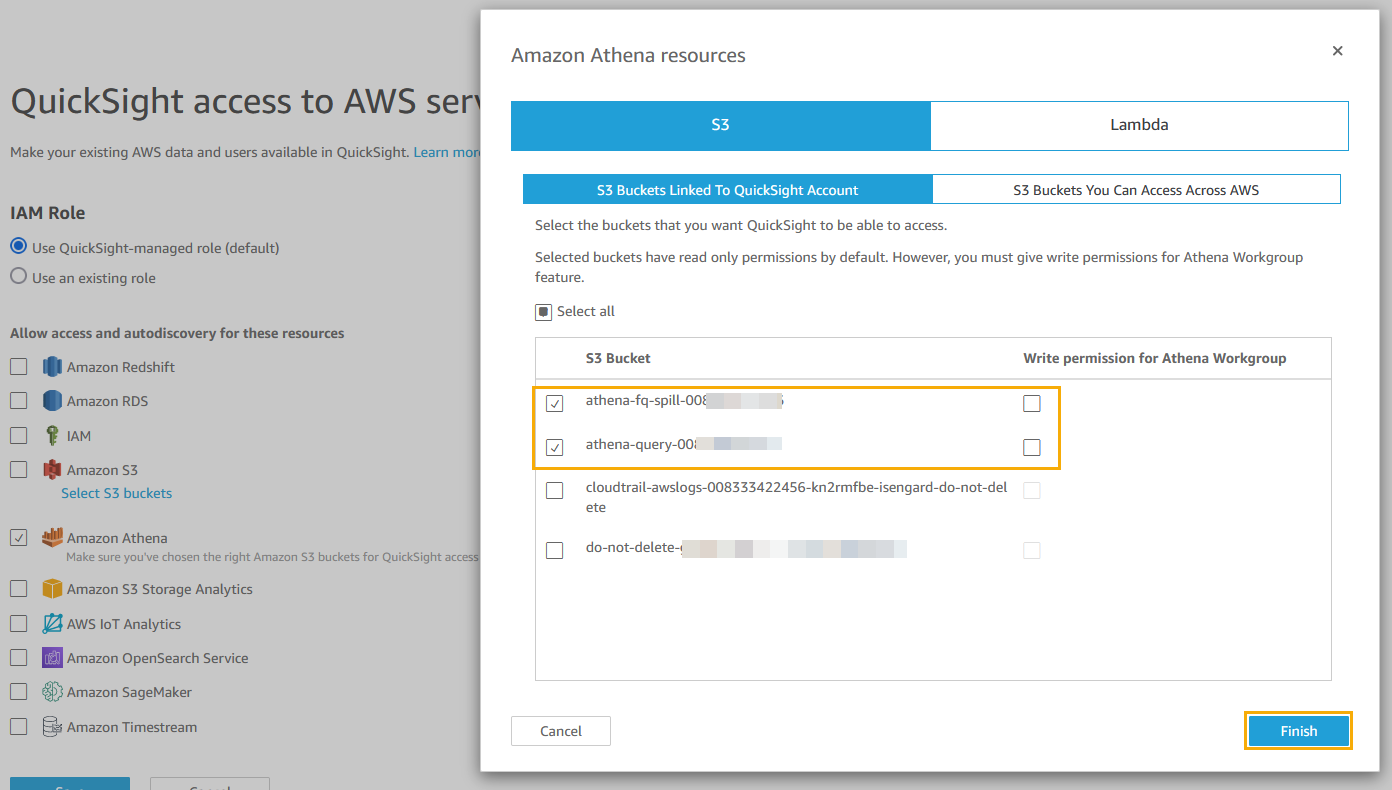
- On the Lambda tab, select the
athena\_hybrid\_azurefunction. - Choose Finish.

- If the QuickSight access to AWS services window appears, choose Save.

- Choose the QuickSight icon on the top left and choose New dataset.

- Choose Athena as the data source.
- For Data source name, enter a name.
- Check the Athena workgroup settings where the Athena data source was created.
- Choose Create data source.

- Choose the catalog
azure\_synapse\_demoand the databasedbo. - Choose Edit/Preview data.
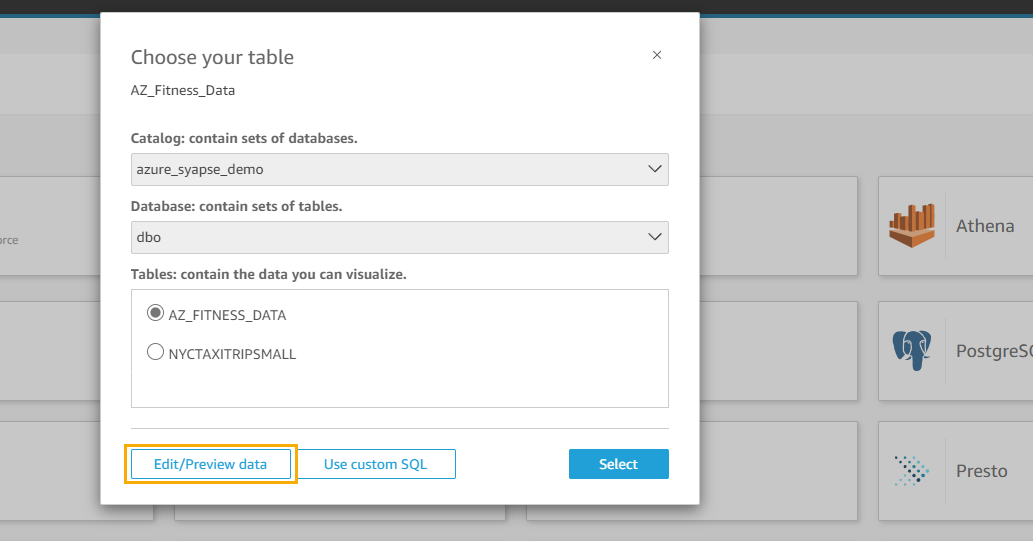
- Change the query mode to SPICE.
- Choose Publish & Visualize.

- Create an analysis in QuickSight.
- Publish a QuickSight dashboard.
If you’re new to QuickSight or looking to build stunning dashboards, this workshop provides step-by-step instructions to grow your dashboard building skills from basic to advanced level. The following screenshot is an example dashboard to give you some inspiration.

Clean up
To avoid ongoing charges, complete the following steps:
- Delete the S3 bucket created for the Athena spill data.
- Delete the Athena data source.
- On the AWS CloudFormation console, select the stack you created for
AthenaSynapseConnectorand choose Delete.
This will delete the created resources, such as the Lambda function. Check the stack’s Events tab to track the progress of the deletion, and wait for the stack status to change to DELETE\_COMPLETE. - Delete the QuickSight datasets.
- Delete the QuickSight analysis.
- Delete your QuickSight subscription and close the account.
Conclusion
In this post, we showed you how to overcome the challenges of connecting to and analyzing data in other clouds by using AWS analytics services to connect to Azure Synapse Analytics with Athena Federated Query and QuickSight. We also showed you how to visualize and derive insights from the fitness data using QuickSight. With QuickSight and Athena Federated Query, organizations can now access additional data sources beyond those already supported natively by QuickSight. If you have data in sources other than Amazon S3, you can use Athena Federated Query to analyze the data in place or build pipelines that extract and store data in Amazon S3.
For more information and resources for QuickSight and Athena, visit Analytics on AWS.
About the authors
 Harish Rajagopalan is a Senior Solutions Architect at Amazon Web Services. Harish works with enterprise customers and helps them with their cloud journey.
 Salim Khan is a Specialist Solutions Architect for Amazon QuickSight. Salim has over 16 years of experience implementing enterprise business intelligence (BI) solutions. Prior to AWS, Salim worked as a BI consultant catering to industry verticals like Automotive, Healthcare, Entertainment, Consumer, Publishing and Financial Services. He has delivered business intelligence, data warehousing, data integration and master data management solutions across enterprises.
 Sriram Vasantha is a Senior Solutions Architect at AWS in Central US helping customers innovate on the cloud. Sriram focuses on application and data modernization, DevSecOps, and digital transformation. In his spare time, Sriram enjoys playing different musical instruments like Piano, Organ, and Guitar.
 Adarsha Nagappasetty is a Senior Solutions Architect at Amazon Web Services. Adarsha works with enterprise customers in Central US and helps them with their cloud journey. In his spare time, Adarsha enjoys spending time outdoors with his family!