Delta Lake is an open-source project that helps implement modern data lake architectures commonly built on Amazon S3 or other cloud storages. With Delta Lake, you can achieve ACID transactions, time travel queries, CDC, and other common use cases on the cloud. Delta Lake is available with multiple AWS services, such as AWS Glue Spark jobs, Amazon EMR, Amazon Athena, and Amazon Redshift Spectrum.
AWS Glue includes Delta crawler, a capability that makes discovering datasets simpler by scanning Delta Lake transaction logs in Amazon Simple Storage Service (Amazon S3), extracting their schema, creating manifest files in Amazon S3, and automatically populating the AWS Glue Data Catalog, which keeps the metadata current. The newly created AWS Glue Data Catalog table has format SymlinkTextInputFormat. Delta crawler creates a manifest file, which is a text file containing the list of data files that query engines such as Presto, Trino, or Athena can use to query the table rather than finding the files with the directory listing. A previous blog post demonstrated how it works. Manifest files needed to be regenerated on a periodic basis to include newer transactions in the original Delta Lake tables which resulted in expensive I/O operations, longer processing times, and increased storage footprint.
With today’s launch, Glue crawler is adding support for creating AWS Glue Data Catalog tables for native Delta Lake tables and does not require generating manifest files. This improves customer experience because now you don’t have to regenerate manifest files whenever a new partition becomes available or a table’s metadata changes. With the native Delta Lake tables and automatic schema evolution with no additional manual intervention, this reduces the time to insight by making newly ingested data quickly available for analysis with your preferred analytics and machine learning (ML) tools.
Amazon Athena SQL engine version 3 started supporting Delta Lake native connector. AWS Glue for Apache Spark also started supporting Delta Lake native connector in Glue version 3.0 and later. Amazon EMR started supporting Delta Lake in EMR release version 6.9.0 and later. It means that you can query the Delta transaction log directly in Amazon Athena, AWS Glue for Apache Spark, and Amazon EMR. It makes the experience of working with native Delta Lake tables seamless across the platforms.
This post demonstrates how AWS Glue crawlers work with native Delta Lake tables and describes typical use cases to query native Delta Lake tables.
How AWS Glue crawler works with native Delta Lake tables
Now AWS Glue crawler has two different options:
- Native table: Create a native Delta Lake table definition on AWS Glue Data Catalog.
- Symlink table: Create a symlink-based manifest table definition on AWS Glue Data Catalog from a Delta Lake table, and generate its symlink files on Amazon S3.
Native table
Native Delta Lake tables are accessible from Amazon Athena (engine version 3), AWS Glue for Apache Spark (Glue version 3.0 and later), Amazon EMR (release version 6.9.0 and later), and other platforms that support Delta Lake tables. With the native Delta Lake tables, you have the capabilities such as ACID transactions, all while needing to maintain just a single source of truth.
Symlink table
Symlink tables are a consistent snapshot of a native Delta Lake table, represented using the SymlinkTextInputFormat using parquet files. The symlink tables are accessible from Amazon Athena and Amazon Redshift Spectrum.
Since the symlink tables are a snapshot of the original native Delta Lake tables, you need to maintain both the original native Delta Lake tables and the symlink tables. When the data or schema in an original Delta Lake table is updated, the symlink tables in the AWS Glue Data Catalog may become out of sync. It means that you can still query the symlink table and get a consistent result, but the result of the table is at the previous point in time.
Crawl native Delta Lake tables using AWS Glue crawler
In this section, let’s go through how to crawl native Delta Lake tables using AWS Glue crawler.
Prerequisite
Here’s the prerequisite for this tutorial:
- Install and configure AWS Command Line Interface (AWS CLI).
- Create your S3 bucket if you do not have it.
- Create your IAM role for AWS Glue crawler if you do not have it.
- Run the following command to copy the sample Delta Lake table into your S3 bucket. (Replace your\_s3\_bucket with your S3 bucket name.)
Create a Delta Lake crawler
A Delta Lake crawler can be created through the AWS Glue console, AWS Glue SDK, or AWS CLI. Specify a DeltaTarget with the following configurations:
DeltaTables– A list of S3DeltaPathswhere the Delta Lake tables are located. (Note that each path must be the parent of a\_delta\_logfolder. If the Delta transaction log is located ats3://bucket/sample\_delta\_table/\_delta\_log, then the paths3://bucket/sample\_delta\_table/should be provided.WriteManifest– A Boolean value indicating whether or not the crawler should write the manifest files for eachDeltaPath. This parameter is only applicable for Delta Lake tables created via manifest filesCreateNativeDeltaTable– A Boolean value indicating whether the crawler should create a native Delta Lake table. If set toFalse, the crawler would create a symlink table instead. Note that bothWriteManifestandCreateNativeDeltaTableoptions can’t be set toTrue.ConnectionName– An optional connection name stored in the Data Catalog that the crawler should use to access Delta Lake tables backed by a VPC.
In this instruction, create the crawler through the console. Complete the following steps to create a Delta Lake crawler:
- Open the AWS Glue console.
- Choose Crawlers.
- Choose Create crawler.
- For Name, enter delta-lake-native-crawler, and choose Next.
- Under Data sources, choose Add a data source.
- For Data source, select Delta Lake.
- For Include delta lake table path(s), enter
s3://your\_s3\_bucket/data/sample\_delta\_table/. - For Create tables for querying, choose Create Native tables,
- Choose Add a Delta Lake data source.

- Choose Next.
- For Existing IAM role, choose your IAM role, then choose Next.
- For Target database, choose Add database, then Add database dialog appears. For Database name, enter
delta\_lake\_native, then choose Create. Choose Next. - Choose Create crawler.
- The Delta Lake crawler can be triggered to run through the console or through the SDK or AWS CLI using the
StartCrawlAPI. It could also be scheduled through the console to trigger the crawlers at specific times. In this instruction, run the crawler through the console. - Select
delta-lake-native-crawler, and choose Run. - Wait for the crawler to complete.
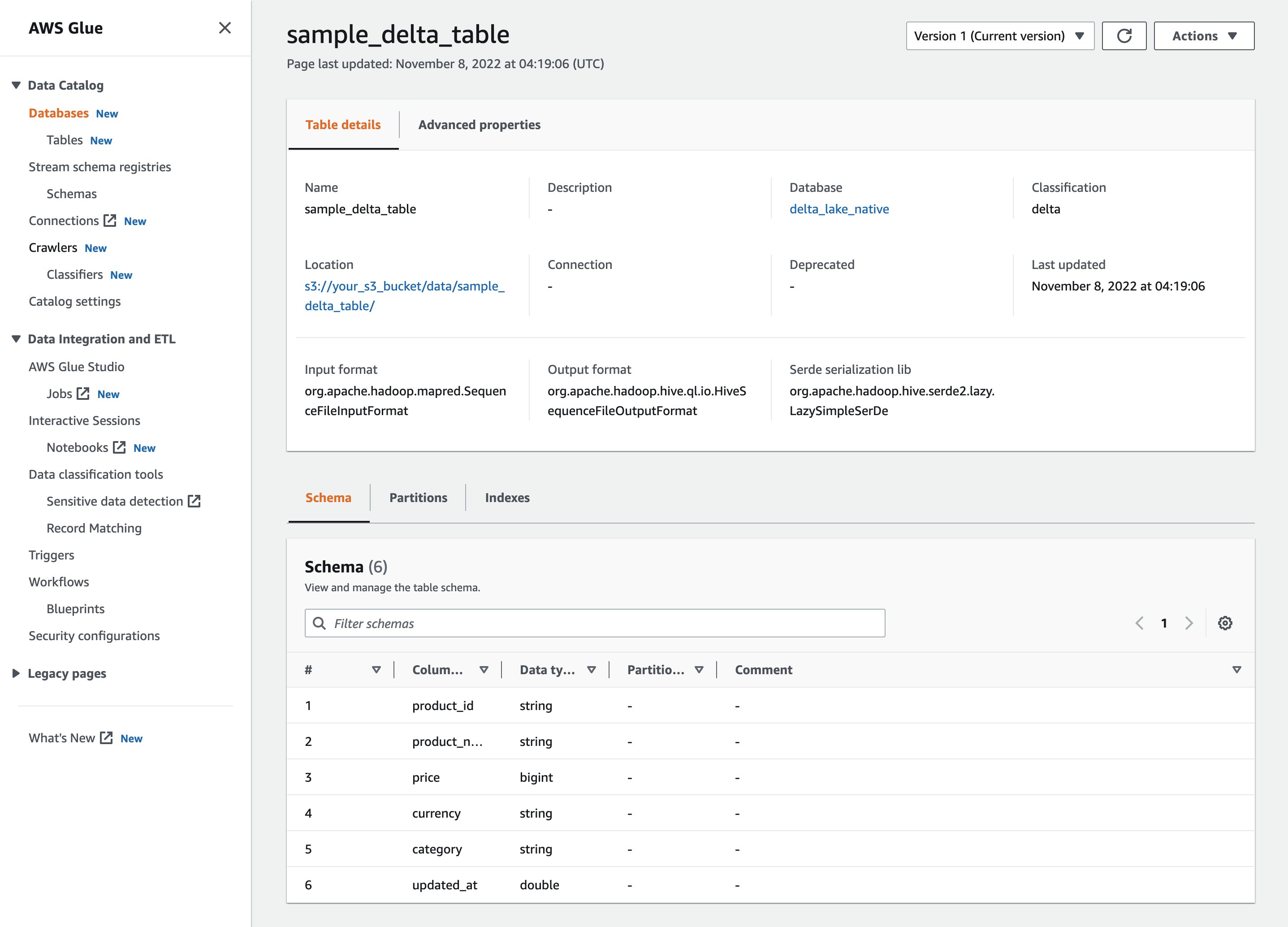
After the crawler has run, you can see the Delta Lake table definition in the AWS Glue console:
You can also verify an AWS Glue table definition through the following AWS CLI command:
After you create the table definition on AWS Glue Data Catalog, AWS analytics services such as Athena and AWS Glue Spark jobs are able to query the Delta Lake table.
Query Delta Lake tables using Amazon Athena
Amazon Athena is an interactive query service that makes it easy to analyze data in Amazon Simple Storage Service (Amazon S3) using standard SQL. Athena is serverless, so there is no infrastructure to manage, and you pay only for the queries that you run on datasets at petabyte scale. You can use Athena to query your S3 data lake for use cases such as data exploration for machine learning (ML) and AI, business intelligence (BI) reporting, and ad hoc querying.
There are now two ways to use Delta Lake tables in Athena:
- For native table: Use Athena’s newly launched native support for Delta Lake tables. You can learn more in Querying Delta Lake tables. This method no longer requires regenerating manifest files after every transaction. Data updates are available for queries in Athena as soon as they are performed in the original Delta Lake tables, and you get up to 40 percent improvement in query performance over querying manifest files. Since Athena optimizes data scans in native Delta Lake queries using statistics in Delta Lake files, you get the advantage of reduced cost for Athena queries. This post focuses on this approach.
- For symlink table: Use
SymlinkTextInputFormatto query symlink tables through manifest files generated from Delta Lake tables. This was previously the only manner in which Delta Lake table querying was supported via Athena and is no longer recommended when you use only Athena to query the Delta Lake tables.
To use the native Delta Lake connector in Athena, you need to use Athena engine version 3. If you are using an older engine version, change the engine version.
Complete following steps to start queries on Athena:
- Open the Amazon Athena console.
- Run the following query.
The following screenshot shows our output:

Query Delta Lake tables using AWS Glue for Apache Spark
AWS Glue for Apache Spark natively supports Delta Lake. AWS Glue version 3.0 (Apache Spark 3.1.1) supports Delta Lake 1.0.0, and AWS Glue version 4.0 (Apache Spark 3.3.0) supports Delta Lake 2.1.0. With this native support for Delta Lake, what you need for configuring Delta Lake is to provide a single job parameter --datalake-formats delta. There is no need to configure a separate connector for Delta Lake in AWS Marketplace. It reduces the configuration steps required to use these frameworks in AWS Glue for Apache Spark.
AWS Glue also provides a serverless notebook interface called AWS Glue Studio notebook to query and process data interactively. Complete the following steps to launch AWS Glue Studio notebook and query a Delta Lake table:
- On the AWS Glue console, choose Jobs in the navigation plane.
- Under Create job, select Jupyter Notebook.

- Choose Create a new notebook from scratch, and choose Create.
- For Job name, enter
delta-sql. - For IAM role, choose your IAM role. If you don’t have your own role for the AWS Glue job, create it by following the steps documented in the AWS Glue Developer Guide.
- Choose Start notebook job.
- Copy and paste the following code to the first cell and run the cell.
- Run the existing cell containing the following code.
- Copy and paste the following code to the third cell and run the cell.
The following screenshot shows our output:

Clean up
Now for the final step, cleaning up the resources:
- Delete your data under your S3 path:
s3://your\_s3\_bucket/data/sample\_delta\_table/. - Delete the AWS Glue crawler
delta-lake-native-crawler. - Delete the AWS Glue database
delta\_lake\_native. - Delete the AWS Glue notebook job
delta-sql.
Conclusion
This post demonstrated how to crawl native Delta Lake tables using an AWS Glue crawler and how to query the crawled tables from Athena and Glue Spark jobs. Start using AWS Glue crawlers for your own native Delta Lake tables.
If you have comments or feedback, please feel free to leave them in the comments.
About the authors
 Noritaka Sekiyama is a Principal Big Data Architect on the AWS Glue team. He works based in Tokyo, Japan. He is responsible for building software artifacts to help customers. In his spare time, he enjoys cycling with his road bike.
 Kyle Duong is a Software Development Engineer on the AWS Glue and Lake Formation team. He is passionate about building big data technologies and distributed systems. In his free time, he enjoys cycling or playing basketball.
 Sandeep Adwankar is a Senior Technical Product Manager at AWS. Based in the California Bay Area, he works with customers around the globe to translate business and technical requirements into products that enable customers to improve how they manage, secure, and access data.