Amazon Kinesis Data Analytics is the easiest way to transform and analyze streaming data in real time using Apache Flink. Customers are already using Kinesis Data Analytics to perform real-time analytics on fast-moving data generated from data sources like IoT sensors, change data capture (CDC) events, gaming, social media, and many others. Apache Flink is a popular open-source framework and distributed processing engine for stateful computations over unbounded and bounded data streams.
Although building Apache Flink applications is typically the responsibility of a data engineering team, automating the deployment and provisioning infrastructure as code (IaC) is usually owned by the platform (or DevOps) team.
The following are typical responsibilities of the data engineering role:
- Write code for real-time analytics Apache Flink applications
- Roll out new application versions or roll them back (for example, in the case of a critical bug)
The following are typical responsibilities of the platform role:
- Write code for IaC
- Provision the required resources in the cloud and manage their access
In this post, we show how you can automate deployment and version updates for Kinesis Data Analytics applications and allow both Platform and engineering teams to effectively collaborate and co-own the final solution using AWS CodePipeline with the AWS Cloud Development Kit (AWS CDK).
Solution overview
To demonstrate the automated deployment and version update of a Kinesis Data Analytics application, we use the following example real-time data analytics architecture for this post.

The workflow includes the following steps:
- An AWS Lambda function (acting as data source) is the event producer pushing events on demand to Amazon Kinesis Data Streams when invoked.
- The Kinesis data stream receives and stores real-time events.
- The Kinesis Data Analytics application reads events from the data stream and performs real-time analytics on it.
Generic architecture
You can refer to the following generic architecture to adapt this example to your preferred CI/CD tool (for example, Jenkins). The overall deployment process is divided into three high-level parts:
- Infrastructure CI/CD – This portion is highlighted in orange. The infrastructure CI/CD pipeline is responsible for deploying all the real-time streaming architecture components, including the Kinesis Data Analytics application and any connected resources typically deployed using AWS CloudFormation.
- ApplicationStack – This portion is highlighted in gray. The application stack is deployed by the infrastructure CI/CD component using AWS CloudFormation.
- Application CI/CD – This portion is highlighted in green. The application CI/CD pipeline updates the Kinesis Data Analytics application in three steps:
- The pipeline builds the Java or Python source code of the Kinesis Data Analytics application and produces the application as a binary file.
- The pipeline pushes the latest binary file to the Amazon Simple Storage Service (Amazon S3) artifact bucket after a successful build as Kinesis Data Analytics application binary files are referenced from S3.
- The S3 bucket file put event triggers a Lambda function, which updates the version of the Kinesis Data Analytics application by deploying the latest binary.
The following diagram illustrates this workflow.

CI/CD architecture with CodePipeline
In this post, we implement the generic architecture using CodePipeline. The following diagram illustrates our updated architecture.
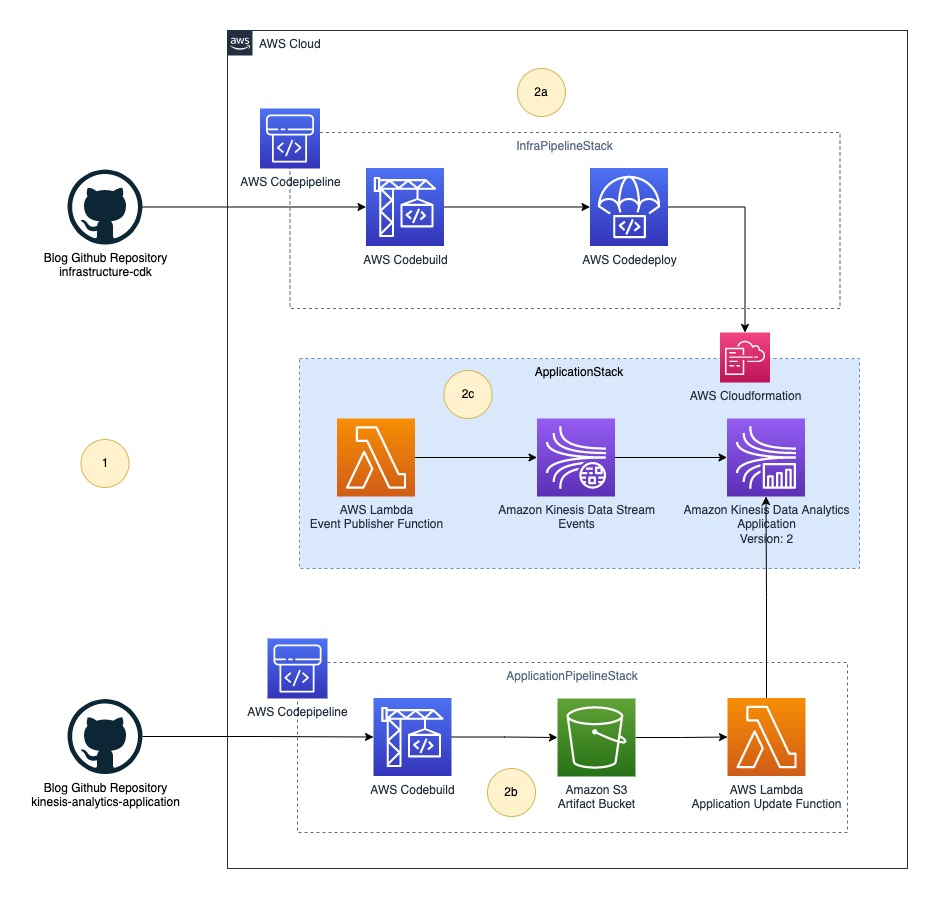
The final solution includes the following steps:
- The platform (DevOps) team and data engineering team push their source code to their respective code repositories.
- CodePipeline deploys the whole infrastructure as three stacks:
- InfraPipelineStack – Contains a pipeline to deploy the overall infrastructure.
- ApplicationPipelineStack – Contains a pipeline to build and deploy Kinesis Data Analytics application binaries. In this post, we build a Java source using the JavaBuildPipeline AWS CDK construct. You can use the PythonBuildPipeline AWS CDK construct to build a Python source.
- ApplicationStack – Contains real-time data analytics pipeline resources including Lambda (data source), Kinesis Data Streams (storage), and Kinesis Data Analytics (Apache Flink application).
Deploy resources using AWS CDK
The following GitHub repository contains the AWS CDK code to create all the necessary resources for the data pipeline. This removes opportunities for manual error, increases efficiency, and ensures consistent configurations over time. To deploy the resources, complete the following steps:
- Clone the GitHub repository to your local computer using the following command:
- Download and install the latest Node.js.
- Run the following command to install the latest version of AWS CDK:
- Run
cdk bootstrapto initialize the AWS CDK environment in your AWS account. Replace your AWS account ID and Region before running the following command.
To learn more about the bootstrapping process, refer to Bootstrapping.
Part 1: Data engineering and platform teams push source code to their code repositories
The data engineering and platform teams begin work in their respective code repositories, as illustrated in the following figure.
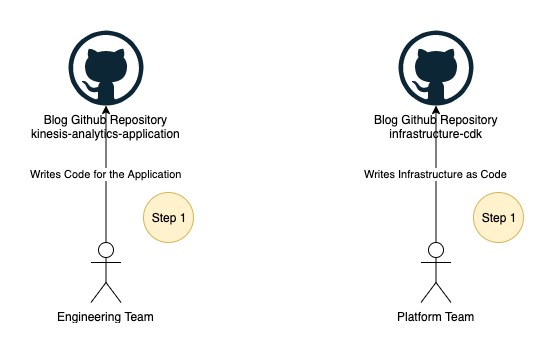
In this post, we use two folders instead of two GitHub repositories, which you can find under the root folder of the cloned repository:
- kinesis-analytics-application – This folder contains example source code of the Kinesis Data Analytics application. This represents your Kinesis Data Analytics application source code developed by your data engineering team.
- infrastructure-cdk – This folder contains example AWS CDK source code of the final solution used for provisioning all the required resources and CodePipeline. You can reuse this code for your Kinesis Data Analytics application deployment.
Application development teams usually stores the application source code in git repositories. For the demonstration purpose, we will use source code as zip file downloaded from Github instead of connecting CodePipeline to the Github repository. You may want to directly connect source repository with CodePipeline. To learn more about how to connect, refer to Create a connection to GitHub.
Part 2: The platform team deploys the application pipeline
The following figure illustrates the next step in the workflow.

In this step, you deploy the first pipeline to build the Java source code from kinesis-analytics-application. Complete the following steps to deploy ApplicationPipelineStack:
- Open your terminal, bash, or command window depending on your OS.
- Switch the current path to the folder
infrastructure-cdk. - Run
npm installto download all dependencies. - Run
cdk deploy ApplicationPipelineStackto deploy the application pipeline.
This process should take about 5 minutes to complete and deploys the following resources to your AWS account, highlighted in green in the preceding diagram:
- CodePipeline, containing stages for AWS CodeBuild and AWS CodeDeploy
- An S3 bucket to store binaries
- A Lambda function to update the Kinesis Data Analytics application JAR after manual approval
Trigger an automatic build for the application pipeline
After the cdk deploy command is successful, complete the following steps to automatically run the pipeline:
- Download the source code .zip file.
- On the AWS CloudFormation console, choose Stacks in the navigation pane.
- Choose the stack
ApplicationPipelineStack.
- On the Outputs tab, choose the link for the key
ArtifactBucketLink.
You’re redirected to the S3 artifact bucket.
- Choose Upload.
- Upload the source code .zip file you downloaded.
The first pipeline run (shown as Auto Build in the following diagram) starts automatically and takes about 5 minutes to reach the manual approval stage. The pipeline automatically downloads the source code from the artifact bucket, builds the Java project kinesis-analytics-application using Maven, and publishes the output binary JAR file back to the artifact bucket under the directory jars.

View the application pipeline run
Complete the following steps to view the application pipeline run:
- On the AWS CloudFormation console, navigate to the stack
ApplicationPipelineStack. - On the Outputs tab, choose the link for the key
ApplicationCodePipelineLink.
You’re redirected to the pipeline details page. You can see a detailed view of the pipeline, including the state of each action in each stage and the state of the transitions.
Do not approve the build for the manual approval stage yet; this is done later.
Part 3: The platform team deploys the infrastructure pipeline
The application pipeline run publishes a JAR file named kinesis-analytics-application-final.jar to the artifact bucket. Next, we deploy the Kinesis Data Analytics architecture. Complete the following steps to deploy the example flow:
- Open a terminal, bash, or command window depending on your OS.
- Switch the current path to the folder
infrastructure-cdk. - Run
cdk deploy InfraPipelineStackto deploy the infrastructure pipeline.
This process should take about 5 minutes to complete and deploys a pipeline containing stages for CodeBuild and CodeDeploy to your AWS account, as highlighted in green in the following diagram.

When the cdk deploy is complete, the infrastructure pipeline run starts automatically (shown as Auto Build 1 in the following diagram) and takes about 10 minutes to download the source code from the artifact bucket, build the AWS CDK project infrastructure-stack, and deploy ApplicationStack automatically to your AWS account. When the infrastructure pipeline run is complete, the following resources are deployed to your account (shown in green in following diagram):
- A CloudFormation template named
app-ApplicationStack - A Lambda function acting as a data source
- A Kinesis data stream acting as the stream storage
- A Kinesis Data Analytics application with the first version of
kinesis-analytics-application-final.jar
View the infrastructure pipeline run
Complete the following steps to view the application pipeline run:
- On the AWS CloudFormation console, navigate to the stack
InfraPipelineStack.
- On the Outputs tab, choose the link for the key
InfraCodePipelineLink.
You’re redirected to the pipeline details page. You can see a detailed view of the pipeline, including the state of each action in each stage and the state of the transitions.
Step 4: The data engineering team deploys the application
Now your account has everything in place for the data engineering team to work independently and roll out new versions of the Kinesis Data Analytics application. You can approve the respective application build from the application pipeline to deploy new versions of the application. The following diagram illustrates the full workflow.

The build process starts automatically when it detects changes in the source code. You can test a version update by re-uploading the source code .zip file to the S3 artifact bucket. In a real-world use case, you update the main branch either via a pull request or by merging your changes, and this action triggers a new pipeline run automatically.
View the current application version
To view the current version of the Kinesis Data Analytics application, complete the following steps:
- On the AWS CloudFormation console, navigate to the stack
InfraPipelineStack. - On the Outputs tab, choose the link for the key
KDAApplicationLink.
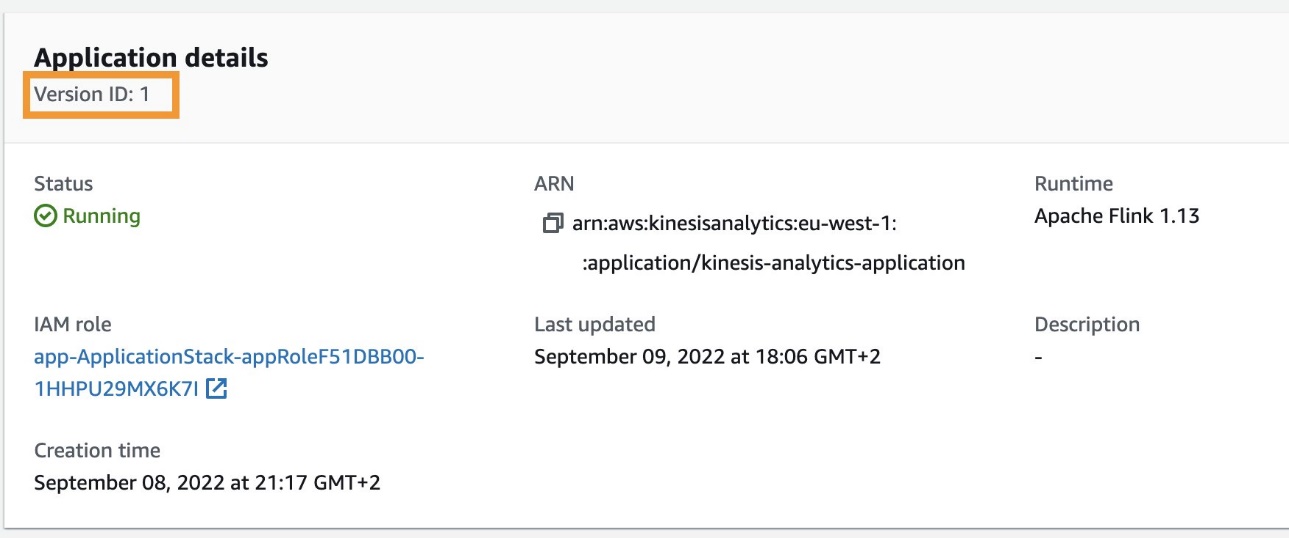
You’re redirected to the Kinesis Data Analytics application details page. You can find the current application version by looking at Version ID.
Approve the application deployment
Complete the following steps to approve the deployment (or version update) of the Kinesis Data Analytics application:
- On the AWS CloudFormation console, navigate to the stack
ApplicationPipelineStack. - On the Outputs tab, choose the link for the key
ApplicationCodePipelineLink. - Choose Review from the pipeline approval stage.

- When prompted, choose Approve to provide approval (optionally adding any comments) for the Kinesis Data Analytics application deployment or version update.

- Repeat the steps mentioned earlier to view the current application version.
You should see the application version as defined in Version ID increased by one, as shown in the following screenshot.

Deploying a new version of the Kinesis Data Analytics application will cause a downtime of around 5 minutes because the Lambda function responsible for the version update makes the API call UpdateApplication, which restarts the application after updating the version. However, the application resumes stream processing where it left off after the restart.
Clean up
Complete the following steps to delete your resources and stop incurring costs:
- On the AWS CloudFormation console, select the stack
InfraPipelineStackand choose Delete. - Select the stack
app-ApplicationStackand choose Delete. - Select stack
ApplicationPipelineStackand choose Delete. - On the Amazon S3 console, select the bucket with the name starting with
javaappCodePipelineand choose Empty. - Enter permanently delete to confirm the choice.
- Select the bucket again and choose Delete.
- Confirm the action by entering the bucket name when prompted.
- Repeat these steps to delete the bucket with the name starting with
infrapipelinestack-pipelineartifactsbucket.
Summary
This post demonstrated how to automate deployment and version updates for your Kinesis Data Analytics applications using CodePipeline and AWS CDK.
For more information, see Continuous integration and delivery (CI/CD) using CDK Pipelines and CodePipeline tutorials.
About the Author
 Anand Shah is a Big Data Prototyping Solutions Architect at AWS. He works with AWS customers and their engineering teams to build prototypes using AWS analytics services and purpose-built databases. Anand helps customers solve the most challenging problems using the art of the possible technology. He enjoys beaches in his leisure time.