To build a data-driven business, it is important to democratize enterprise data assets in a data catalog. With a unified data catalog, you can quickly search datasets and figure out data schema, data format, and location. The AWS Glue Data Catalog provides a uniform repository where disparate systems can store and find metadata to keep track of data in data silos.
Apache Flink is a widely used data processing engine for scalable streaming ETL, analytics, and event-driven applications. It provides precise time and state management with fault tolerance. Flink can process bounded stream (batch) and unbounded stream (stream) with a unified API or application. After data is processed with Apache Flink, downstream applications can access the curated data with a unified data catalog. With unified metadata, both data processing and data consuming applications can access the tables using the same metadata.
This post shows you how to integrate Apache Flink in Amazon EMR with the AWS Glue Data Catalog so that you can ingest streaming data in real time and access the data in near-real time for business analysis.
Apache Flink connector and catalog architecture
Apache Flink uses a connector and catalog to interact with data and metadata. The following diagram shows the architecture of the Apache Flink connector for data read/write, and catalog for metadata read/write.
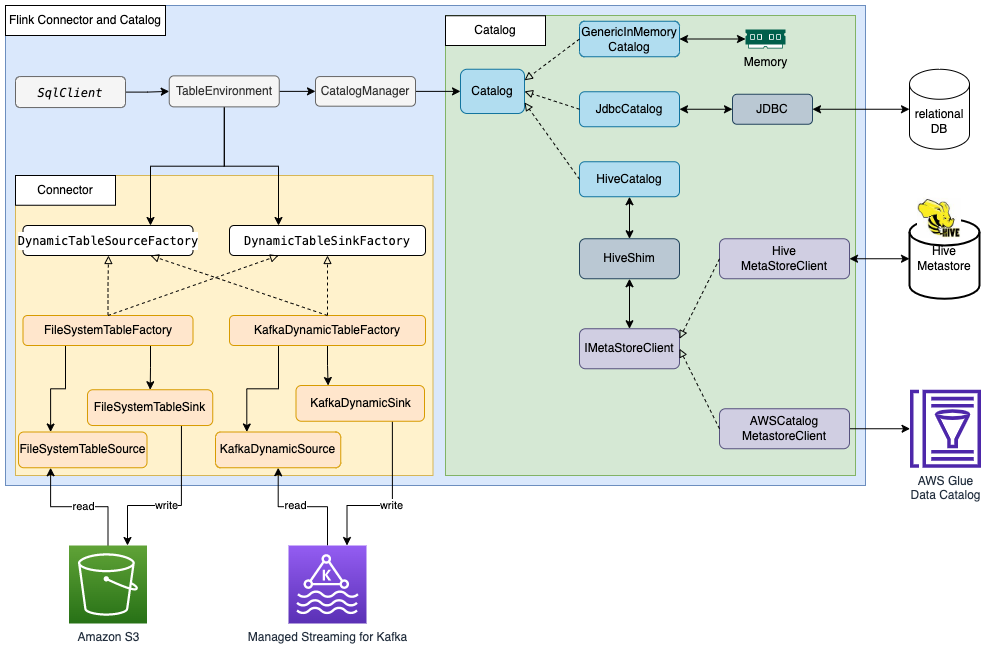
For data read/write, Flink has the interface DynamicTableSourceFactory for read and DynamicTableSinkFactory for write. A different Flink connector implements two interfaces to access data in different storage. For example, the Flink FileSystem connector has FileSystemTableFactory to read/write data in Hadoop Distributed File System (HDFS) or Amazon Simple Storage Service (Amazon S3), the Flink HBase connector has HBase2DynamicTableFactory to read/write data in HBase, and the Flink Kafka connector has KafkaDynamicTableFactory to read/write data in Kafka. You can refer to Table & SQL Connectors for more information.
For metadata read/write, Flink has the catalog interface. Flink has three built-in implementations for the catalog. GenericInMemoryCatalog stores the catalog data in memory. JdbcCatalog stores the catalog data in a JDBC-supported relational database. As of this writing, MySQL and PostgreSQL databases are supported in the JDBC catalog. HiveCatalog stores the catalog data in Hive Metastore. HiveCatalog uses HiveShim to provide different Hive version compatibility. We can configure different metastore clients to use Hive Metastore or the AWS Glue Data Catalog. In this post, we configure the Amazon EMR property hive.metastore.client.factory.class to com.amazonaws.glue.catalog.metastore.AWSGlueDataCatalogHiveClientFactory (see Using the AWS Glue Data Catalog as the metastore for Hive) so that we can use the AWS Glue Data Catalog to store Flink catalog data. Refer to Catalogs for more information.
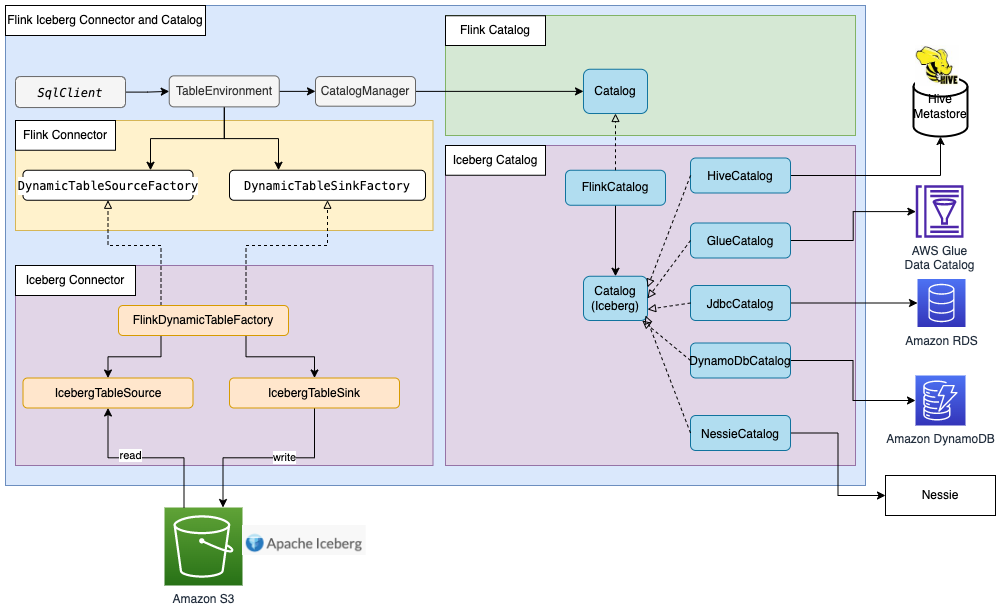
Most Flink built-in connectors, such as for Kafka, Amazon Kinesis, Amazon DynamoDB, Elasticsearch, or FileSystem, can use Flink HiveCatalog to store metadata in the AWS Glue Data Catalog. However, some connector implementations such as Apache Iceberg have their own catalog management mechanism. FlinkCatalog in Iceberg implements the catalog interface in Flink. FlinkCatalog in Iceberg has a wrapper to its own catalog implementation. The following diagram shows the relationship between Apache Flink, the Iceberg connector, and the catalog. For more information, refer to Creating catalogs and using catalogs and Catalogs.
Apache Hudi also has its own catalog management. Both HoodieCatalog and HoodieHiveCatalog implements a catalog interface in Flink. HoodieCatalog stores metadata in a file system such as HDFS. HoodieHiveCatalog stores metadata in Hive Metastore or the AWS Glue Data Catalog, depending on whether you configure hive.metastore.client.factory.class to use com.amazonaws.glue.catalog.metastore.AWSGlueDataCatalogHiveClientFactory. The following diagram shows relationship between Apache Flink, the Hudi connector, and the catalog. For more information, refer to Create Catalog.

Because Iceberg and Hudi have different catalog management mechanisms, we show three scenarios of Flink integration with the AWS Glue Data Catalog in this post:
- Read/Write to Iceberg tables in Flink with metadata in Glue Data Catalog
- Read/Write to Hudi tables in Flink with metadata in Glue Data Catalog
- Read/Write to other storage format in Flink with metadata in Glue Data Catalog
Solution overview
The following diagram shows the overall architecture of the solution described in this post.
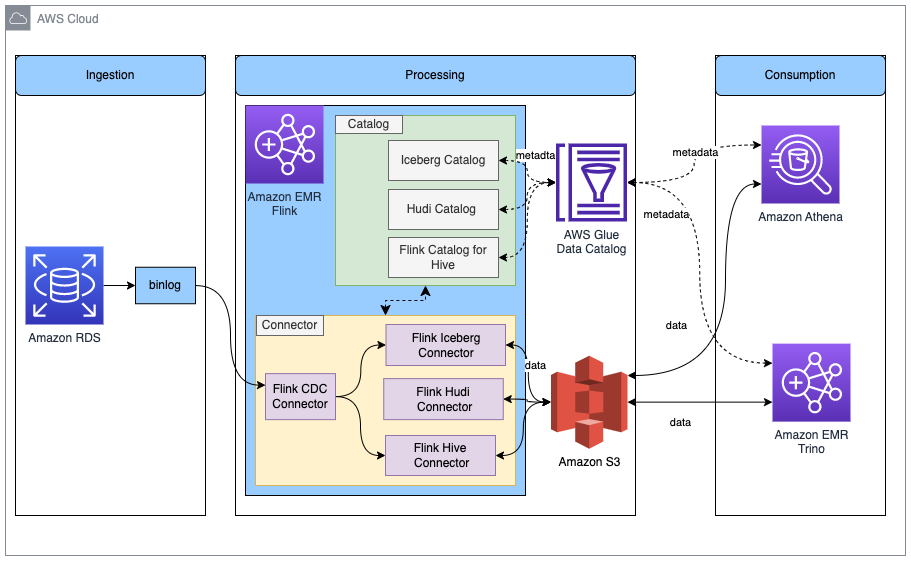
In this solution, we enable an Amazon RDS for MySQL binlog to extract transaction changes in real time. The Amazon EMR Flink CDC connector reads the binlog data and processes the data. Transformed data can be stored in Amazon S3. We use the AWS Glue Data Catalog to store the metadata such as table schema and table location. Downstream data consumer applications such as Amazon Athena or Amazon EMR Trino access the data for business analysis.
The following are the high-level steps to set up this solution:
- Enable
binlogfor Amazon RDS for MySQL and initialize the database. - Create an EMR cluster with the AWS Glue Data Catalog.
- Ingest change data capture (CDC) data with Apache Flink CDC in Amazon EMR.
- Store the processed data in Amazon S3 with metadata in the AWS Glue Data Catalog.
- Verify all table metadata is stored in the AWS Glue Data Catalog.
- Consume data with Athena or Amazon EMR Trino for business analysis.
- Update and delete source records in Amazon RDS for MySQL and validate the reflection of the data lake tables.
Prerequisites
This post uses an AWS Identity and Access Management (IAM) role with permissions for the following services:
- Amazon RDS for MySQL (5.7.40)
- Amazon EMR (6.9.0)
- Amazon Athena
- AWS Glue Data Catalog
- Amazon S3
Enable binlog for Amazon RDS for MySQL and initialize the database
To enable CDC in Amazon RDS for MySQL, we need to configure binary logging for Amazon RDS for MySQL. Refer to Configuring MySQL binary logging for more information. We also create the database salesdb in MySQL and create the tables customer, order, and others to set up the data source.
- On the Amazon RDS console, choose Parameter groups in the navigation pane.
- Create a new parameter group for MySQL.
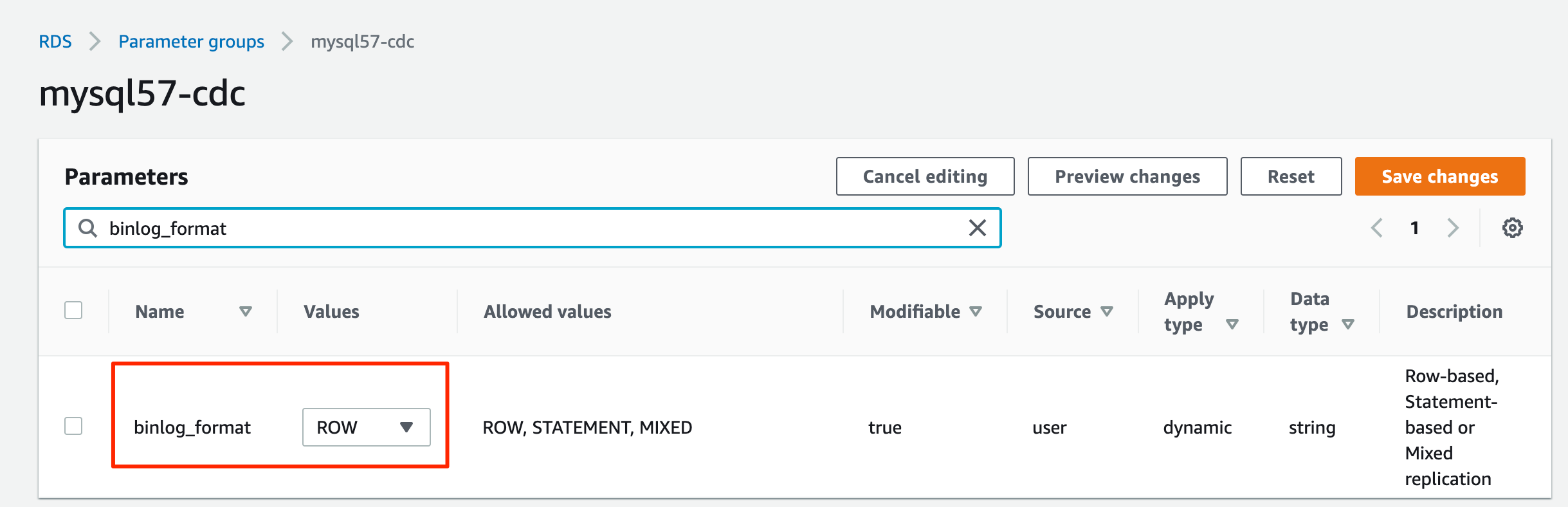
- Edit the parameter group you just created to set
binlog\_format=ROW.
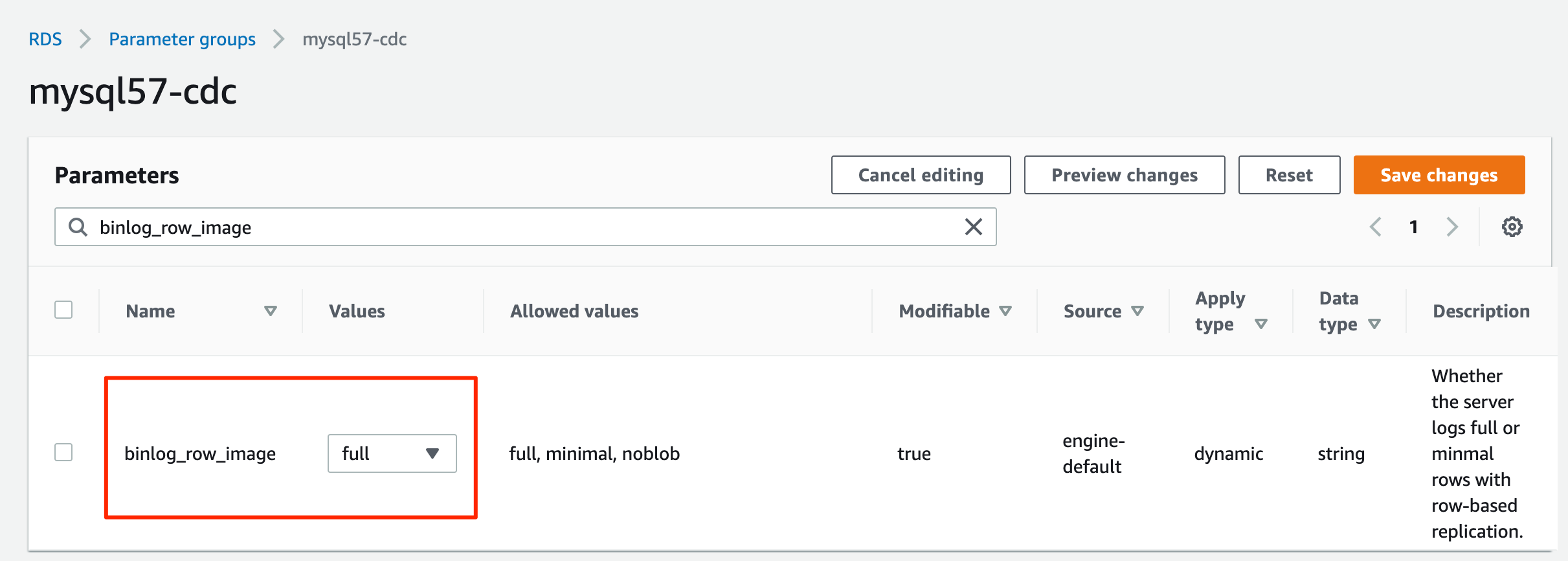
- Edit the parameter group you just created to set
binlog\_row\_image=full.
- Create an RDS for MySQL DB instance with the parameter group.
- Note down the values for
hostname,username, andpassword, which we use later. - Download the MySQL database initialization script from Amazon S3 by running the following command:
- Connect to the RDS for MySQL database and run the
salesdb.sqlcommand to initialize the database, providing the host name and user name according to your RDS for MySQL database configuration:
Create an EMR cluster with the AWS Glue Data Catalog
From Amazon EMR 6.9.0, the Flink table API/SQL can integrate with the AWS Glue Data Catalog. To use the Flink and AWS Glue integration, you must create an Amazon EMR 6.9.0 or later version.
- Create the file
iceberg.propertiesfor the Amazon EMR Trino integration with the Data Catalog. When the table format is Iceberg, your file should have following content:
- Upload
iceberg.propertiesto an S3 bucket, for exampleDOC-EXAMPLE-BUCKET.
For more information on how to integrate Amazon EMR Trino with Iceberg, refer to Use an Iceberg cluster with Trino.
- Create the file
trino-glue-catalog-setup.shto configure the Trino integration with the Data Catalog. Usetrino-glue-catalog-setup.shas the bootstrap script. Your file should have the following content (replaceDOC-EXAMPLE-BUCKETwith your S3 bucket name):
- Upload
trino-glue-catalog-setup.shto your S3 bucket (DOC-EXAMPLE-BUCKET).
Refer to Create bootstrap actions to install additional software to run a bootstrap script.
- Create the file
flink-glue-catalog-setup.shto configure the Flink integration with the Data Catalog. - Use a script runner and run the
flink-glue-catalog-setup.shscript as a step function.
Your file should have the following content (the JAR file name here is using Amazon EMR 6.9.0; a later version JAR name may change, so make sure to update according to your Amazon EMR version).
Note that here we use an Amazon EMR step, not a bootstrap, to run this script. An Amazon EMR step script is run after Amazon EMR Flink is provisioned.
- Upload
flink-glue-catalog-setup.shto your S3 bucket (DOC-EXAMPLE-BUCKET).
Refer to Configuring Flink to Hive Metastore in Amazon EMR for more information on how to configure Flink and Hive Metastore. Refer to Run commands and scripts on an Amazon EMR cluster for more details on running the Amazon EMR step script.
- Create an EMR 6.9.0 cluster with the applications Hive, Flink, and Trino.
You can create an EMR cluster with the AWS Command Line Interface (AWS CLI) or the AWS Management Console. Refer to the appropriate subsection for instructions.
Create an EMR cluster with the AWS CLI
To use the AWS CLI, complete the following steps:
- Create the file
emr-flink-trino-glue.jsonto configure Amazon EMR to use the Data Catalog. Your file should have the following content:
- Run the following command to create the EMR cluster. Provide your local
emr-flink-trino-glue.jsonparent folder path, S3 bucket, EMR cluster Region, EC2 key name, and S3 bucket for EMR logs.
Create an EMR cluster on the console
To use the console, complete the following steps:
- On the Amazon EMR console, create an EMR cluster and select Use for Hive table metadata for AWS Glue Data Catalog settings.
- Add configuration settings with the following code:

- In the Steps section, add a step called Custom JAR.
- Set JAR location to
s3://<region>.elasticmapreduce/libs/script-runner/script-runner.jar, where <region> is the region in which your EMR cluster resides. - Set Arguments to the S3 path you uploaded earlier.

- In the Bootstrap Actions section, choose Custom Action.
- Set Script location to the S3 path you uploaded.

- Continue the subsequent steps to complete your EMR cluster creation.
Ingest CDC data with Apache Flink CDC in Amazon EMR
The Flink CDC connector supports reading database snapshots and captures updates in the configured tables. We have deployed the Flink CDC connector for MySQL by downloading flink-sql-connector-mysql-cdc-2.2.1.jar and putting it into the Flink library when we create our EMR cluster. The Flink CDC connector can use the Flink Hive catalog to store Flink CDC table schema into Hive Metastore or the AWS Glue Data Catalog. In this post, we use the Data Catalog to store our Flink CDC table.
Complete the following steps to ingest RDS for MySQL databases and tables with Flink CDC and store metadata in the Data Catalog:
- SSH to the EMR primary node.
- Start Flink on a YARN session by running the following command, providing your S3 bucket name:
- Start the Flink SQL client CLI by running the following command:
- Create the Flink Hive catalog by specifying the catalog type as
hiveand providing your S3 bucket name:
Because we’re configuring the EMR Hive catalog use the AWS Glue Data Catalog, all the databases and tables created in the Flink Hive catalog are stored in the Data Catalog.
- Create the Flink CDC table, providing the host name, user name, and password for the RDS for MySQL instance you created earlier.
Note that because the RDS for MySQL user name and password will be stored in the Data Catalog as table properties, you should be enable AWS Glue database/table authorization with AWS Lake Formation to protect your sensitive data.
- Query the table you just created:
You will get a query result like following screenshot.

Store processed data in Amazon S3 with metadata in the Data Catalog
As we’re ingesting the relational database data in Amazon RDS for MySQL, raw data may be updated or deleted. To support data update and delete, we can choose data lake technologies such as Apache Iceberg or Apache Hudi to store the processed data. As we mentioned earlier, Iceberg and Hudi have different catalog management. We show both scenarios to use Flink to read/write the Iceberg and Hudi tables with metadata in the AWS Glue Data Catalog.
For non-Iceberg and non-Hudi, we use a FileSystem Parquet file to show how the Flink built-in connector uses the Data Catalog.
Read/Write to Iceberg tables in Flink with metadata in Glue Data Catalog
The following diagram shows the architecture for this configuration.

- Create a Flink Iceberg catalog using the Data Catalog by specifying
catalog-implasorg.apache.iceberg.aws.glue.GlueCatalog.
For more information about Flink and Data Catalog integration for Iceberg, refer to Glue Catalog.
- In the Flink SQL client CLI, run the following command, providing your S3 bucket name:
- Create an Iceberg table to store processed data:
- Insert the processed data into Iceberg:
Read/Write to Hudi tables in Flink with metadata in Glue Data Catalog
The following diagram shows the architecture for this configuration.
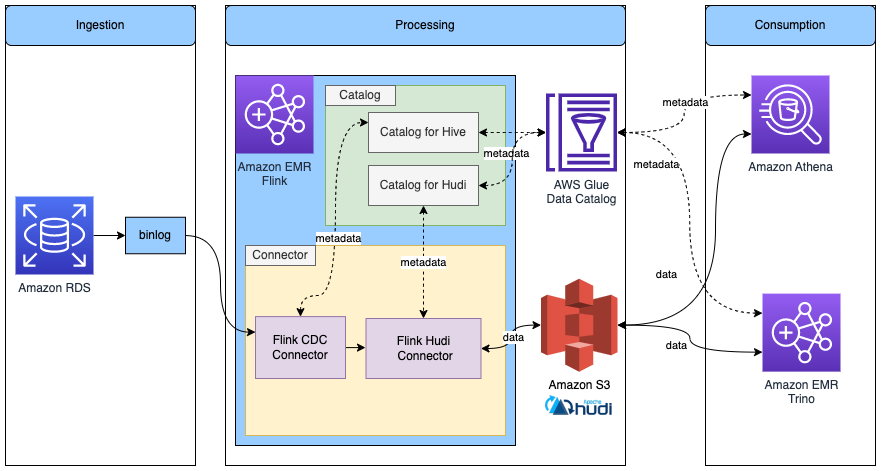
Complete the following steps:
- Create a catalog for Hudi to use the Hive catalog by specifying
modeashms.
Because we already configured Amazon EMR to use the Data Catalog when we created the EMR cluster, this Hudi Hive catalog uses the Data Catalog under the hood. For more information about Flink and Data Catalog integration for Hudi, refer to Create Catalog.
- In the Flink SQL client CLI, run the following command, providing your S3 bucket name:
- Create a Hudi table using the Data Catalog, and provide your S3 bucket name:
- Insert the processed data into Hudi:
Read/Write to other storage format in Flink with metadata in Glue Data Catalog
The following diagram shows the architecture for this configuration.
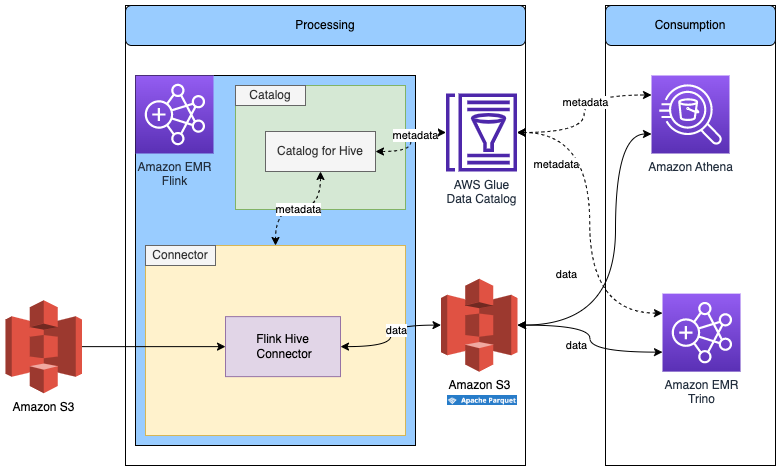
We already created the Flink Hive catalog in the previous step, so we’ll reuse that catalog.
- In the Flink SQL client CLI, run the following command:
We change the SQL dialect to Hive to create a table with Hive syntax.
- Create a table with the following SQL, and provide your S3 bucket name:
Because Parquet files don’t support updated rows, we can’t consume data from CDC data. However, we can consume data from Iceberg or Hudi.
- Use the following code to query the Iceberg table and insert data into the Parquet table:
Verify all table metadata is stored in the Data Catalog
You can navigate to the AWS Glue console to verify all the tables are stored in the Data Catalog.
- On the AWS Glue console, choose Databases in the navigation pane to list all the databases we created.

- Open a database and verify that all the tables are in that database.

Consume data with Athena or Amazon EMR Trino for business analysis
You can use Athena or Amazon EMR Trino to access the result data.
Query the data with Athena
To access the data with Athena, complete the following steps:
- Open the Athena query editor.
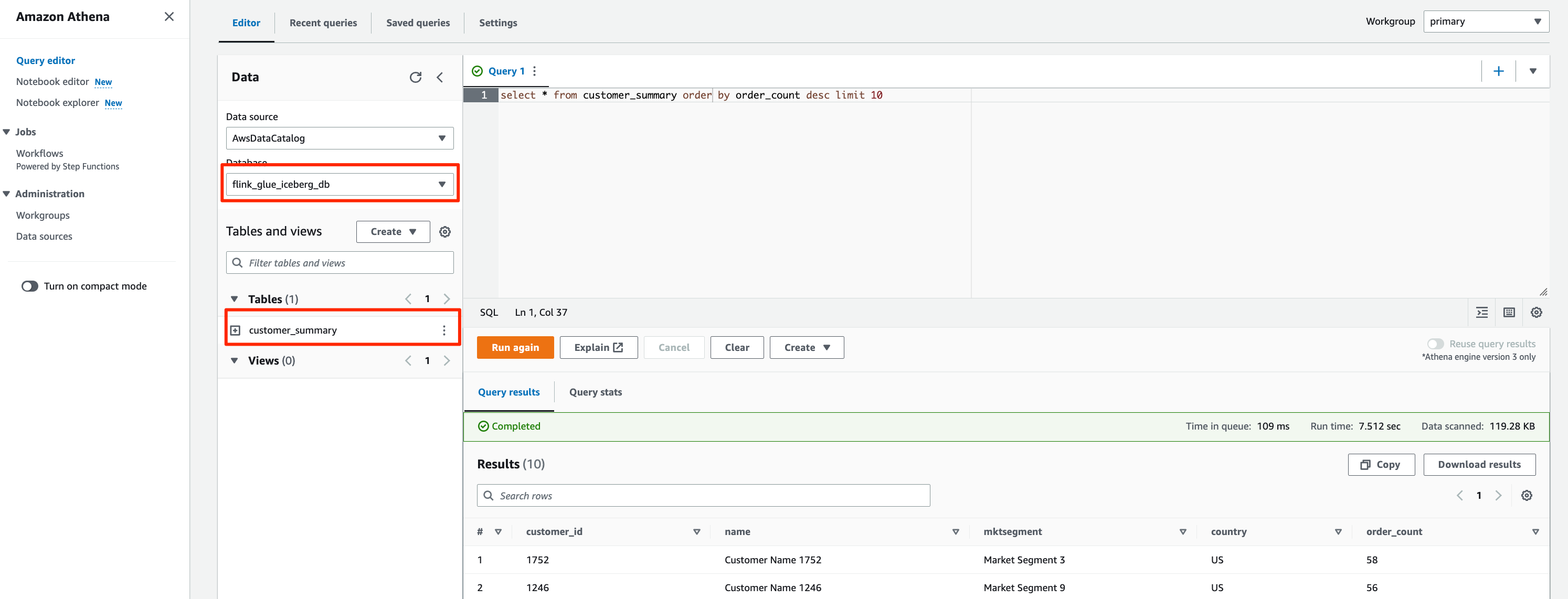
- Choose
flink\_glue\_iceberg\_dbfor Database.
You should see the customer\_summary table listed.
- Run the following SQL script to query the Iceberg result table:
The query result will look like the following screenshot.
- For the Hudi table, change Database to
flink\_glue\_hudi\_dband run the same SQL query.

- For the Parquet table, change Database to
flink\_hive\_parquet\_dband run the same SQL query.

Query the data with Amazon EMR Trino
To access Iceberg with Amazon EMR Trino, SSH to the EMR primary node.
- Run the following command to start the Trino CLI:
Amazon EMR Trino can now query the tables in the AWS Glue Data Catalog.
- Run the following command to query the result table:
The query result looks like the following screenshot.

- Exit the Trino CLI.
- Start the Trino CLI with the
hivecatalog to query the Hudi table:
- Run the following command to query the Hudi table:
Update and delete source records in Amazon RDS for MySQL and validate the reflection of the data lake tables
We can update and delete some records in the RDS for MySQL database and then validate that the changes are reflected in the Iceberg and Hudi tables.
- Connect to the RDS for MySQL database and run the following SQL:
- Query the
customer\_summarytable with Athena or Amazon EMR Trino.
The updated and deleted records are reflected in the Iceberg and Hudi tables.

Clean up
When you’re done with this exercise, complete the following steps to delete your resources and stop incurring costs:
- Delete the RDS for MySQL database.
- Delete the EMR cluster.
- Drop the databases and tables created in the Data Catalog.
- Remove files in Amazon S3.
Conclusion
This post showed you how to integrate Apache Flink in Amazon EMR with the AWS Glue Data Catalog. You can use a Flink SQL connector to read/write data in a different store, such as Kafka, CDC, HBase, Amazon S3, Iceberg, or Hudi. You can also store the metadata in the Data Catalog. The Flink table API has the same connector and catalog implementation mechanism. In a single session, we can use multiple catalog instances pointing to different types, like IcebergCatalog and HiveCatalog, and use then interchangeably in your query. You can also write code with the Flink table API to develop the same solution to integrate Flink and the Data Catalog.
In our solution, we consumed the RDS for MySQL binary log directly with Flink CDC. You can also use Amazon MSK Connect to consume the binary log with MySQL Debezim and store the data in Amazon Managed Streaming for Apache Kafka (Amazon MSK). Refer to Create a low-latency source-to-data lake pipeline using Amazon MSK Connect, Apache Flink, and Apache Hudi for more information.
With the Amazon EMR Flink unified batch and streaming data processing function, you can ingest and process data with one computing engine. With Apache Iceberg and Hudi integrated in Amazon EMR, you can build an evolvable and scalable data lake. With the AWS Glue Data Catalog, you can manage all enterprise data catalogs in a unified manner and consume data easily.
Follow the steps in this post to build your unified batch and streaming solution with Amazon EMR Flink and the AWS Glue Data Catalog. Please leave a comment if you have any questions.
About the Authors
 Jianwei Li is Senior Analytics Specialist TAM. He provides consultant service for AWS enterprise support customers to design and build modern data platform.

Samrat Deb is Software Development Engineer at Amazon EMR. In his spare time, he love exploring new places, different culture and food.

Prabhu Josephraj is a Senior Software Development Engineer working for Amazon EMR. He is focused on leading the team that builds solutions in Apache Hadoop and Apache Flink. In his spare time, Prabhu enjoys spending time with his family.