Data lakes are a popular choice for today’s organizations to store their data around their business activities. As a best practice of a data lake design, data should be immutable once stored. But regulations such as the General Data Protection Regulation (GDPR) have created obligations for data operators who must be able to erase or update personal data from their data lake when requested.
A data lake built on AWS uses Amazon Simple Storage Service (Amazon S3) as its primary storage environment. When a customer asks to erase or update private data, the data lake operator needs to find the required objects in Amazon S3 that contain the required data and take steps to erase or update that data. This activity can be a complex process for the following reasons:
- Data lakes may contain many S3 objects (each may contain multiple rows), and often it’s difficult to find the object containing the exact data that needs to be erased or personally identifiable information (PII) to be updated as per the request
- By nature, S3 objects are immutable and therefore applying direct row-based transactions like DELETE or UPDATE isn’t possible
To handle these situations, a transactional feature on S3 objects is required, and frameworks such as Apache Hudi or Apache Iceberg provide you the transactional feature for upserts in Amazon S3.
AWS contributed the Apache Iceberg integration with the AWS Glue Data Catalog, which enables you to use open-source data computation engines like Apache Spark with Iceberg on AWS Glue. In 2022, Amazon Athena announced support of Iceberg, enabling transaction queries on S3 objects.
In this post, we show you how to stream real-time data to an Iceberg table in Amazon S3 using AWS Glue streaming and perform transactions using Amazon Athena for deletes and updates. We use a serverless mechanism for this implementation, which requires minimum operational overhead to manage and fine-tune various configuration parameters, and enables you to extend your use case to ACID operations beyond the GDPR.
Solution overview
We used the Amazon Kinesis Data Generator (KDG) to produce synthetic streaming data in Amazon Kinesis Data Streams and then processed the streaming input data using AWS Glue streaming to store the data in Amazon S3 in Iceberg table format. As part of the customer’s request, we ran delete and update statements using Athena with Iceberg support.
The following diagram illustrates the solution architecture.
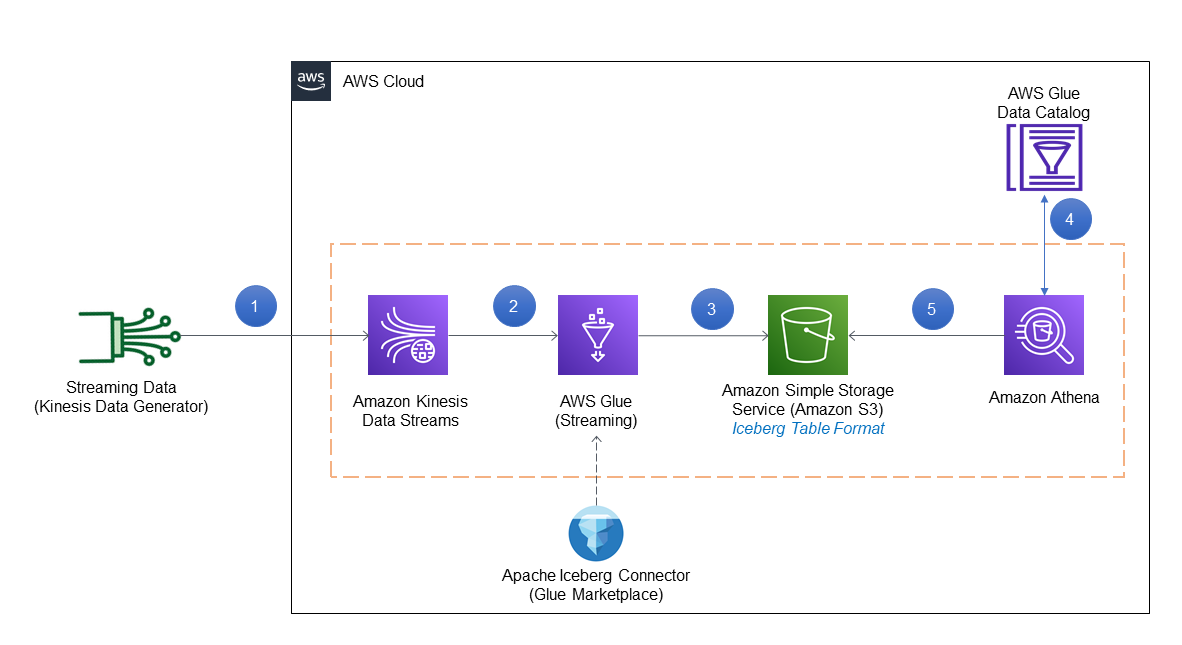
The solution workflow consists of the following steps:
- Streaming data is generated in JSON format using the KDG template and inserted into Kinesis Data Streams.
- An AWS Glue streaming job is connected to Kinesis Data Streams to process the data using the Iceberg connector.
- The streaming job output is stored in Amazon S3 in Iceberg table format.
- Athena uses the AWS Glue Data Catalog to store and retrieve table metadata for the Amazon S3 data in Iceberg format.
- Athena interacts with the Data Catalog tables in Iceberg format for transactional queries required for GDPR.
The codebase required for this post is available in the GitHub repository.
Prerequisites
Before starting the implementation, make sure the following prerequisites are met:
- You have an AWS account
- The Region used for this post is
us-east-1 - You have access to the AWS CloudFormation template from GitHub to set up the basic services and AWS Identity and Access Management (IAM) role
Deploy resources using AWS CloudFormation
Complete the following steps to deploy your solution resources:
- After you sign in to your AWS account, launch the CloudFormation template by choosing Launch Stack:

- For Stack name, enter a name.
- For Username, enter the user name for the KDG.
- For Password, enter the password for the KDG (this must be at least six alphanumeric characters, and contain at least one number).
- For IAMGlueStreamingJobRoleName, enter a name for the IAM role used for the AWS Glue streaming job.
- Choose Next and create your stack.

This CloudFormation template configures the following resources in your account:
- An S3 bucket named
streamingicebergdemo-XX(note that the XX part is a random unique number to make the S3 bucket name unique) - An IAM policy and role
- The KDG URL used for creating synthetic data
- After you complete the setup, go to the Outputs tab of the CloudFormation stack to get the S3 bucket name, AWS Glue job execution role (as per your input), and KDG URL.

- Before proceeding with the demo, create a folder named
custdataunder the created S3 bucket.

Create a Kinesis data stream
We use Kinesis Data Streams to create a serverless streaming data service that is built to handle millions of events with low latency. The following steps guide you on how to create the data stream in the us-east-1 Region:
- Log in to the AWS Management Console.
- Navigate to Kinesis console (make sure the Region is
us-east-1). - Select Kinesis Data Streams and choose Create data stream.

- For Data stream name, enter
demo-data-stream. - For this post, we select On-demand as the Kinesis data stream capacity mode.
On-demand mode works to eliminate the need for provisioning and managing the capacity for streaming data. However, you can implement this solution with Kinesis Data Streams in provisioned mode as well.
- Choose Create data stream.

- Wait for successful creation of
demo-data-streamand for it to be inActivestatus.

Set up the Kinesis Data Generator
To create a sample streaming dataset, we use the KDG URL generated on the CloudFormation stack Outputs tab and log in with the credentials used in the parameters for the CloudFormation template. For this post, we use the following template to generate sample data in the demo-data-stream Kinesis data stream.
- Log in to the KDG URL with the user name and password you supplied during stack creation.
- Change the Region to
us-east-1. - Select the Kinesis data stream
demo-data-stream. - For Records per second, choose Constant and enter
100(it can be another number, depending on the rate of record creation). - On the Template 1 tab, enter the KDG data generation template:
- Choose Test template to test the sample records.
- When the testing is correct, choose Send data.
This will start sending 100 records per second in the Kinesis data stream. (To stop sending data, choose Stop Sending Data to Kinesis.)
Integrate Iceberg with AWS Glue
To add the Apache Iceberg Connector for AWS Glue, complete the following steps. The connector is free to use and supports AWS Glue 1.0, 2.0, and 3.0.
- On the AWS Glue console, choose AWS Glue Studio in the navigation pane.
- In the navigation pane, navigate to AWS Marketplace.
- Search for and choose Apache Iceberg Connector for AWS Glue.

- Choose Accept Terms and Continue to Subscribe.

- Choose Continue to Configuration.
- For Fulfillment option, choose your AWS Glue version.
- For Software version, choose the latest software version.
- Choose Continue to Launch.

- Under Usage Instructions, choose the link to activate the connector.

- Enter a name for the connection, then choose Create connection and activate the connector.

- Verify the new connector on the AWS Glue Studio Connectors.

Create the AWS Glue Data Catalog database
The AWS Glue Data Catalog contains references to data that is used as sources and targets of your extract, transform, and load (ETL) jobs in AWS Glue. To create your data warehouse or data lake, you must catalog this data. The AWS Glue Data Catalog is an index to the location and schema of your data. You use the information in the Data Catalog to create and monitor your ETL jobs.
For this post, we create a Data Catalog database named icebergdemodb containing the metadata information of a table named customer, which will be queried through Athena.
- On the AWS Glue console, choose Databases in the navigation pane.
- Choose Add database.
- For Database name, enter
icebergdemodb.
This creates an AWS Glue database for metadata storage.
Create a Data Catalog table in Iceberg format
In this step, we create a Data Catalog table in Iceberg table format.
- On the Athena console, create an Athena workgroup named
demoworkgroupfor SQL queries. - Choose Athena engine version 3 for Query engine version.
For more information about Athena versions, refer to Changing Athena engine versions.

- Enter the S3 bucket location for Query result configuration under Additional configurations.

- Open the Athena query editor and choose
demoworkgroup. - Choose the database
icebergdemodb. - Enter and run the following DDL to create a table pointing to the Data Catalog database
icerbergdemodb. Note that theTBLPROPERTIESsection mentionsICEBERGas the table type andLOCATIONpoints to the S3 folder (custdata) URI created in earlier steps. This DDL command is available on the GitHub repo.

After you run the command successfully, you can see the table customer in the Data Catalog.

Create an AWS Glue streaming job
In this section, we create the AWS Glue streaming job, which fetches the record from the Kinesis data stream using the Spark script editor.
- On the AWS Glue console, choose Jobs (new) in the navigation pane.

- For Create job¸ select Spark script editor.
- For Options¸ select Create a new script with boilerplate code.
- Choose Create.

- Enter the code available in the GitHub repo in the editor.
The sample code keeps appending data in the target location by fetching records from the Kinesis data stream.
- Choose the Job details tab in the query editor.
- For Name, enter
Demo\_Job. - For IAM role¸ choose
demojobrole. - For Type, choose Spark Streaming.
- For Glue Version, choose Glue 3.0.
- For Language, choose Python 3.
- For Worker type, choose G 0.25X.
- Select Automatically scale the number of workers.
- For Maximum number of workers, enter
5.

- Under Advanced properties, select Use Glue Data Catalog as the Hive metastore.
- For Connections, choose the connector you created.
- For Job parameters, enter the following key pairs (provide your S3 bucket and account ID):
| Key | Value |
--iceberg\_job\_catalog\_warehouse | s3://streamingicebergdemo-XX/custdata/ |
--output\_path | s3://streamingicebergdemo-XX |
--kinesis\_arn | arn:aws:kinesis:us-east-1:<AWS Account ID>:stream/demo-data-stream |
--user-jars-first | True |

- Choose Run to start the AWS Glue streaming job.
- To monitor the job, choose Monitoring in the navigation pane.
- Select
Demo\_Joband choose View run details to check the job run details and Amazon CloudWatch logs.

Run GDPR use cases on Athena
In this section, we demonstrate a few use cases that are relevant to GDPR alignment with the user data that’s stored in Iceberg format in the Amazon S3-based data lake as implemented in the previous steps. For this, let’s consider that the following requests are being initiated in the workflow to comply with the regulations:
- Delete the records for the input
customerid(for example,59289) - Update
phonenumberfor thecustomerid(for example,51936)
The IDs used in this example are samples only because they were created through the KDG template used earlier, which creates sample data. You can search for IDs in your implementation by querying through the Athena query editor. The steps remain the same.
Delete data by customer ID
Complete the following steps to fulfill the first use case:
- On the Athena console, and make sure
icebergdemodbis chosen as the database. - Open the query editor.
- Enter the following query using a customer ID and choose Run:
This query gives the count of records for the input customerid before delete.

- Enter the following query with the same customer ID and choose Run:
This query deletes the data for the input customerid as per the workflow generated.

- Test if there is data with the customer ID using a count query.
The count should be 0.

Update data by customer ID
Complete the following steps to test the second use case:
- On the Athena console, make sure
icebergdemodbis chosen as the database. - Open the query editor.
- Enter the following query with a customer ID and choose Run.
This query gives the value for phonenumber before update.

- Run the following query to update the required columns:
This query updates the data to a dummy value.

- Run the SELECT query to check the update.
You can see the data is updated correctly.

Vacuum table
A good practice is to run the VACUUM command periodically on the table because operations like INSERT, UPDATE, DELETE, and MERGE will take place on the Iceberg table. See the following code:

Considerations
The following are a few considerations to keep in mind for this implementation:
- Review the considerations and limitations for Athena support for Iceberg table format. For example, Athena only creates and operates on Iceberg v2 tables. To learn more about AWS integrations, refer to Iceberg AWS integrations.
- Check the AWS Glue streaming ETL notes and restrictions for AWS Glue streaming jobs.
Clean up
Complete the following steps to clean up the resources you created for this post:
-
- Delete the custdata folder in the S3 bucket.
- Delete the CloudFormation stack.
- Delete the Kinesis data stream.
- Delete the S3 bucket storing the data.
- Delete the AWS Glue job and Iceberg connector.
- Delete the AWS Glue Data Catalog database and table.
- Delete the Athena workgroup.
- Delete the IAM roles and policies.
Conclusion
This post explained how you can use the Iceberg table format on Athena to implement GDPR use cases like data deletion and data upserts as required, when streaming data is being generated and ingested through AWS Glue streaming jobs in Amazon S3.
The operations for the Iceberg table that we demonstrated in this post aren’t all of the data operations that Iceberg supports. Refer to the Apache Iceberg documentation for details on various operations.
About the Authors
 Dhiraj Thakur is a Solutions Architect with Amazon Web Services. He works with AWS customers and partners to provide guidance on enterprise cloud adoption, migration, and strategy. He is passionate about technology and enjoys building and experimenting in the analytics and AI/ML space.
 Rajdip Chaudhuri is Solutions Architect with Amazon Web Services specializing in data and analytics. He enjoys working with AWS customers and partners on data and analytics requirements. In his spare time, he enjoys soccer.