This is a guest post written by Ahmed Saef Zamzam and Geetha Anne from Confluent.
Businesses are using real-time data streams to gain insights into their company’s performance and make informed, data-driven decisions faster. As real-time data has become essential for businesses, a growing number of companies are adapting their data strategy to focus on data in motion. Event streaming is the central nervous system of a data in motion strategy and, in many organizations, Apache Kafka is the tool that powers it.
Today, Kafka is well known and widely used for streaming data. However, managing and operating Kafka at scale can still be challenging. Confluent offers a solution through its fully managed, cloud-native service that simplifies running and operating data streams at scale. Confluent extends open-source Kafka through a suite of related services and features designed to enhance the data in motion experience for operators, developers, and architects in production.
In this post, we demonstrate how Amazon Athena, Amazon QuickSight, and Confluent work together to enable visualization of data streams in near-real time. We use the Kafka connector in Athena to do the following:
- Join data inside Confluent with data stored in one of the many data sources supported by Athena, such as Amazon Simple Storage Service (Amazon S3)
- Visualize Confluent data using QuickSight
Challenges
Purpose-built stream processing engines, like Confluent ksqlDB, often provide SQL-like semantics for real-time transformations, joins, aggregations, and filters on streaming data. With ksqlDB, you can create persistent queries, which continuously process streams of events according to specific logic, and materialize streaming data in views that can be queried at a point in time (pull queries) or subscribed to by clients (push queries).
ksqlDB is one solution that made stream processing accessible to a wider range of users. However, pull queries, like those supported by ksqlDB, may not be suitable for all stream processing use cases, and there may be complexities or unique requirements that pull queries are not designed for.
Data visualization for Confluent data
A frequent use case for enterprises is data visualization. To visualize data stored in Confluent, you can use one of over 120 pre-built connectors, provided by Confluent, to write streaming data to a destination data store of your choice. Next, you connect your business intelligence (BI) tool to the data store to begin visualizing the data.
The following diagram depicts a typical architecture utilized by many Confluent customers. In this workflow, data is written to Amazon S3 through the Confluent S3 sink connector and then analyzed with Athena, a serverless interactive analytics service that enables you to analyze and query data stored in Amazon S3 and various other data sources using standard SQL. You can then use Athena as an input data source to QuickSight, a highly scalable cloud native BI service, for further analysis.

Although this approach works well for many use cases, it requires data to be moved, and therefore duplicated, before it can be visualized. This duplication not only adds time and effort for data engineers who may need to develop and test new scripts, but also creates data redundancy, making it more challenging to manage and secure the data, and increases storage cost.
Enriching data with reference data in another data store
With ksqlDB queries, the source and destination are always Kafka topics. Therefore, if you have a data stream that you need to enrich with external reference data, you have two options. One option is to import the reference data into Confluent, model it as a table, and use ksqlDB’s stream-table join to enrich the stream. The other option is to ingest the data stream into a separate data store and perform join operations there. Both require data movement and result in duplicate data storage.
Solution overview
So far, we have discussed two challenges that are not addressed by conventional stream processing tools. Is there a solution that addresses both challenges simultaneously?
When you want to analyze data without separate pipelines and jobs, a popular choice is Athena. With Athena, you can run SQL queries on a wide range of data sources—in addition to Amazon S3—without learning a new language, developing scripts to extract (and duplicate) data, or managing infrastructure.
Recently, Athena announced a connector for Kafka. Like Athena’s other connectors, queries on Kafka are processed within Kafka and return results to Athena. The connector supports predicate pushdown, which means that adding filters to your queries can reduce the amount of data scanned, improve query performance, and reduce cost.
For example, when using this connector, the amount of data scanned by the query SELECT * FROM CONFLUENT\_TABLE could be significantly higher than the amount of data scanned by the query SELECT * FROM CONFLUENT\_TABLE WHERE COUNTRY = 'UK'. The reason is that the AWS Lambda function which provides the runtime environment for the Athena connector, filters data at the source before returning it to Athena.
Let’s assume we have a stream of online transactions flowing into Confluent and customer reference data stored in Amazon S3. We want to use Athena to join both data sources together and produce a new dataset for QuickSight. Instead of using the S3 sink connector to load data into Amazon S3, we use Athena to query Confluent and join it with S3 data—all without moving data. The following diagram illustrates this architecture.
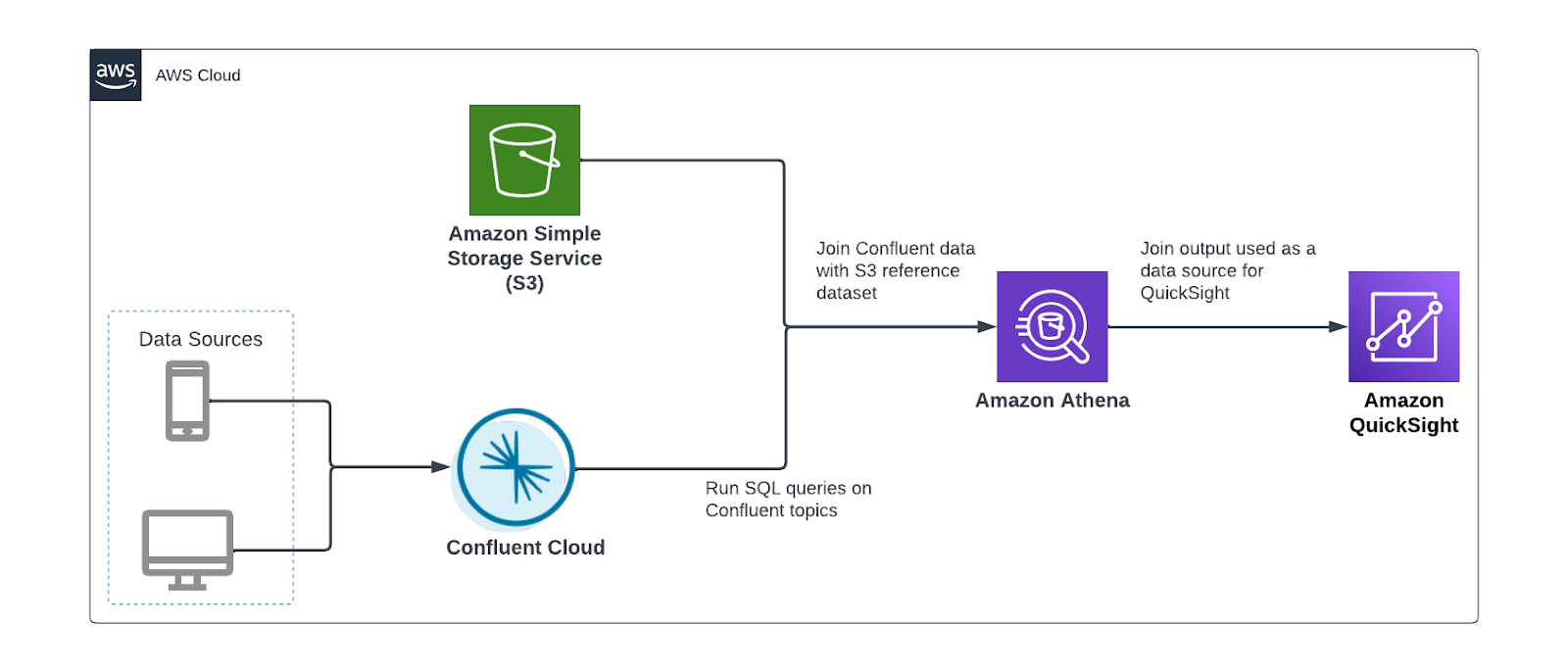
We perform the following steps:
- Register the schema of your Confluent data.
- Configure the Athena connector for Kafka.
- Optionally, interactively analyze Confluent data.
- Create a QuickSight dataset using Athena as the source.
Register the schema
To connect Athena to Confluent, the connector needs the schema of the topic to be registered in the AWS Glue Schema Registry, which Athena uses for query planning.
The following is a sample record in Confluent:
The following is the schema of this record:
The data producer writing the data can register this schema with the AWS Glue Schema Registry. Alternatively, you can use the AWS Management Console or AWS Command Line Interface (AWS CLI) to create a schema manually.
We create the schema manually by running the following CLI command. Replace <registry\_name> with your registry name and make sure that the text in the description field includes the required string {AthenaFederationKafka}:
Next, we run the following command to create a schema inside the newly created schema registry:
Before running the command, be sure to provide the following details:
- Replace <registry\_name> with our AWS Glue Schema Registry name
- Replace <schema\_name> with the name of our Confluent Cloud topic, for example, transactions
- Replace <Compatibility\_Mode> with one of the supported compatibility modes, for example, ‘Backward’
- Replace <Schema> with our schema
Configure and deploy the Athena Connector
With our schema created, we’re ready to deploy the Athena connector. Complete the following steps:
- On the Athena console, choose Data sources in the navigation pane.
- Choose Create data source.
- Search for and select Apache Kafka.

- For Data source name, enter the name for the data source.

This data source name will be referenced in your queries. For example:
Applying this to our use case and previously defined schema, our query would be as follows:
- In the Connection details section, choose Create Lambda function.

You’re redirected to the Applications page on the Lambda console. Some of the application settings are already filled.
The following are the important settings required for integrating with Confluent Cloud. For more information on these settings, refer to Parameters.
- For LambdaFunctionName, enter the name for the Lambda function the connector will use. For example,
athena\_confluent\_connector.
We use this parameter in the next step.
- For KafkaEndpoint, enter the Confluent Cloud bootstrap URL.
You can find this on the Cluster settings page in the Confluent Cloud UI.

Confluent Cloud supports two authentication mechanisms: OAuth and SASL/PLAIN (API keys). The connector doesn’t support OAuth; this leaves us with SASL/PLAIN. SASL/PLAIN uses SSL as a security protocol and PLAIN as SASL mechanism.
- For AuthType, enter
SASL\_SSL\_PLAIN.
The API key and secret used by the connector to access Confluent need to be stored in AWS Secrets Manager.
- Get your Confluent API key or create a new one.
- Run the following AWS CLI command to create the secret in Secrets Manager:
The secret string should have two key-value pairs, one named username and the other password.
- For SecretNamePrefix, enter the secret name prefix created in the previous step.
- If the Confluent cloud cluster is reachable over the internet, leave SecurityGroupIds and SubnetIds blank. Otherwise, your Lambda function needs to run in a VPC that has connectivity to your Confluent Cloud network. Therefore, enter a security group ID and three private subnet IDs in this VPC.
- For SpillBucket, enter the name of an S3 bucket where the connector can spill data.
Athena connectors temporarily store (spill) data to Amazon S3 for further processing by Athena.
- Select I acknowledge that this app creates custom IAM roles and resource policies.
- Choose Deploy.
- Return to the Connection details section on the Athena console and for Lambda, enter the name of the Lambda function you created.
- Choose Next.

- Choose Create data source.
Perform interactive analysis on Confluent data
With the Athena connector set up, our streaming data is now queryable from the same service we use to analyze S3 data lakes. Next, we use Athena to conduct point-in-time analysis of transactions flowing through Confluent Cloud.
Aggregation
We can use standard SQL functions to aggregate the data. For example, we can get the revenue by product category:

Enrich transaction data with customer data
The aggregation example is also available with ksqlDB pull queries. However, Athena’s connector allows us to join the data with other data sources like Amazon S3.
In our use case, the transactions streamed to Confluent Cloud lack detailed information about customers, apart from a customer\_id. However, we have a reference dataset in Amazon S3 that has more information about the customers. With Athena, we can join both datasets together to gain insights about our customers. See the following code:
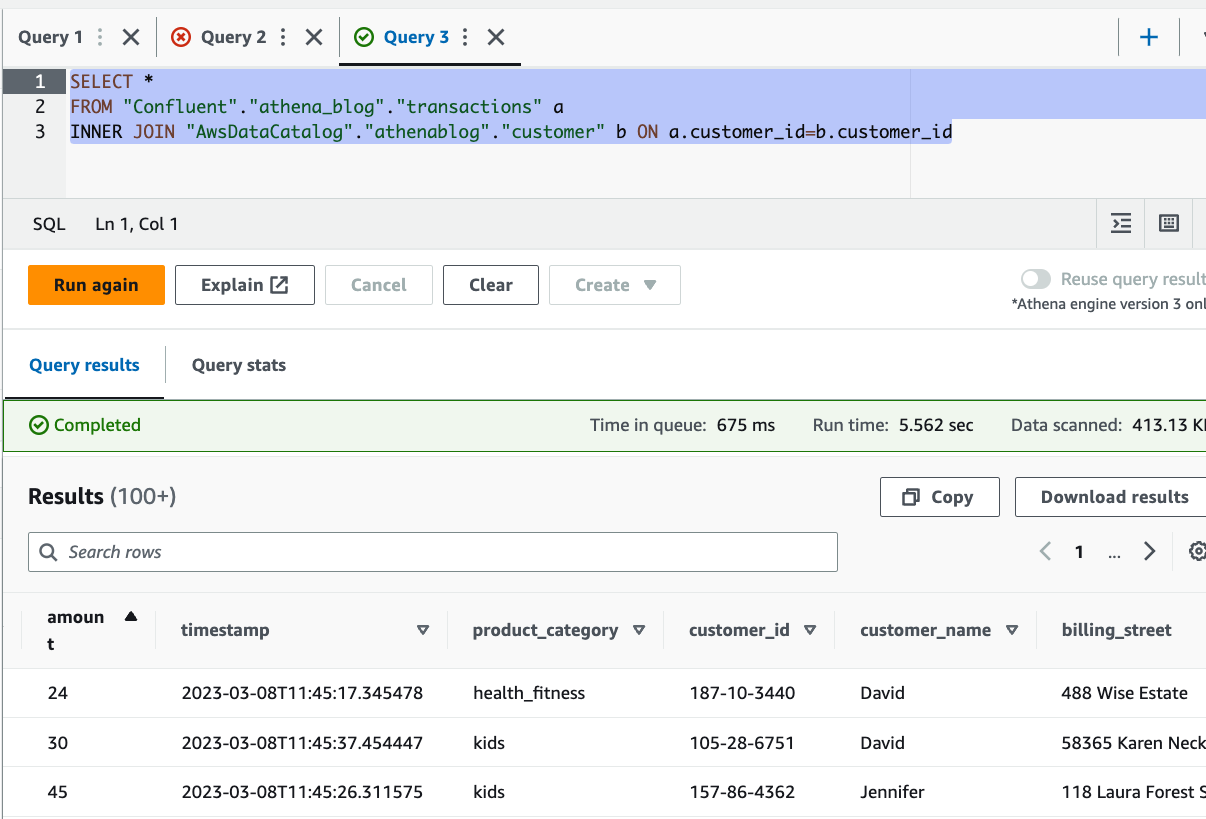
You can see from the results that we were able to enrich the streaming data with customer details, stored in Amazon S3, including name and address.
Visualize data using QuickSight
Another powerful feature this connector brings is the ability to visualize data stored in Confluent using any BI tool that supports Athena as a data source. In this post, we use QuickSight. QuickSight is a machine learning (ML)-powered BI service built for the cloud. You can use it to deliver easy-to-understand insights to the people you work with, wherever they are.
For more information about signing up for QuickSight, see Signing up for an Amazon QuickSight subscription.
Complete the following steps to visualize your streaming data with QuickSight:
- On the QuickSight console, choose Datasets in the navigation pane.
- Choose New dataset.
- Choose Athena as the data source.
- For Data source name, enter a name.
- Choose Create data source.
- In the Choose your table section, choose Use custom SQL.

- Enter the join query like the one given previously, then choose Confirm query.

- Next, choose to import the data into SPICE (Super-fast, Parallel, In-memory Calculation Engine), a fully managed in-memory cache that boosts performance, or directly query the data.
Utilizing SPICE will enhance performance, but the data may need to be periodically updated. You can choose to incrementally refresh your dataset or schedule regular refreshes with SPICE. If you want near-real-time data reflected in your dashboards, select Directly query your data. Note that with the direct query option, user actions in QuickSight, such as applying a drill-down filter, may invoke a new Athena query.
- Choose Visualize.

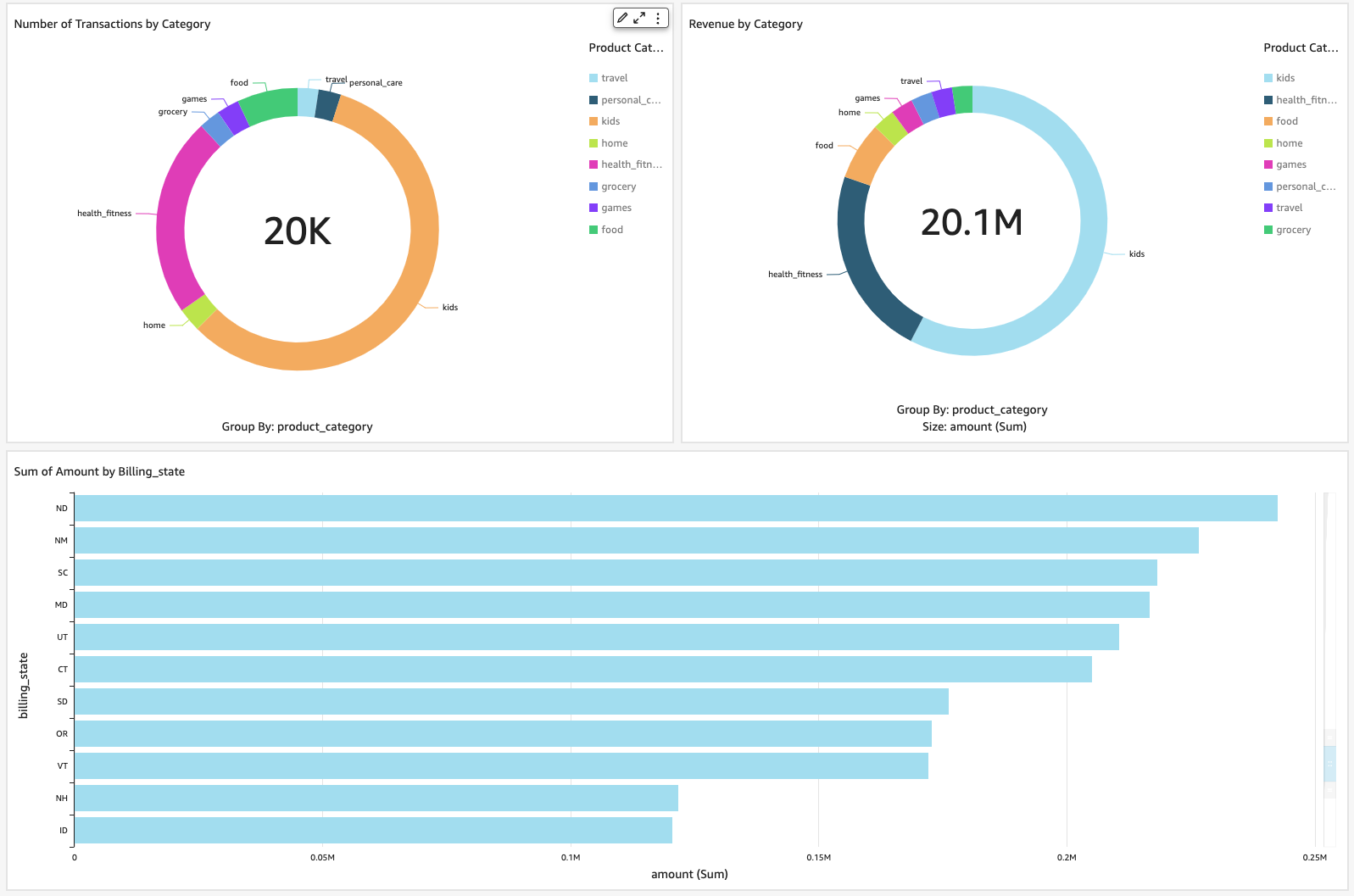
That’s it, we have successfully connected QuickSight to Confluent through Athena. With just a few clicks, you can create a few visuals displaying data from Confluent.
Clean up
To avoid incurring ongoing charges, delete the resources you provisioned by completing the following steps:
- Delete the AWS Glue schema and registry.
- Delete the Athena Kafka connector.
- Delete the QuickSight dataset.
Conclusion
In this post, we discussed use cases for Athena and Confluent. We provided examples of how you can use both for near-real-time data visualization with QuickSight and interactive analysis involving joins between streaming data in Confluent and data stored in Amazon S3.
The Athena connector for Kafka simplifies the process of querying and analyzing streaming data from Confluent Cloud. It removes the need to first move streaming data to persistent storage before it can be used in downstream use cases like business intelligence. This complements the existing integration between Confluent and Athena, using the S3 sink connector, which enables loading streaming data into a data lake, and is an additional option for customers who want to enable interactive analysis on Confluent data.
About the authors
 Ahmed Zamzam is a Senior Partner Solutions Architect at Confluent, with a focus on the AWS partnership. In his role, he works with customers in the EMEA region across various industries to assist them in building applications that leverage their data using Confluent and AWS. Prior to Confluent, Ahmed was a Specialist Solutions Architect for Analytics AWS specialized in data streaming and search. In his free time, Ahmed enjoys traveling, playing tennis, and cycling.
 Geetha Anne is a Partner Solutions Engineer at Confluent with previous experience in implementing solutions for data-driven business problems on the cloud, involving data warehousing and real-time streaming analytics. She fell in love with distributed computing during her undergraduate days and has followed her interest ever since. Geetha provides technical guidance, design advice, and thought leadership to key Confluent customers and partners. She also enjoys teaching complex technical concepts to both tech-savvy and general audiences.