Amazon Athena supports the MERGE command on Apache Iceberg tables, which allows you to perform inserts, updates, and deletes in your data lake at scale using familiar SQL statements that are compliant with ACID (Atomic, Consistent, Isolated, Durable). Apache Iceberg is an open table format for data lakes that manages large collections of files as tables. It supports modern analytical data lake operations such as create table as select (CTAS), upsert and merge, and time travel queries. Athena also supports the ability to create views and perform VACUUM (snapshot expiration) on Apache Iceberg tables to optimize storage and performance. With these features, you can now build data pipelines completely in standard SQL that are serverless, more simple to build, and able to operate at scale. This enables developers to:
- Focus on writing business logic and not worry about setting up and managing the underlying infrastructure
- Perform data transformations with Athena
- Help comply with certain data deletion requirements
- Apply change data capture (CDC) from sources databases
With data lakes, data pipelines are typically configured to write data into a raw zone, which is an Amazon Simple Storage Service (Amazon S3) bucket or folder that contains data as is from source systems. Data is accumulated in this zone, such that inserts, updates, or deletes on the sources database appear as records in new files as transactions occur on the source. Although the raw zone can be queried, any downstream processing or analytical queries typically need to deduplicate data to derive a current view of the source table. For example, if a single record is updated multiple times in the source database, these be need to be deduplicated and the most recent record selected.
Typically, data transformation processes are used to perform this operation, and a final consistent view is stored in an S3 bucket or folder. Data transformation processes can be complex requiring more coding, more testing and are also error prone. This was a challenge because data lakes are based on files and have been optimized for appending data. Previously, you had to overwrite the complete S3 object or folder, which was not only inefficient but also interrupted users who were querying the same data. With the evolution of frameworks such as Apache Iceberg, you can perform SQL-based upsert in-place in Amazon S3 using Athena, without blocking user queries and while still maintaining query performance.
In this post, we demonstrate how you can use Athena to apply CDC from a relational database to target tables in an S3 data lake.
Overview of solution
For this post, consider a mock sports ticketing application based on the following project. We use a single table in that database that contains sporting events information and ingest it into an S3 data lake on a continuous basis (initial load and ongoing changes). This data ingestion pipeline can be implemented using AWS Database Migration Service (AWS DMS) to extract both full and ongoing CDC extracts. With CDC, you can determine and track data that has changed and provide it as a stream of changes that a downstream application can consume. Most databases use a transaction log to record changes made to the database. AWS DMS reads the transaction log by using engine-specific API operations and captures the changes made to the database in a nonintrusive manner.
Specifically, to extract changed data including inserts, updates, and deletes from the database, you can configure AWS DMS with two replication tasks, as described in the following workshop. The first task performs an initial copy of the full data into an S3 folder. The second task is configured to replicate ongoing CDC into a separate folder in S3, which is further organized into date-based subfolders based on the source databases’ transaction commit date. With full and CDC data in separate S3 folders, it’s easier to maintain and operate data replication and downstream processing jobs. To enable this, you can apply the following extra connection attributes to the S3 endpoint in AWS DMS, (refer to S3Settings for other CSV and related settings):
- TimestampColumnName – AWS DMS adds a column that you name with timestamp information for the commit of that row in the source database.
- includeOpForFullLoad – AWS DMS adds a column named Op to every file to indicate if the record is an I (INSERT), U (UPDATE), or D (DELETE).
- DatePartitionEnabled, DatePartitionSequence, DatePartitionDelimiter – These settings are used to configure AWS DMS to write changed data to date/time-based folders in the data lake. By partitioning folders, you can better manage S3 objects and optimize data lake queries for subsequent downstream processing.
We use the support in Athena for Apache Iceberg tables called MERGE INTO, which can express row-level updates. Apache Iceberg supports MERGE INTO by rewriting data files that contain rows that need to be updated. After the data is merged, we demonstrate how to use Athena to perform time travel on the sporting\_event table, and use views to abstract and present different versions of the data to end-users. Finally, to simplify table maintenance, we demonstrate performing VACUUM on Apache Iceberg tables to delete older snapshots, which will optimize latency and cost of both read and write operations.
The following diagram illustrates the solution architecture.
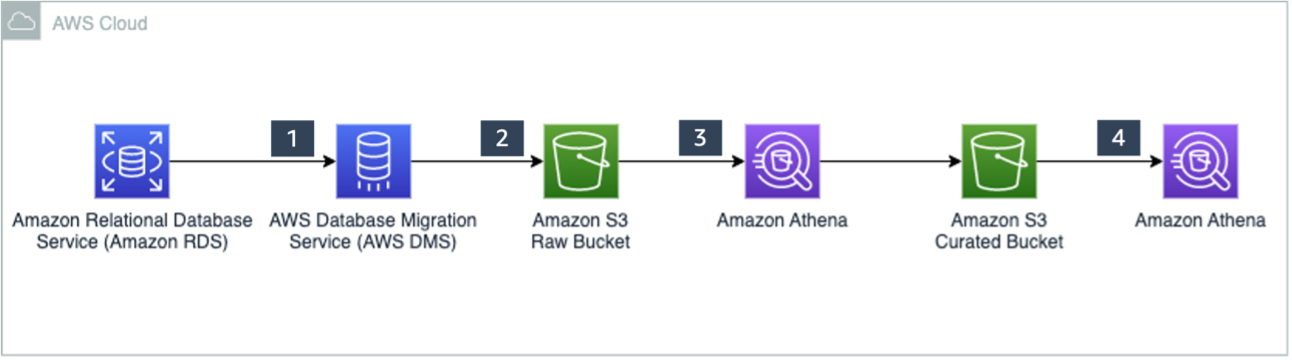
The solution workflow consists of the following steps:
- Data ingestion:
- Steps 1 and 2 use AWS DMS, which connects to the source database to load initial data and ongoing changes (CDC) to Amazon S3 in CSV format. For this post, we have provided sample full and CDC datasets in CSV format that have been generated using AWS DMS.
- Step 3 is comprised of the following actions:
- Create an external table in Athena pointing to the source data ingested in Amazon S3.
- Create an Apache Iceberg target table and load data from the source table.
- Merge CDC data into the Apache Iceberg table using MERGE INTO.
- Data access:
- In Step 4, create a view on the Apache Iceberg table.
- Use the view to query data using standard SQL.
Prerequisites
Before getting started, make sure you have the required permissions to perform the following in your AWS account:
- Create AWS Identity and Access Management (IAM) roles as needed
- Read and write to an S3 bucket
- Manage a database, table, and workgroups, and run queries in Athena
Create tables on the raw data
First, create a database for this demo.
- Navigate to the Athena console and choose Query editor.
If this is your first time using the Athena query editor, you need to configure and specify an S3 bucket to store the query results. - Create a database with the following code:
- Next, create a folder in an S3 bucket that you can use for this demo. Name this folder
sporting\_event\_full. - Upload LOAD00000001.csv into the folder.
- Switch to the
raw\_demodatabase and create a table to point to the raw input data: - Run the following query to review the data:

- Next, create another folder in the same S3 bucket called
sporting\_event\_cdc. - Within this folder, create three subfolders in a time hierarchy folder structure such that the final S3 folder URI looks like
s3://<your-bucket>/sporting\_event\_cdc/2022/09/22/. - Upload 20220922-184314489.csv into this folder.This folder structure is similar to how AWS DMS stores CDC data when you enable date-based folder partitioning.
- Create a table to point to the CDC data. This table also includes a partition column because the source data in Amazon S3 is organized into date-based folders.
- Next, alter the table to add new partitions. Because the data is stored in non-Hive style format by AWS DMS, to query this data, add this partition manually or use an AWS Glue crawler. As data accumulates, continue to add new partitions to query this data.
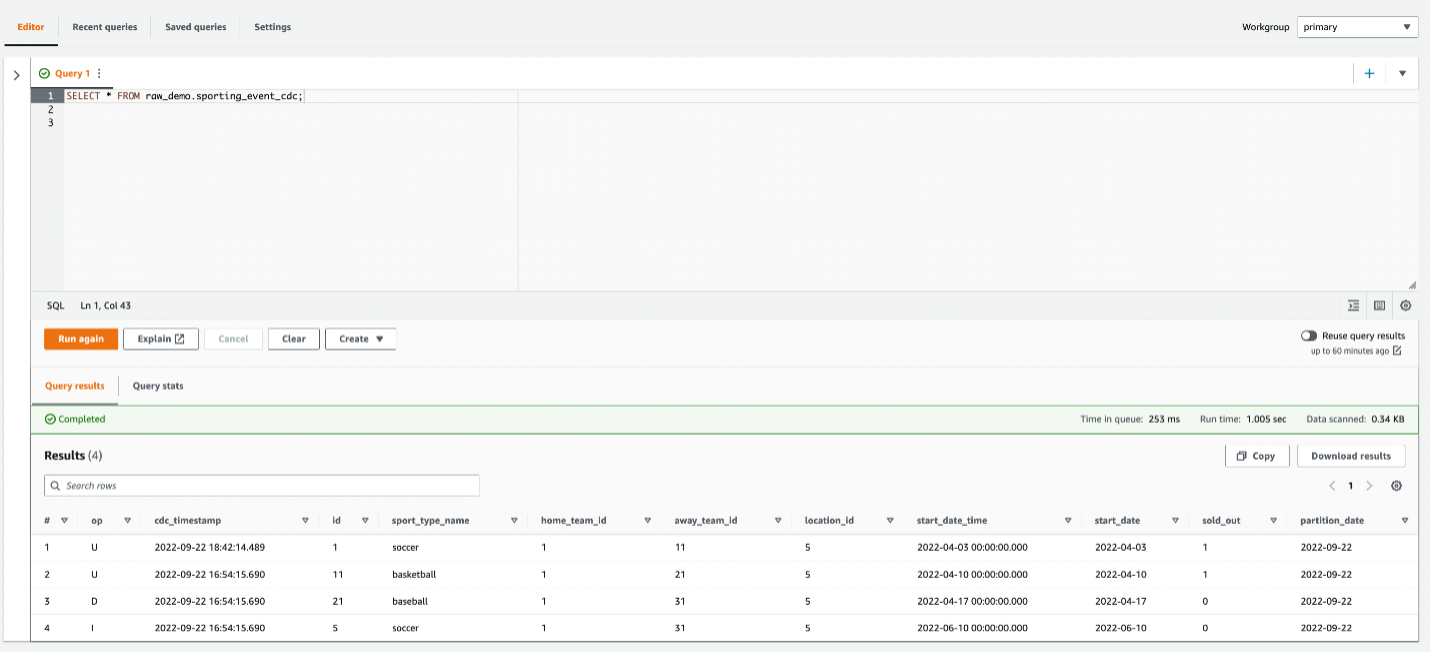
- Run the following query to review the CDC data:
There are two records with IDs 1 and 11 that are updates with op code U. The record with ID 21 has a delete (D) op code, and the record with ID 5 is an insert (I).
Use CTAS to create the target Iceberg table in Parquet format
CTAS statements create new tables using standard SELECT queries. The resultant table is added to the AWS Glue Data Catalog and made available for querying.
- First, create another database to store the target table:
- Next, switch to this database and run the CTAS statement to select data from the raw input table to create the target Iceberg table (replace the location with an appropriate S3 bucket in your account):
- Run the following query to review data in the Iceberg table:
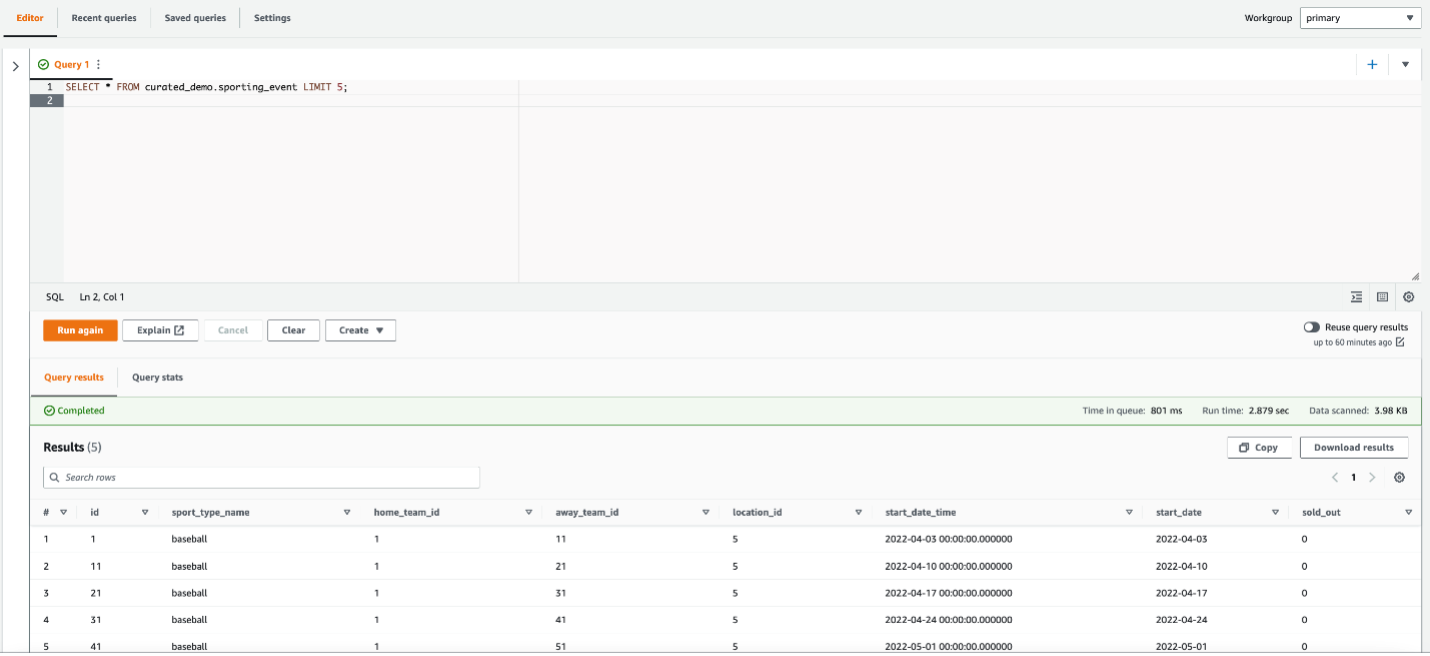
Use MERGE INTO to insert, update, and delete data into the Iceberg table
The MERGE INTO command updates the target table with data from the CDC table. The following statement uses a combination of primary keys and the Op column in the source data, which indicates if the source row is an insert, update, or delete. We use the id column as the primary key to join the target table to the source table, and we use the Op column to determine if a record needs to be deleted.
Run the following query to verify data in the Iceberg table:
The record with ID 21 has been deleted, and the other records in the CDC dataset have been updated and inserted, as expected.

Create a view that contains the previous state
When you write to an Iceberg table, a new snapshot or version of a table is created each time.
A snapshot represents the state of a table at a point in time and is used to access the complete set of data files in the table. Time travel queries in Athena query Amazon S3 for historical data from a consistent snapshot as of a specified date and time or a specified snapshot ID. However, this requires knowledge of a table’s current snapshots. To abstract this information from users, you can create views on top of Iceberg tables:
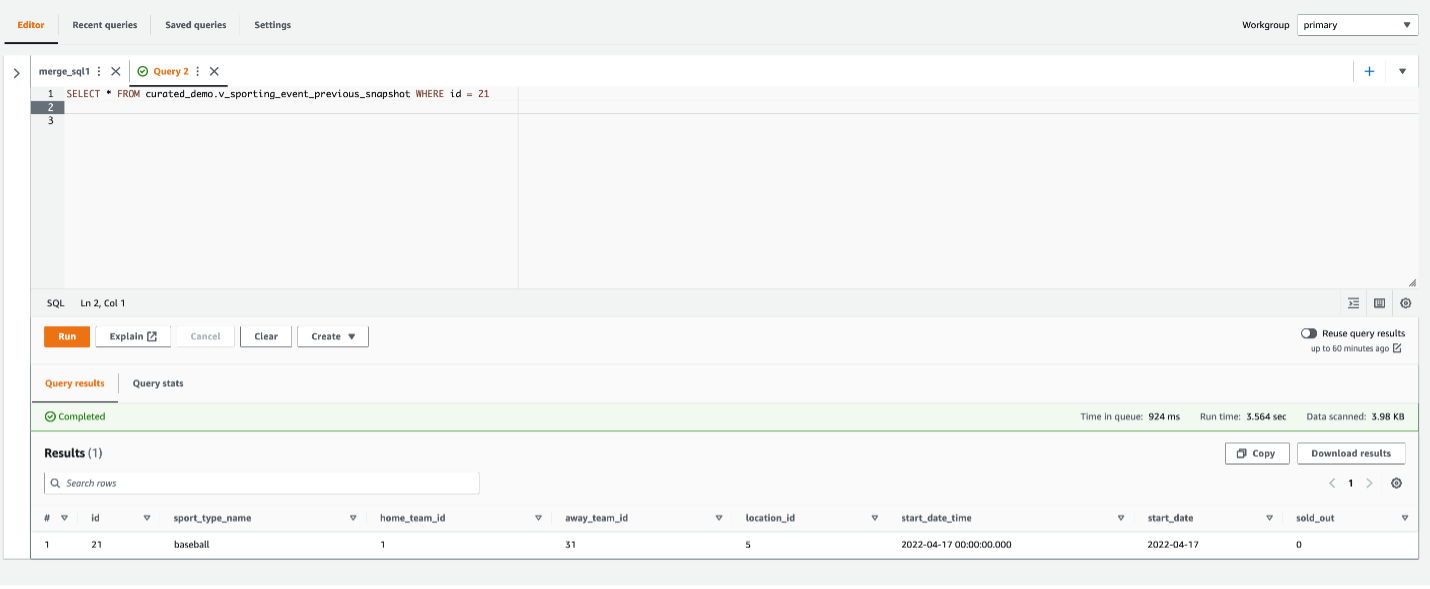
Run the following query using this view to retrieve the snapshot of data before the CDC was applied:
You can see the record with ID 21, which was deleted earlier.
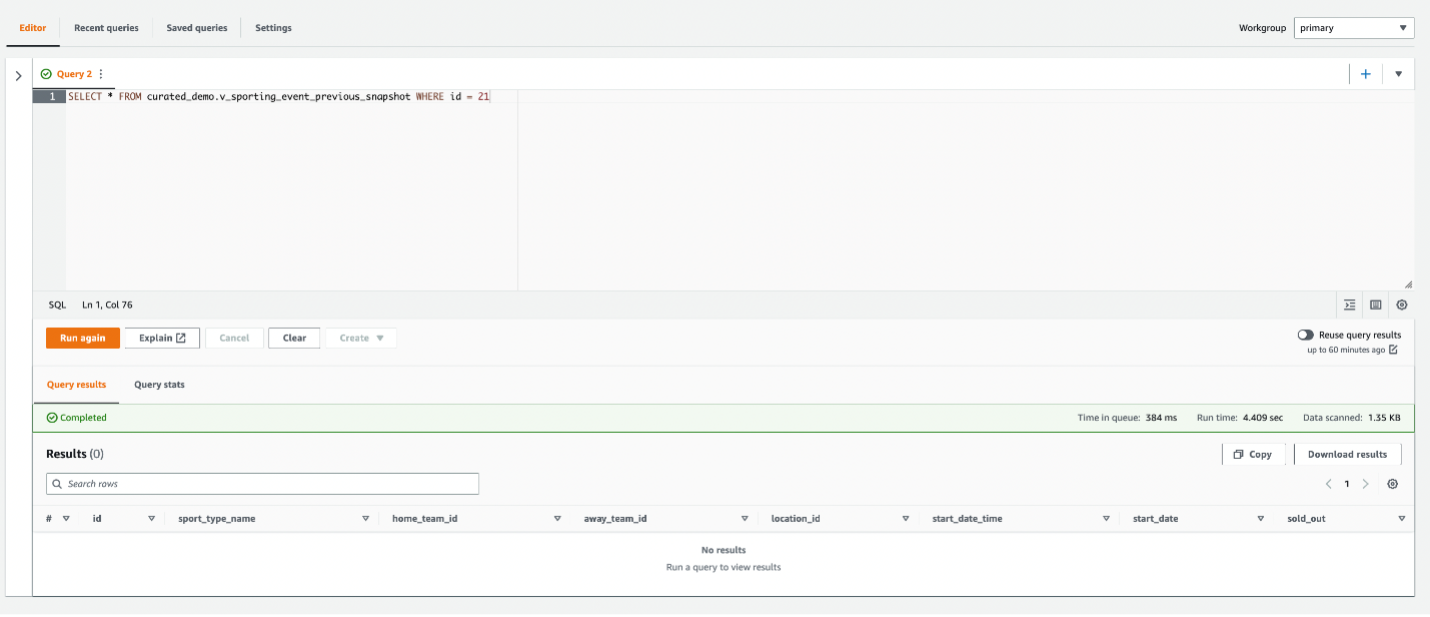
Compliance with privacy regulations may require that you permanently delete records in all snapshots. To accomplish this, you can set properties for snapshot retention in Athena when creating the table, or you can alter the table:
This instructs Athena to store only one version of the data and not maintain any transaction history. After a table has been updated with these properties, run the VACUUM command to remove the older snapshots and clean up storage:
Run the following query again:
The record with ID 21 has been permanently deleted.
Considerations
As data accumulates in the CDC folder of your raw zone, older files can be archived to Amazon S3 Glacier. Subsequently, the MERGE INTO statement can also be run on a single source file if needed by using $path in the WHERE condition of the USING clause:
This results in Athena scanning all files in the partition’s folder before the filter is applied, but can be minimized by choosing fine-grained hourly partitions. With this approach, you can trigger the MERGE INTO to run on Athena as files arrive in your S3 bucket using Amazon S3 event notifications. This could enable near-real-time use cases where users need to query a consistent view of data in the data lake as soon it is created in source systems.
Clean up
To avoid incurring ongoing costs, complete the following steps to clean up your resources:
- Run the following SQL to drop the tables and views:
Because Iceberg tables are considered managed tables in Athena, dropping an Iceberg table also removes all the data in the corresponding S3 folder.
- Run the following SQL to drop the databases:
- Delete the S3 folders and CSV files that you had uploaded.
Conclusion
This post showed you how to apply CDC to a target Iceberg table using CTAS and MERGE INTO statements in Athena. You can perform bulk load using a CTAS statement. When new data or changed data arrives, use the MERGE INTO statement to merge the CDC changes. To optimize storage and improve performance of queries, use the VACUUM command regularly.
As next steps, you can orchestrate these SQL statements using AWS Step Functions to implement end-to-end data pipelines for your data lake. For more information, refer to Build and orchestrate ETL pipelines using Amazon Athena and AWS Step Functions.
About the Authors
 Ranjit Rajan is a Principal Data Lab Solutions Architect with AWS. Ranjit works with AWS customers to help them design and build data and analytics applications in the cloud.
 Kannan Iyer is a Senior Data Lab Solutions Architect with AWS. Kannan works with AWS customers to help them design and build data and analytics applications in the cloud.
 Alexandre Rezende is a Data Lab Solutions Architect with AWS. Alexandre works with customers on their Business Intelligence, Data Warehouse, and Data Lake use cases, design architectures to solve their business problems, and helps them build MVPs to accelerate their path to production.