Amazon Redshift is a widely used, fully managed, petabyte-scale cloud data warehouse. Tens of thousands of customers use Amazon Redshift to process exabytes of data every day to power their analytic workloads. Customers are looking for tools that make it easier to migrate from other data warehouses, such as Google BigQuery, to Amazon Redshift to take advantage of the service price-performance, ease of use, security, and reliability.
In this post, we show you how to use AWS native services to accelerate your migration from Google BigQuery to Amazon Redshift. We use AWS Glue, a fully managed, serverless, ETL (extract, transform, and load) service, and the Google BigQuery Connector for AWS Glue (for more information, refer to Migrating data from Google BigQuery to Amazon S3 using AWS Glue custom connectors). We also add automation and flexibility to simplify migration of multiple tables to Amazon Redshift using the Custom Auto Loader Framework.
Solution overview
The solution provides a scalable and managed data migration workflow to migrate data from Google BigQuery to Amazon Simple Storage Service (Amazon S3), and then from Amazon S3 to Amazon Redshift. This pre-built solution scales to load data in parallel using input parameters.
The following architecture diagram shows how the solution works. It starts with setting up the migration configuration to connect to Google BigQuery, then converts the database schemas, and finally migrates the data to Amazon Redshift.

The workflow contains the following steps:
- A configuration file is uploaded to an S3 bucket you have chosen for this solution. This JSON file contains the migration metadata, namely the following:
- A list of Google BigQuery projects and datasets.
- A list of all tables to be migrated for each project and dataset pair.
- An Amazon EventBridge rule triggers an AWS Step Functions state machine to start migrating the tables.
- The Step Functions state machine iterates on the tables to be migrated and runs an AWS Glue Python shell job to extract the metadata from Google BigQuery and store it in an Amazon DynamoDB table used for tracking the tables’ migration status.
- The state machine iterates on the metadata from this DynamoDB table to run the table migration in parallel, based on the maximum number of migration jobs without incurring limits or quotas on Google BigQuery. It performs the following steps:
- Runs the AWS Glue migration job for each table in parallel.
- Tracks the run status in the DynamoDB table.
- After the tables have been migrated, checks for errors and exits.
- The data exported from Google BigQuery is saved to Amazon S3. We use Amazon S3 (even though AWS Glue jobs can write directly to Amazon Redshift tables) for a few specific reasons:
- We can decouple the data migration and the data load steps.
- It offers more control on the load steps, with the ability to reload the data or pause the process.
- It provides fine-grained monitoring of the Amazon Redshift load status.
- The Custom Auto Loader Framework automatically creates schemas and tables in the target database and continuously loads data from Amazon S3 to Amazon Redshift.
A few additional points to note:
- If you have already created the target schema and tables in the Amazon Redshift database, you can configure the Custom Auto Loader Framework to not automatically detect and convert the schema.
- If you want more control over converting the Google BigQuery schema, you can use the AWS Schema Conversion Tool (AWS SCT). For more information, refer to Migrate Google BigQuery to Amazon Redshift using AWS Schema Conversion tool (SCT).
- As of this writing, neither the AWS SCT nor Custom Auto Loader Framework support the conversion of nested data types (record, array and struct). Amazon Redshift supports semistructured data using the Super data type, so if your table uses such complex data types, then you need to create the target tables manually.
To deploy the solution, there are two main steps:
- Deploy the solution stack using AWS CloudFormation.
- Deploy and configure Custom Auto Loader Framework to load files from Amazon S3 to Amazon Redshift.
Prerequisites
Before getting started, make sure you have the following:
- An account in Google Cloud, specifically a service account that has permissions to Google BigQuery.
- An AWS account with an AWS Identity and Access Management (IAM) user with an access key and secret key to configure the AWS Command Line Interface (AWS CLI). The IAM user also needs permissions to create an IAM role and policies.
- An Amazon Redshift cluster or Amazon Redshift Serverless workgroup. If you don’t have one, refer to Amazon Redshift Serverless.
- An S3 bucket. If you don’t want to use one of your existing buckets, you can create a new one. Note the name of the bucket to use later when you pass it to the CloudFormation stack as an input parameter.
- A configuration file with the list of tables to be migrated. This file should have the following structure:
Alternatively, you can download the demo file, which uses the open dataset created by the Centers for Medicare & Medicaid Services.
In this example, we named the file bq-mig-config.json
- Set up the Google BigQuery Connector for AWS Glue as described in the post Migrating data from Google BigQuery to Amazon S3 using AWS Glue custom connectors. The steps to consider are:
-
- Configure your Google account.
- Create an IAM role for AWS Glue (and note down the name of the IAM role).
- Subscribe to and activate the Google BigQuery Connector for AWS Glue.
Deploy the solution using AWS CloudFormation
To deploy the solution stack using AWS CloudFormation, complete the following steps:
- Choose Launch Stack:

This template provisions the AWS resources in the us-east-1 Region. If you want to deploy to a different Region, download the template bigquery-cft.yaml and launch it manually: on the AWS CloudFormation console, choose Create stack with new resources and upload the template file you downloaded.
The list of provisioned resources is as follows:
-
- An EventBridge rule to start the Step Functions state machine on the upload of the configuration file.
- A Step Functions state machine that runs the migration logic. The following diagram illustrates the state machine.

- An AWS Glue Python shell job used to extract the metadata from Google BigQuery. The metadata will be stored in an DynamoDB table, with a calculated attribute to prioritize the migration job. By default, the connector creates one partition per 400 MB in the table being read (before filtering). As of this writing, the Google BigQuery Storage API has a maximum quota for parallel read streams, so we set the limit for worker nodes for tables larger than 400 GB. We also calculate the max number of jobs that can run in parallel based on those values.
- An AWS Glue ETL job used to extract the data from each Google BigQuery table and saves it in Amazon S3 in Parquet format.
- A DynamoDB table (
bq\_to\_s3\_tracking) used to store the metadata for each table to be migrated (size of the table, S3 path used to store the migrated data, and the number of workers needed to migrate the table). - A DynamoDB table (
bq\_to\_s3\_maxstreams) used to store the maximum number of streams per state machine run. This helps us minimize job failures due to limits or quotas. Use the Cloud Formation template to customize the name of the DynamoDB table. The prefix for the DynamoDB table isbq\_to\_s3. - The IAM roles needed by the state machine and AWS Glue jobs.
- Choose Next.

- For Stack name, enter a name.
- For Parameters, enter the parameters listed in the following table, then choose Create.
| CloudFormation Template Parameter | Allowed Values | Description |
InputBucketName | S3 bucket name | The S3 bucket where the AWS Glue job stores the migrated data. The data will be actually stored in a folder named |
InputConnectionName | AWS Glue connection name, the default is glue-bq-connector-24 | The name of the AWS Glue connection that is created using the Google BigQuery connector. |
InputDynamoDBTablePrefix | DynamoDB table name prefix, the default is bq\_to\_s3 | The prefix that will be used when naming the two DynamoDB tables created by the solution. |
InputGlueETLJob | AWS Glue ETL job name, the default is bq-migration-ETL | The name you want to give to the AWS Glue ETL job. The actual script is saved in the S3 path specified in the parameter InputGlueS3Path. |
InputGlueMetaJob | AWS Glue Python shell job name, the default is bq-get-metadata | The name you want to give to AWS Glue Python shell job. The actual script is saved in the S3 path specified in the parameter InputGlueS3Path. |
InputGlueS3Path | S3 path, the default is s3://aws-glue-scripts-${AWS::Account}-${AWS::Region}/admin/ | This is the S3 path in which the stack will copy the scripts for AWS Glue jobs. Remember to replace: ${AWS::Account} with the actual AWS account ID and ${AWS::Region} with the Region you plan to use, or provide your own bucket and prefix in a complete path. |
InputMaxParallelism | Number of parallel migration jobs to run, the default is 30 | The maximum number of tables you want to migrate concurrently. |
InputBQSecret | AWS Secrets Manager secret name | The name of the AWS Secrets Manager secret in which you stored the Google BigQuery credential. |
InputBQProjectName | Google BigQuery project name | The name of your project in Google BigQuery in which you want to store temporary tables; you will need write permissions on the project. |
StateMachineName | Step Functions state machine name, the default is
| The name of the Step Functions state machine. |
SourceS3BucketName | S3 bucket name, the default is aws-blogs-artifacts-public | The S3 bucket where the artifacts for this post are stored. Do not change the default. |
Deploy and configure the Custom Auto Loader Framework to load files from Amazon S3 to Amazon Redshift
The Custom Auto Loader Framework utility makes data ingestion to Amazon Redshift simpler and automatically loads data files from Amazon S3 to Amazon Redshift. The files are mapped to the respective tables by simply dropping files into preconfigured locations on Amazon S3. For more details about the architecture and internal workflow, refer to Custom Auto Loader Framework.
To set up the Custom Auto Loader Framework, complete the following steps:
- Choose Launch Stack to deploy the CloudFormation stack in the
us-east-1Region:
- On the AWS CloudFormation console, choose Next.
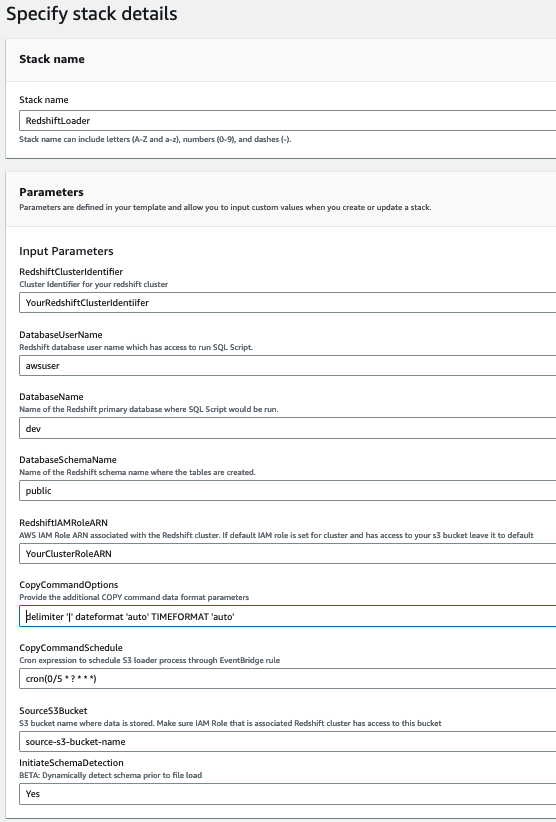
- Provide the following parameters to help ensure the successful creation of resources. Make sure you have collected these values beforehand.
| Parameter Name | Allowed Values | Description |
|---|---|---|
CopyCommandSchedule | cron(0/5 * ? * * *) | The EventBridge rules KickoffFileProcessingSchedule and QueueRSProcessingSchedule are triggered based on this schedule. The default is 5 minutes. |
DatabaseName | dev | The Amazon Redshift database name. |
DatabaseSchemaName | public | The Amazon Redshift schema name. |
DatabaseUserName | demo | The Amazon Redshift user name who has access to run COPY commands on the Amazon Redshift database and schema. |
RedshiftClusterIdentifier | democluster | The Amazon Redshift cluster name. |
RedshiftIAMRoleARN | arn:aws:iam::7000000000:role/RedshiftDemoRole | The Amazon Redshift cluster attached role, which has access to the S3 bucket. This role is used in COPY commands. |
SourceS3Bucket | Your-bucket-name | The S3 bucket where data is located. Use the same bucket you used to store the migrated data as indicated in the previous stack. |
CopyCommandOptions | delimiter '|' gzip | Provide the additional COPY command data format parameters as follows:
|
InitiateSchemaDetection | Yes | The setting to dynamically detect the schema prior to file upload. |
The following screenshot shows an example of our parameters.
- Choose Create.
- Monitor the progress of the Stack creation and wait until it is complete.
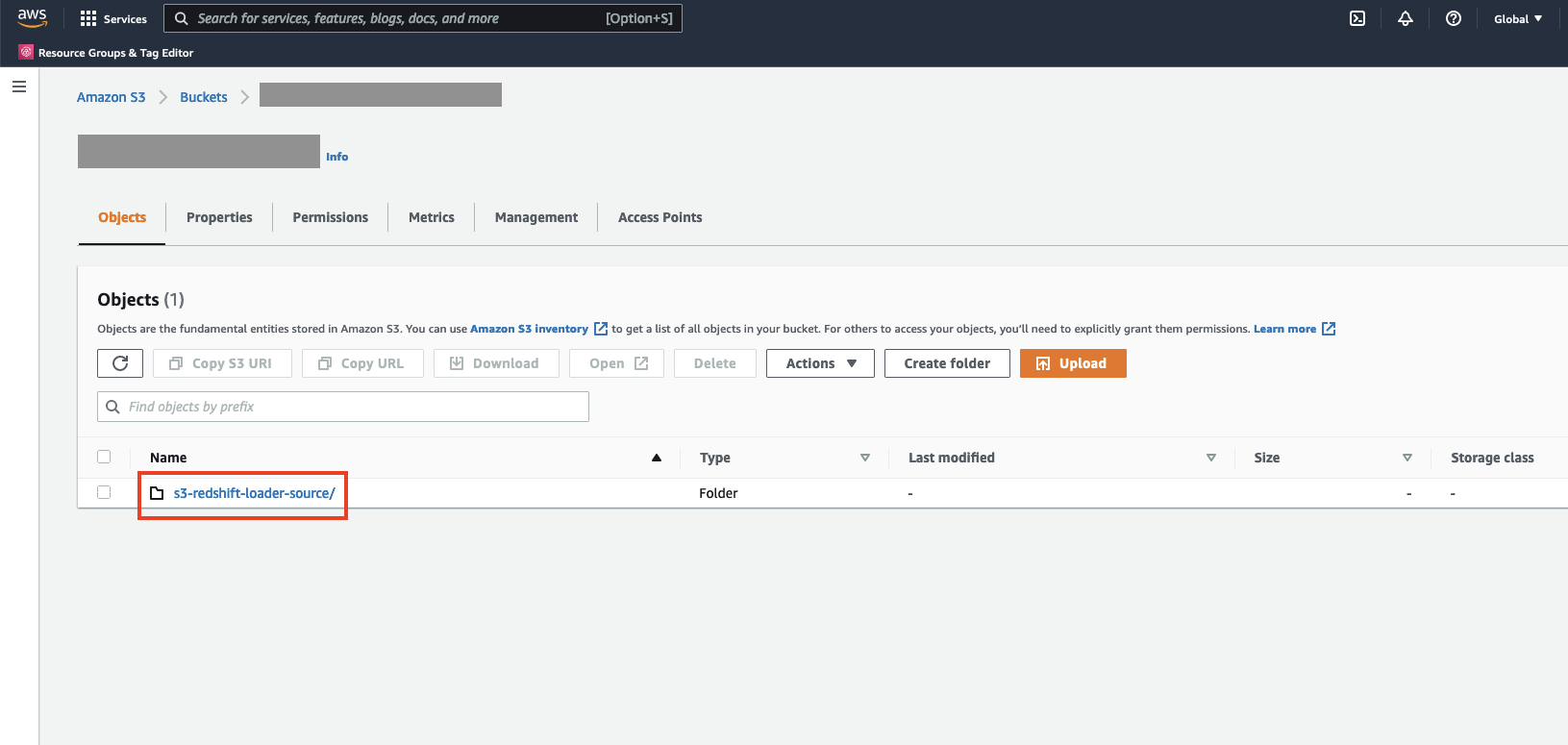
- To verify the Custom Auto Loader Framework configuration, log in to the Amazon S3 console and navigate to the S3 bucket you provided as a value to the
SourceS3Bucketparameter.
You should see a new directory called s3-redshift-loader-source is created.
Test the solution
To test the solution, complete the following steps:
- Create the configuration file based on the prerequisites. You can also download the demo file.
- To set up the S3 bucket, on the Amazon S3 console, navigate to the folder
bq-mig-configin the bucket you provided in the stack. - Upload the config file into it.
- To enable EventBridge notifications to the bucket, open the bucket on the console and on the Properties tab, locate Event notifications.
- In the Amazon EventBridge section, choose Edit.
- Select On, then choose Save changes.

- On AWS Step Function console, monitor the run of the state machine.
- Monitor the status of the loads in Amazon Redshift. For instructions, refer to Viewing Current Loads.
- Open the Amazon Redshift Query Editor V2 and query your data.
Pricing considerations
You might have egress charges for migrating data out of Google BigQuery into Amazon S3. Review and calculate the cost for moving your data on your Google cloud billing console. As of this writing, AWS Glue 3.0 or later charges $0.44 per DPU-hour, billed per second, with a 1-minute minimum for Spark ETL jobs. For more information, see AWS Glue Pricing. With auto scaling enabled, AWS Glue automatically adds and removes workers from the cluster depending on the parallelism at each stage or microbatch of the job run.
Clean up
To avoid incurring future charges, clean up your resources:
- Delete the CloudFormation solution stack.
- Delete the CloudFormation Custom Auto Loader Framework stack.
Conclusion
In this post, we demonstrated how to build a scalable and automated data pipeline to migrate your data from Google BigQuery to Amazon Redshift. We also highlighted how the Custom Auto Loader framework can automate the schema detection, create tables for your S3 files, and continuously load the files into your Amazon Redshift warehouse. With this approach, you can automate the migration of entire projects (even multiple projects at the time) in Google BigQuery to Amazon Redshift. This helps improve data migration times into Amazon Redshift significantly through the automatic table migration parallelization.
The auto-copy feature in Amazon Redshift simplifies automatic data loading from Amazon S3 with a simple SQL command, users can easily automate data ingestion from Amazon S3 to Amazon Redshift using the Amazon Redshift auto-copy preview feature
For more information about the performance of the Google BigQuery Connector for AWS Glue, refer to Migrate terabytes of data quickly from Google Cloud to Amazon S3 with AWS Glue Connector for Google BigQuery and learn how to migrate a large amount of data (1.9 TB) into Amazon S3 quickly (about 8 minutes).
To learn more about AWS Glue ETL jobs, see Simplify data pipelines with AWS Glue automatic code generation and workflows and Making ETL easier with AWS Glue Studio.
About the Authors
 Tahir Aziz is an Analytics Solution Architect at AWS. He has worked with building data warehouses and big data solutions for over 13 years. He loves to help customers design end-to-end analytics solutions on AWS. Outside of work, he enjoys traveling and cooking.
 Ritesh Kumar Sinha is an Analytics Specialist Solutions Architect based out of San Francisco. He has helped customers build scalable data warehousing and big data solutions for over 16 years. He loves to design and build efficient end-to-end solutions on AWS. In his spare time, he loves reading, walking, and doing yoga.
 Fabrizio Napolitano is a Principal Specialist Solutions Architect for DB and Analytics. He has worked in the analytics space for the last 20 years, and has recently and quite by surprise become a Hockey Dad after moving to Canada.
 Manjula Nagineni is a Senior Solutions Architect with AWS based in New York. She works with major financial service institutions, architecting and modernizing their large-scale applications while adopting AWS Cloud services. She is passionate about designing big data workloads cloud-natively. She has over 20 years of IT experience in software development, analytics, and architecture across multiple domains such as finance, retail, and telecom.
 Sohaib Katariwala is an Analytics Specialist Solutions Architect at AWS. He has over 12 years of experience helping organizations derive insights from their data.