Alerts and notifications play a crucial role in maintaining data quality because they facilitate prompt and efficient responses to any data quality issues that may arise within a dataset. By establishing and configuring alerts and notifications, you can actively monitor data quality and receive timely alerts when data quality issues are identified. This proactive approach helps mitigate the risk of making decisions based on inaccurate information. Furthermore, it allows for necessary actions to be taken, such as rectifying errors in the data source, refining data transformation processes, and updating data quality rules.
We are excited to announce that AWS Glue Data Quality is now generally available, offering built-in integration with Amazon EventBridge and AWS Step Functions to streamline event-driven data quality management. You can access this feature today in the available Regions. It simplifies your experience of monitoring and evaluating the quality of your data.
This post is Part 4 of a five-post series to explain how to set up alerts and orchestrate data quality rules with AWS Glue Data Quality:
- Part 1: Getting started with AWS Glue Data Quality from the AWS Glue Data Catalog
- Part 2: Getting started with AWS Glue Data Quality for ETL Pipelines
- Part 3: Set up data quality rules across multiple datasets using AWS Glue Data Quality
- Part 4: Set up alerts and orchestrate data quality rules with AWS Glue Data Quality
- Part 5: Visualize data quality score and metrics generated by AWS Glue Data Quality
Solution overview
In this post, we provide a comprehensive guide on enabling alerts and notifications using Amazon Simple Notification Service (Amazon SNS) We walk you through the step-by-step process of using EventBridge to establish rules that activate an AWS Lambda function when the data quality outcome aligns with the designated pattern. The Lambda function is responsible for converting the data quality metrics and dispatching them to the designated email addresses via Amazon SNS.
To expedite the implementation of the solution, we have prepared an AWS CloudFormation template for your convenience. AWS CloudFormation serves as a powerful management tool, enabling you to define and provision all necessary infrastructure resources within AWS using a unified and standardized language.
The solution aims to automate data quality evaluation for AWS Glue Data Catalog tables (data quality at rest) and allows you to configure email notifications when the AWS Glue Data Quality results become available.
The following architecture diagram provides an overview of the complete pipeline.

The data pipeline consists of the following key steps:
- The first step involves AWS Glue Data Quality evaluations that are automated using Step Functions. The workflow is designed to start the evaluations based on the rulesets defined on the dataset (or table). The workflow accepts input parameters provided by the user.
- An EventBridge rule receives an event notification from the AWS Glue Data Quality evaluations including the results. The rule evaluates the event payload based on the predefined rule and then triggers a Lambda function for notification.
- The Lambda function sends an SNS notification containing data quality statistics to the designated email address. Additionally, the function writes the customized result to the specified Amazon Simple Storage Service (Amazon S3) bucket, ensuring its persistence and accessibility for further analysis or processing.
The following sections discuss the setup for these steps in more detail.
Deploy resources with AWS CloudFormation
We create several resources with AWS CloudFormation, including a Lambda function, EventBridge rule, Step Functions state machine, and AWS Identity and Access Management (IAM) role. Complete the following steps:
- To launch the CloudFormation stack, choose Launch Stack:

- Provide your email address for EmailAddressAlertNotification, which will be registered as the target recipient for data quality notifications.
- Leave the other parameters at their default values and create the stack.

The stack takes about 4 minutes to complete.
- Record the outputs listed on the Outputs tab on the AWS CloudFormation console.

- Navigate to the S3 bucket created by the stack (
DataQualityS3BucketNameStaging) and upload the file yellow\_tripdata\_2022-01.parquet file. - Check your email for a message with the subject “AWS Notification – Subscription Confirmation” and confirm your subscription.
Now that the CloudFormation stack is complete, let’s update the Lambda function code before running the AWS Glue Data Quality pipeline using Step Functions.
Update the Lambda function
This section explains the steps to update the Lambda function. We modify the ARN of Amazon SNS and the S3 output bucket name based on the resources created by AWS CloudFormation.
Complete the following steps:
- On the Lambda console, choose Functions in the navigation pane.
- Choose the function
GlueDataQualityBlogAlertLambda-xxxx(created by the CloudFormation template in the previous step). - Modify the values for
sns\_topic\_arnands3bucketwith the corresponding values from the CloudFormation stack outputs forSNSTopicNameAlertNotificationandDataQualityS3BucketNameOutputs, respectively.

- On the File menu, choose Save.
- Choose Deploy.
Now that we’ve updated the Lambda function, let’s check the EventBridge rule created by the CloudFormation template.
Review and analyze the EventBridge rule
This section explains the significance of the EventBridge rule and how rules use event patterns to select events and send them to specific targets. In this section, we create a rule with an event pattern set as Data Quality Evaluations Results Available and configure the target as a Lambda function.
- On the EventBridge console, choose Rules in the navigation pane.
- Choose the rule
GlueDataQualityBlogEventBridge-xxxx.
On the Event pattern tab, we can review the source event pattern. Event patterns are based on the structure and content of the events generated by various AWS services or custom applications.
- We set the source as
aws-glue-dataqualitywith the event pattern detail typeData Quality Evaluations Results Available.

On the Targets tab, you can review the specific actions or services that will be triggered when an event matches a specified pattern.
- Here, we configure EventBridge to invoke a specific Lambda function when an event matches the defined pattern.
This allows you to run serverless functions in response to events.

Now that you understand the EventBridge rule, let’s review the AWS Glue Data Quality pipeline created by Step Functions.
Set up and deploy the Step Functions state machine
AWS CloudFormation created the StateMachineGlueDataQualityCustomBlog-xxxx state machine to orchestrate the evaluation of existing AWS Glue Data Quality rules, creation of custom rules if needed, and subsequent evaluation of the ruleset. Complete the following steps to configure and run the state machine:
- On the Step Functions console, choose State machines in the navigation pane.
- Open the state machine
StateMachineGlueDataQualityCustomBlog-xxxx. - Choose Edit.

- Modify row 80 with the IAM role ARN starting with
GlueDataQualityBlogStepsFunctionRole-xxxxand choose Save.
Step Functions needs certain permissions (least priviledge) to run the state machine and evaluate the AWS Glue Data Quality ruleset.
- Choose Start execution.

- Provide the following input:
This step assumes the existence of the ruleset and runs the workflow as depicted in the following screenshot. It runs the data quality ruleset evaluation and writes results to the S3 bucket.

If it doesn’t find the ruleset name in the data quality rules, it will create a custom ruleset for you and perform the data quality ruleset evaluation. AWS Step Functions is creating the custom ruleset. Below is a code snippet from the state machine code.


State machine results and run options
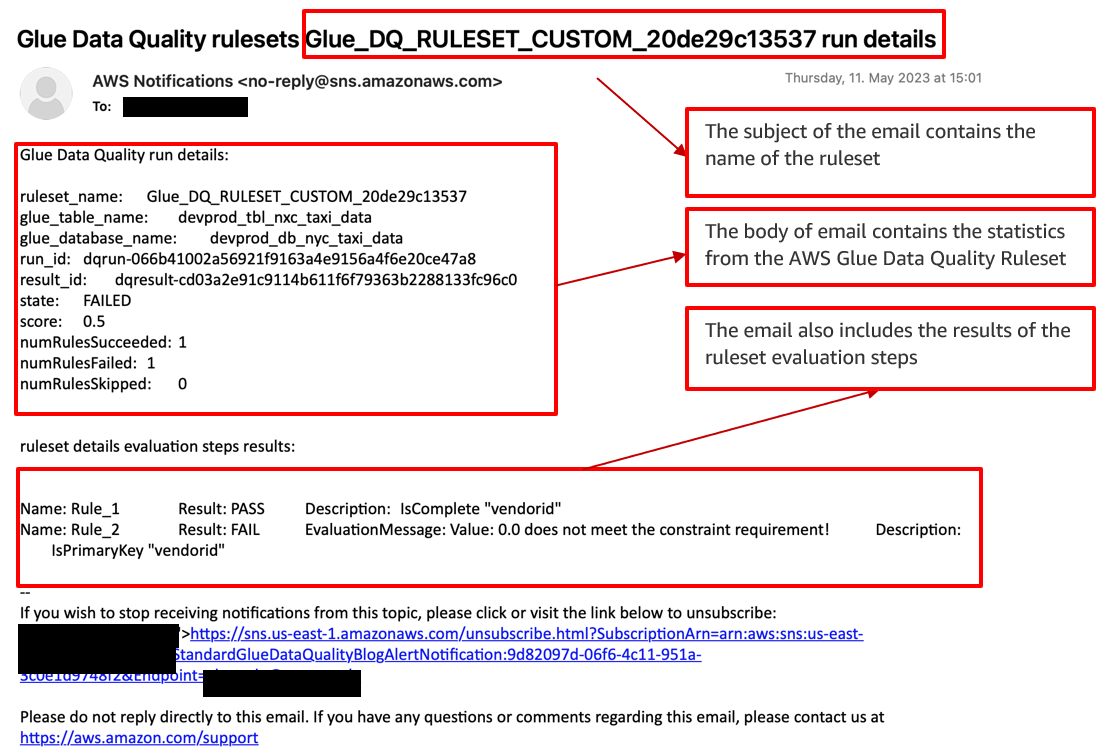
The Step Functions state machine has run AWS the Glue Data Quality evaluation. Now EventBridge matches the pattern Data Quality Evaluations Results Available and triggers the Lambda function. The Lambda function writes customized AWS Glue Data Quality metrics results to the S3 bucket and sends an email notification via Amazon SNS.
The following sample email provides operational metrics for the AWS Glue Data Quality ruleset evaluation. It provides details about the ruleset name, the number of rules passed or failed, and the score. This helps you visualize the results of each rule along with the evaluation message if a rule fails.
You have the flexibility to choose between two run modes for the Step Functions workflow:
- The first option is on-demand mode, where you manually trigger the Step Functions workflow whenever you want to initiate the AWS Glue Data Quality evaluation.
- Alternatively, you can schedule the entire Step Functions workflow using EventBridge. With EventBridge, you can define a schedule or specific triggers to automatically initiate the workflow at predetermined intervals or in response to specific events. This automated approach reduces the need for manual intervention and streamlines the data quality evaluation process. For more details, refer to Schedule a Serverless Workflow.
Clean up
To avoid incurring future charges and to clean up unused roles and policies, delete the resources you created:
- On the AWS CloudFormation console, choose Stacks in the navigation pane.
- Select your stack and delete it.
If you’re continuing to Part 5 in this series, you can skip this step.
Conclusion
In this post, we discussed three key steps that organizations can take to optimize data quality and reliability on AWS:
- Create a CloudFormation template to ensure consistency and reproducibility in deploying AWS resources.
- Integrate AWS Glue Data Quality ruleset evaluation and Lambda to automatically evaluate data quality and receive event-driven alerts and email notifications via Amazon SNS. This significantly enhances the accuracy and reliability of your data.
- Use Step Functions to orchestrate AWS Glue Data Quality ruleset actions. You can create and evaluate custom and recommended rulesets, optimizing data quality and accuracy.
These steps form a comprehensive approach to data quality and reliability on AWS, helping organizations maintain high standards and achieve their goals.
To dive into the AWS Glue Data Quality APIs, refer to Data Quality APIs. To learn more about AWS Glue Data Quality, check out the AWS Glue Data Quality Developer Guide.
If you require any assistance in constructing this pipeline within the AWS Lake Formation environment or if you have any inquiries regarding this post, please inform us in the comments section or initiate a new thread on the Lake Formation forum.
About the authors
 Avik Bhattacharjee is a Senior Partner Solution Architect at AWS. He works with customers to build IT strategy, making digital transformation through the cloud more accessible, focusing on big data and analytics and AI/ML.
 Amit Kumar Panda is a Data Architect at AWS Professional Services who is passionate about helping customers build scalable data analytics solutions to enable making critical business decisions.
 Neel Patel is a software engineer working within GlueML. He has contributed to the AWS Glue Data Quality feature and hopes it will expand the repertoire for all AWS CloudFormation users along with displaying the power and usability of AWS Glue as a whole.
 Edward Cho is a Software Development Engineer at AWS Glue. He has contributed to the AWS Glue Data Quality feature as well as the underlying open-source project Deequ.