Data is the lifeblood of modern businesses. In today’s data-driven world, companies rely on data to make informed decisions, gain a competitive edge, and provide exceptional customer experiences. However, not all data is created equal. Poor-quality data can lead to incorrect insights, bad decisions, and lost opportunities.
AWS Glue Data Quality measures and monitors the quality of your dataset. It supports both data quality at rest and data quality in AWS Glue extract, transform, and load (ETL) pipelines. Data quality at rest focuses on validating the data stored in data lakes, databases, or data warehouses. It ensures that the data meets specific quality standards before it is consumed. Data quality in ETL pipelines, on the other hand, ensures the quality of data as it moves through the ETL process. It helps identify data quality issues during the ETL pipeline, allowing for early detection and correction of problems and prevents the failure of the data pipeline because of data quality issues.
This is Part 3 of a five-post series on AWS Glue Data Quality. In this post, we demonstrate the advanced data quality checks that you can typically perform when bringing data from a database to an Amazon Simple Storage Service (Amazon S3) data lake. Check out the other posts in this series:
- Part 1: Getting started with AWS Glue Data Quality from the AWS Glue Data Catalog
- Part 2: Getting started with AWS Glue Data Quality for ETL Pipelines
- Part 3: Set up data quality rules across multiple datasets using AWS Glue Data Quality
- Part 4: Set up alerts and orchestrate data quality rules with AWS Glue Data Quality
- Part 5: Visualize data quality score and metrics generated by AWS Glue Data Quality
Use case overview
Let’s consider an example use case where we have a database named classicmodels that contains retail data for a car dealership. This example database includes sample data for various entities, such as Customers, Products, ProductLines, Orders, OrderDetails, Payments, Employees, and Offices. You can find more details about this example database in MySQL Sample Database.
In this scenario, we assume the role of a data engineer who is responsible for building a data pipeline. The primary objective is to extract data from a relational database, specifically an Amazon RDS for MySQL database, and store it in Amazon S3, which serves as a data lake. After the data is loaded into the data lake, the data engineer is also responsible for performing data quality checks to ensure that the data in the data lake maintains its quality. To achieve this, the data engineer uses the newly launched AWS Glue Data Quality evaluation feature.
The following diagram illustrates the entity relationship model that describes the relationships between different tables. In this post, we use the employees, customers, and products table.

Solution overview
This solution focuses on transferring data from an RDS for MySQL database to Amazon S3 and performing data quality checks using the AWS Glue ETL pipeline and AWS Glue Data Catalog. The workflow involves the following steps:
- Data is extracted from the RDS for MySQL database using AWS Glue ETL.
- The extracted data is stored in Amazon S3, which serves as the data lake.
- The Data Catalog and AWS Glue ETL pipeline are utilized to validate the successful completion of data ingestion by performing data quality checks on the data stored in Amazon S3.
The following diagram illustrates the solution architecture.

To implement the solution, we complete the following steps:
- Set up resources with AWS CloudFormation.
- Establish a connection to the RDS for MySQL instance from AWS Cloud9.
- Run an AWS Glue crawler on the RDS for MySQL database.
- Validate the Data Catalog.
- Run an AWS Glue ETL job to bring data from Amazon RDS for MySQL to Amazon S3.
- Evaluate the advanced data quality rules in the ETL job.
- Evaluate the advanced data quality rules in the Data Catalog.
Set up resources with AWS CloudFormation
This post includes a CloudFormation template for a quick setup. You can review and customize it to suit your needs. The template generates the following resources:
- An RDS for MySQL database instance (source)
- An S3 bucket for the data lake (destination)
- An AWS Glue ETL job to bring data from source to destination
- An AWS Glue crawler to crawl the RDS for MySQL databases and create a centralized Data Catalog
- AWS Identity and Access Management (IAM) users and policies
- An AWS Cloud9 environment to connect to the RDS DB instance and create a sample dataset
- An Amazon VPC, public subnet, two private subnets, internet gateway, NAT gateway, and route tables
To launch the CloudFormation stack, complete the following steps:
- Sign in to the AWS CloudFormation console.
- Choose Launch Stack:

- Choose Next.
- For DatabaseUserPassword, enter your preferred password.
- Choose Next.
- Scroll to the end and choose Next.
- Select I acknowledge that AWS CloudFormation might create IAM resources with custom names and choose Submit.
This stack can take around 10 minutes to complete, after which you can view the deployed stack on the AWS CloudFormation console.

Establish a connection to the RDS for MySQL instance from AWS Cloud9
To connect to the RDS for MySQL instance, complete the following steps:
- On the AWS Cloud9 console, choose Open under Cloud9 IDE for your environment.

- Run the following command to the AWS Cloud9 terminal. Provide your values for the MySQL endpoint (located on the CloudFormation stack’s Outputs tab), database user name, and database user password:
- Download the SQL file.
- On the File menu, choose Upload from Local Files and upload the file to AWS Cloud9.
- Run the following SQL commands within the downloaded file:
- Retrieve a list of tables using the following SQL statement and make sure that eight tables are loaded successfully:

Run an AWS Glue crawler on the RDS for MySQL database
To run your crawler, complete the following steps:
- On the AWS Glue console, choose Crawlers under Data Catalog in the navigation pane.
- Locate and run the crawler
dq-rds-crawler.
The crawler will take a few minutes to crawl all the tables from the classicmodels database.

Validate the AWS Glue Data Catalog
To validate the Data Catalog when the crawler is complete, complete the following steps:
- On the AWS Glue console, choose Databases under Data Catalog in the navigation pane.
- Choose the
mysql\_private\_classicmodelsdatabase.
You will able to see all the RDS tables available under mysql\_private\_classicmodels.

Run an AWS Glue ETL job to bring data from Amazon RDS for MySQL to Amazon S3
To run your ETL job, complete the following steps:
- On the AWS Glue console, choose Visual ETL under ETL jobs in the navigation pane.
- Select
dq-rds-to-s3from the job list and choose Run job.

When the job is complete, you will able to see three new tables under mysql\_s3\_db. It may take a few minutes to complete.

Now let’s dive into evaluating the data quality rules.
Evaluate the advanced data quality rules in the ETL job
In this section, we evaluate the results of different data quality rules.
ReferentialIntegrity
Let’s start with referential integrity. The ReferentialIntegrity data quality ruleset is currently supported in ETL jobs. This feature ensures that the relationships between tables in a database are maintained. It checks if the foreign key relationships between tables are valid and consistent, helping to identify any referential integrity violations.
- On the AWS Glue console, choose Visual ETL under ETL jobs in the navigation pane.
- In AWS Glue Studio, select Visual with a blank canvas.
- Provide a name for your job; for example, RDS
ReferentialIntegrity. - Choose the plus sign in the AWS Glue Studio canvas and on the Data tab, choose AWS Glue Data Catalog.
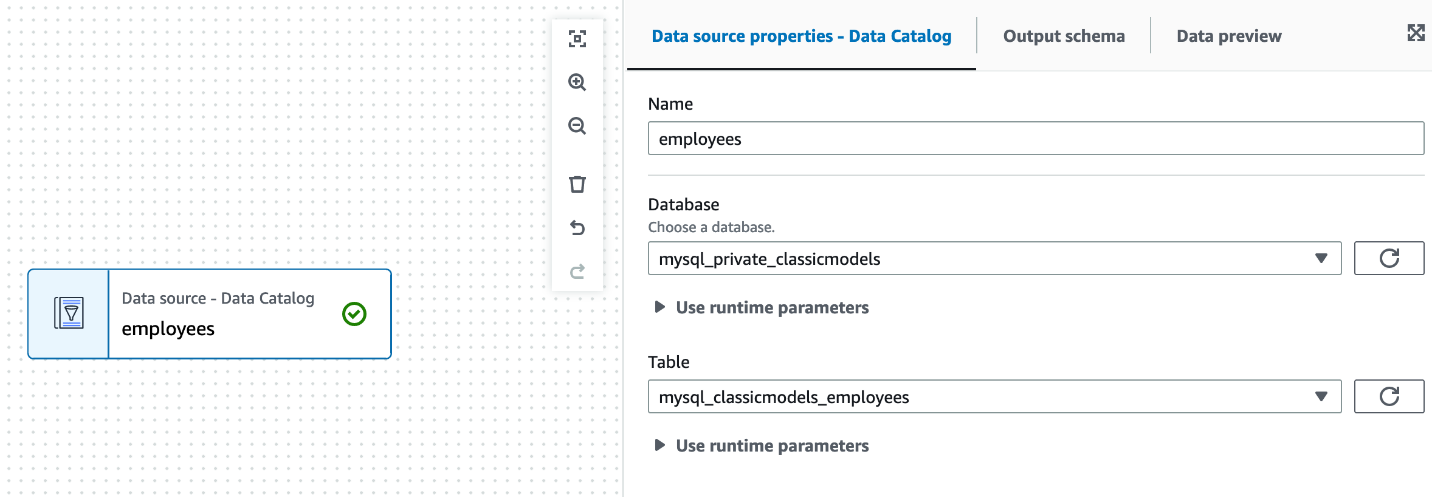
- For Name, enter a name for your data source; for example, employees.
- For Database, choose
mysql\_private\_classicmodels. - For Table, choose
mysql\_classicmodels\_employees.
- Choose the plus sign in the AWS Glue Studio canvas and on the Data tab, choose AWS Glue Data Catalog.
- For Name, enter a name for your data source; for example,
customers. - For Database, choose
mysql\_private\_classicmodels. - For Table, choose
mysql\_classicmodels\_employees. - Choose the plus sign in the AWS Glue Studio canvas and on the Transform tab, choose Evaluate Data Quality.
- For Node parents, choose
employeesandcustomers. - For Aliases for referenced data source, select Primary source for employees and for customers, enter the alias customers.
All other datasets are used as references to ensure that the primary dataset has good-quality data.

- Search for
ReferentialIntegrityunder Rule types and choose the plus sign to add an exampleReferentialIntegrityrule.

- Replace the rule with the following code and keep the remaining options as default:
- Under Data quality action, select Publish results to Amazon CloudWatch and select Fail job without loading target data.
- On the Job details tab, choose
GlueServiceRole-for-gluedq-blogfor IAM role and keep the remaining options as default. - Choose Run and wait for the job to complete.
It will take a few minutes to complete.
- When the job is complete, navigate to the Data quality tab and locate the Data quality results section.
You can confirm if the job completed successfully and which data quality rules it passed. In this example, it indicates that 60–70% of EmployeeNumber from the employees table are present in the customers table.

You can identify which records failed the referential integrity using AWS Glue Studio. To learn more, refer to Getting started with AWS Glue Data Quality for ETL Pipelines.
Similarly, if you are checking if all the EmployeeNumber from the employees table are present in the customers table, you can pass the following rule:
DatasetMatch
DatasetMatch compares two datasets to identify differences and similarities. You can use it to detect changes between datasets or to find duplicates, missing values, or inconsistencies across datasets.
- On the AWS Glue console, choose Visual ETL under ETL jobs in the navigation pane.
- In AWS Glue Studio, select Visual with a blank canvas.
- Provide a name for your job; for example,
RDS DatasetMatch. - Choose the plus sign in the AWS Glue Studio canvas and on the Data tab, choose AWS Glue Data Catalog.
- For Name, enter a name for your data source; for example,
rds\_employees\_primary. - For Database, choose
mysql\_private\_classicmodels. - For Table, choose
mysql\_classicmodels\_employees. - Choose the plus sign in the AWS Glue Studio canvas and on the Data tab, choose AWS Glue Data Catalog.
- For Name, enter a name for your data source; for example,
s3\_employees\_reference. - For Database, choose
mysql\_s3\_db. - For Table, choose
s3\_employees. - Choose the plus sign in the AWS Glue Studio canvas and on the Transform tab, choose Evaluate Data Quality.
- For Node parents, choose
employeesandcustomers. - For Aliases for referenced data source, select Primary source for
rds\_employees\_primaryand fors3\_employees\_reference, enter the aliasreference.

- Replace the default example rules with the following code and keep the remaining options as default:
- On the Job details tab, choose
GlueServiceRole-for-gluedq-blogfor IAM role and keep the remaining options as default. - Choose Run and wait for the job to complete.
- When the job is complete, navigate to the Data quality tab and locate the Data quality results section.
In this example, it indicates both datasets are identical.

AggregateMatch
AggregateMatch verifies the accuracy of aggregated data. It compares the aggregated values in a dataset against the expected results to identify any discrepancies, such as incorrect sums, averages, counts, or other aggregate calculations. This is a performant option to evaluate if two datasets match at an aggregate level. For this rule, we clone the previous job we created for DatasetMatch.
- On the AWS Glue console, choose Visual ETL under ETL jobs in the navigation pane.
- Select
RDS DatasetMatchand on the Actions menu, choose Clone job.

- Change the job name to
DQ AggregateMatch. - Change the dataset
rds\_employees\_primaryto rds\_products\_primary and the table tomysql\_classicmodels\_products. - Change the dataset
s3\_orders\_referencetos3\_products\_referenceand the table tos3\_products. - Choose Evaluate Data Quality, and under Node parents, choose
rds\_products\_primaryands3\_products\_reference. - Replace the rules with the following code:

- Choose Run and wait for the job to complete.
- When the job is complete, navigate to the Data quality tab and locate the Data quality results section.
The results indicate that the avg(msrp) on both datasets is the same.

RowCountMatch
RowCountMatch checks the number of rows in a dataset and compares it to an expected count. It helps identify missing or extra rows in a dataset, ensuring data completeness. For this rule, we edit the job we created earlier for AggregateMatch.
- On the AWS Glue console, choose Visual ETL under ETL jobs in the navigation pane.
- Select RDS
AggregateMatchand on the Actions menu, choose Edit job.

- Choose Evaluate Data Quality and choose the plus sign next to
RowCountMatch.

- Keep the default data quality rules and choose Save:
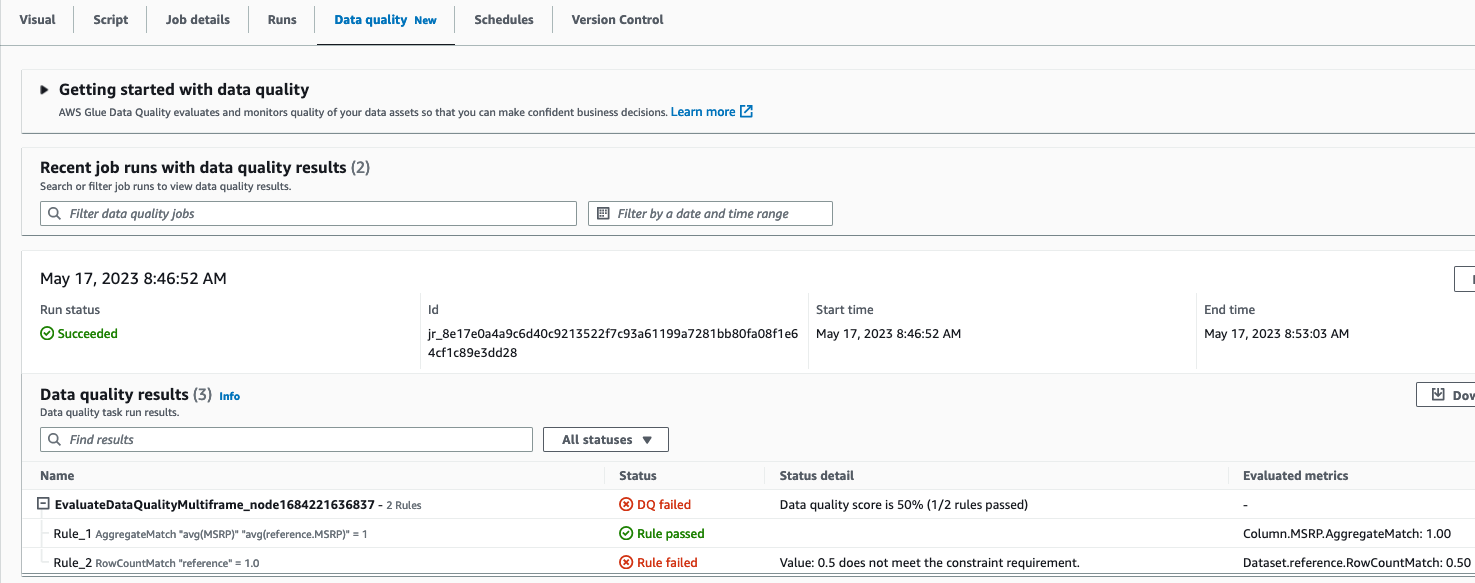
RowCountMatch "reference" = 1.0
- Choose Run and wait for the job to complete.
- When the job is complete, navigate to the Data quality tab and locate the Data quality results section.
It shows that the DQ RowCountMatch rule failed, indicating a mismatch between the row count of the source RDS table and the target S3 table. Further investigation reveals that the ETL job ran four times for the Products table, and the row counts didn’t match.
SchemaMatch
SchemaMatch validates the schema of two datasets matches. It checks if the actual data types match the expected data types and flags any inconsistencies, such as a numeric column containing non-numeric values. For this rule, we edit the job we used for AggregateMatch.
- On the AWS Glue console, choose Visual ETL under ETL jobs in the navigation pane.
- Select
RDS AggregateMatchand on the Actions menu, choose Edit job.

- Choose Evaluate Data Quality and choose the plus sign next to
RowCountMatch. - Update the default rules with the following code and save the job:

- Choose Run and wait for the job to complete.
- When the job is complete, navigate to the Data quality tab and locate the Data quality results section.
It should show a successful completion with a Rule passed status, indicating that the schemas of both datasets are identical.

Evaluate the advanced data quality rules in the Data Catalog
The AWS Glue Data Catalog also supports advanced data quality rules. For this post, we show one example of an aggregate match between Amazon S3 and Amazon RDS.
- On the AWS Glue console, choose Databases in the navigation pane.
- Choose the
mysql\_private\_classicmodelsdatabase to view the three tables created under it. - Choose the
mysql\_classicmodels\_productstable. - On the Data quality tab, choose Create data quality rules.

- Search for
AggregateMatchand choose the plus sign to view the default example rule. - Add the following rules:
reference is the alias of the secondary dataset defined in the AWS Glue ETL job. For the Data Catalog, you can use <database\_name>.<table\_name>.<column\_name> to reference secondary datasets.
- Choose Save ruleset and provide the name
production\_catalog\_dq\_check. - Choose
GlueServiceRole-for-gluedq-blogfor IAM role and keep the remaining options as default. - Choose Run and wait for the data quality check to complete.
When the job is complete, you can confirm that both data quality checks passed.

With these advanced data quality features of AWS Glue Data Quality, you can enhance the reliability, accuracy, and consistency of your data, leading to better insights and decision-making.
Clean up
To clean up your resources, complete the following steps:
- Delete the AWS Glue job.
- Delete the CloudFormation stack.
Conclusion
Data quality refers to the accuracy, completeness, consistency, timeliness, and validity of the information being collected, processed, and analyzed. High-quality data is essential for businesses to make informed decisions, gain valuable insights, and maintain their competitive advantage. As data complexity increases, advanced rules are critical to handle complex data quality challenges. The rules we demonstrated in this post can help you manage the quality of data that lives in disparate data sources, providing you the capabilities to reconcile them. Try them out and provide your feedback on what other use cases you need to solve!
About the authors
 Navnit Shukla is AWS Specialist Solutions Architect in Analytics. He is passionate about helping customers uncover insights from their data. He builds solutions to help organizations make data-driven decisions.
 Rahul Sharma is a Software Development Engineer at AWS Glue. He focuses on building distributed systems to support features in AWS Glue. He has a passion for helping customers build data management solutions on the AWS Cloud.
 Edward Cho is a Software Development Engineer at AWS Glue. He has contributed to the AWS Glue Data Quality feature as well as the underlying open-source project Deequ.
 Shriya Vanvari is a Software Developer Engineer in AWS Glue. She is passionate about learning how to build efficient and scalable systems to provide better experience for customers. Outside of work, she enjoys reading and chasing sunsets.