Amazon Redshift is a fast, fully managed petabyte-scale cloud data warehouse that makes it simple and cost-effective to analyze all your data using standard SQL and your existing business intelligence (BI) tools. Tens of thousands of customers today use Amazon Redshift to analyze exabytes of data and run analytical queries, making it the most widely used cloud data warehouse. Amazon Redshift is available in both serverless and provisioned configurations.
Amazon Redshift enables you to directly access data stored in Amazon Simple Storage Service (Amazon S3) using SQL queries and join data across your data warehouse and data lake. With Amazon Redshift, you can query the data in your S3 data lake using a central AWS Glue metastore from your Redshift data warehouse.
Amazon Redshift supports querying a wide variety of data formats, such as CSV, JSON, Parquet, and ORC, and table formats like Apache Hudi and Delta. Amazon Redshift also supports querying nested data with complex data types such as struct, array, and map.
With this capability, Amazon Redshift extends your petabyte-scale data warehouse to an exabyte-scale data lake on Amazon S3 in a cost-effective manner.
Apache Iceberg is the latest table format that is supported now in preview by Amazon Redshift. In this post, we show you how to query Iceberg tables using Amazon Redshift, and explore Iceberg support and options.
Solution overview
Apache Iceberg is an open table format for very large petabyte-scale analytic datasets. Iceberg manages large collections of files as tables, and it supports modern analytical data lake operations such as record-level insert, update, delete, and time travel queries. The Iceberg specification allows seamless table evolution such as schema and partition evolution, and its design is optimized for usage on Amazon S3.
Iceberg stores the metadata pointer for all the metadata files. When a SELECT query is reading an Iceberg table, the query engine first goes to the Iceberg catalog, then retrieves the entry of the location of the latest metadata file, as shown in the following diagram.
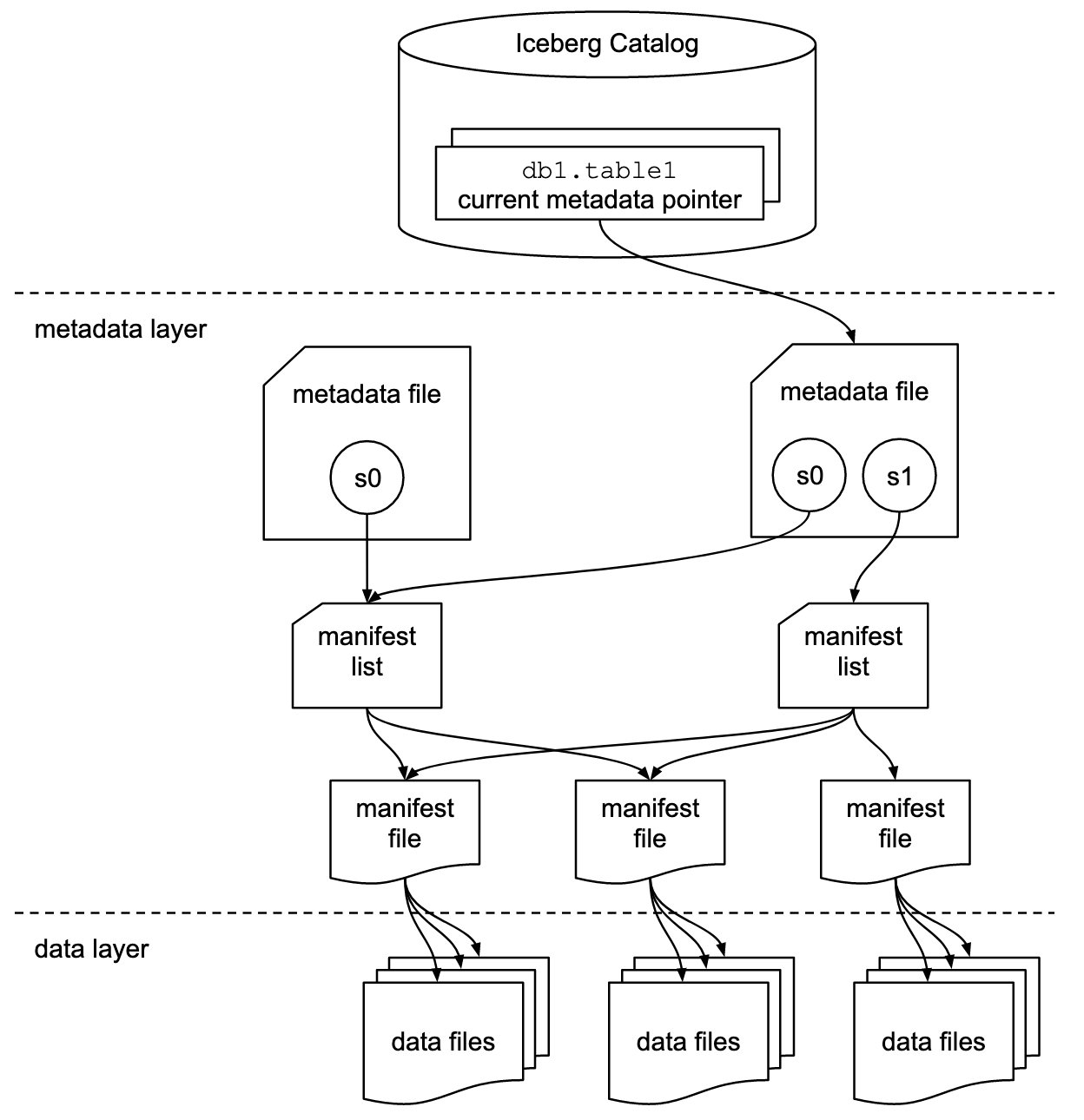
Amazon Redshift now provides support for Apache Iceberg tables, which allows data lake customers to run read-only analytics queries in a transactionally consistent way. This enables you to easily manage and maintain your tables on transactional data lakes.
Amazon Redshift supports Apache Iceberg’s native schema and partition evolution capabilities using the AWS Glue Data Catalog, eliminating the need to alter table definitions to add new partitions or to move and process large amounts of data to change the schema of an existing data lake table. Amazon Redshift uses the column statistics stored in the Apache Iceberg table metadata to optimize its query plans and reduce the file scans required to run queries.
In this post, we use the Yellow taxi public dataset from NYC Taxi & Limousine Commission as our source data. The dataset contains data files in Apache Parquet format on Amazon S3. We use Amazon Athena to convert this Parquet dataset and then use Amazon Redshift Spectrum to query and join with a Redshift local table, perform row-level deletes and updates and partition evolution, all coordinated through the AWS Glue Data Catalog in an S3 data lake.
Prerequisites
You should have the following prerequisites:
- An AWS account. If you don’t have one, you can sign up for one.
- A Redshift cluster with the current track version. For setup instructions, see Create a sample Amazon Redshift cluster.
- Alternatively, you could use an Amazon Redshift Serverless endpoint. For setup instructions, see Getting started with Amazon Redshift Serverless.
- An AWS Identity and Access Management (IAM) role set up for Redshift data lake access.
- An S3 bucket to store Parquet and Iceberg files.
- An Athena workgroup with Athena engine version 3 to use CTAS and MERGE commands with an Apache Iceberg table. To upgrade your existing Athena engine to version 3 in your Athena workgroup, follow the instructions in Upgrade to Athena engine version 3 to increase query performance and access more analytics features or refer to Changing the engine version in the Athena console.
Convert Parquet data to an Iceberg table
For this post, you need the Yellow taxi public dataset from the NYC Taxi & Limousine Commission available in Iceberg format. You can download the files and then use Athena to convert the Parquet dataset into an Iceberg table, or refer to Build an Apache Iceberg data lake using Amazon Athena, Amazon EMR, and AWS Glue blog post to create the Iceberg table.
In this post, we use Athena to convert the data. Complete the following steps:
- Download the files using the previous link or use the AWS Command Line Interface (AWS CLI) to copy the files from the public S3 bucket for year 2020 and 2021 to your S3 bucket using the following command:
For more information, refer to Setting up the Amazon Redshift CLI.
- Create a database
Icebergdband create a table using Athena pointing to the Parquet format files using the following statement: - Validate the data in the Parquet table using the following SQL:

- Create an Iceberg table in Athena with the following code. You can see the table type properties as an Iceberg table with Parquet format and snappy compression in the following
create tablestatement. You need to update the S3 location before running the SQL. Also note that the Iceberg table is partitioned with theYearkey. - After you create the table, load the data into the Iceberg table using the previously loaded Parquet table
nyc\_taxi\_yellow\_parquetwith the following SQL: - When the SQL statement is complete, validate the data in the Iceberg table
nyc\_taxi\_yellow\_iceberg. This step is required before moving to the next step. - You can validate that the nyc\_taxi\_yellow\_iceberg table is in Iceberg format table and partitioned on the Year column using the following command:


Create an external schema in Amazon Redshift
In this section, we demonstrate how to create an external schema in Amazon Redshift pointing to the AWS Glue database icebergdb to query the Iceberg table nyc\_taxi\_yellow\_iceberg that we saw in the previous section using Athena.
Log in to the Redshift via Query Editor v2 or a SQL client and run the following command (note that the AWS Glue database icebergdb and Region information is being used):
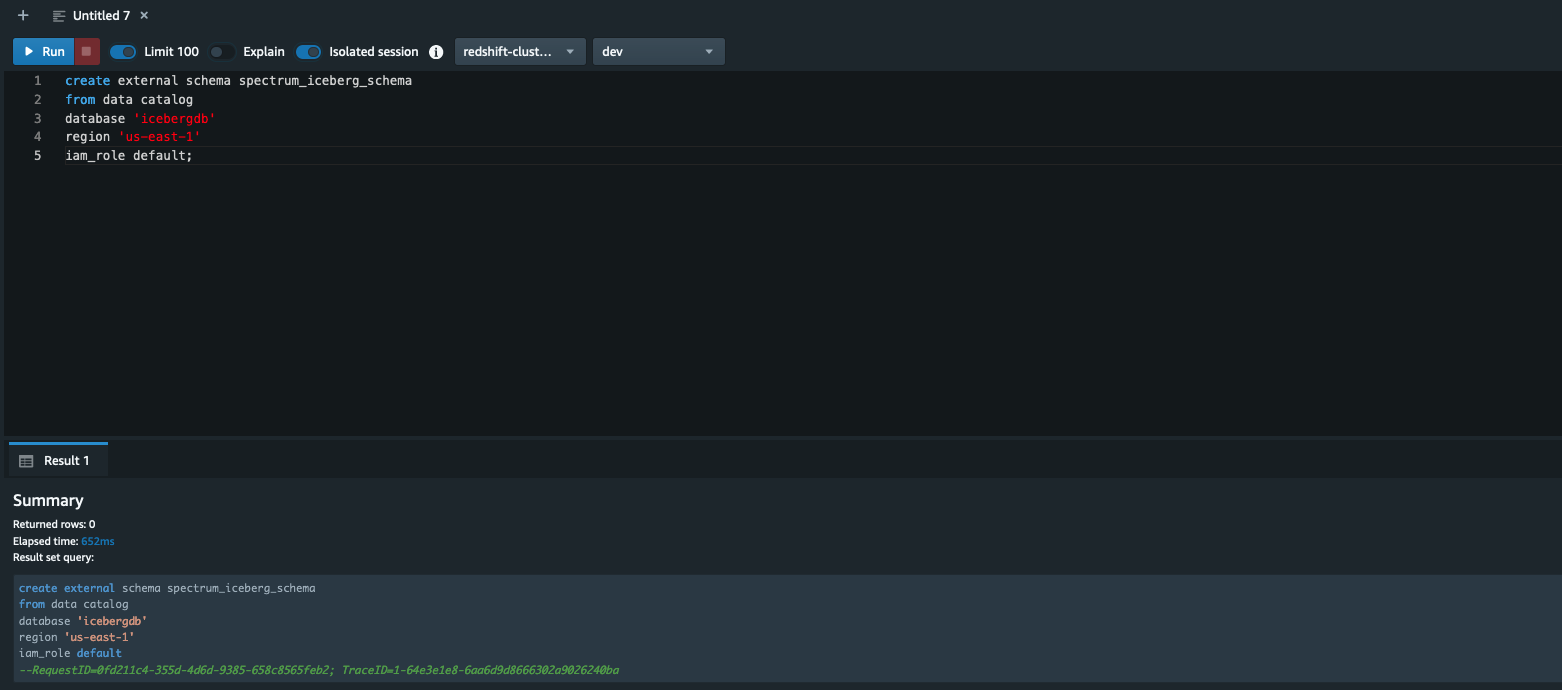
To learn about creating external schemas in Amazon Redshift, refer to create external schema
After you create the external schema spectrum\_iceberg\_schema, you can query the Iceberg table in Amazon Redshift.
Query the Iceberg table in Amazon Redshift
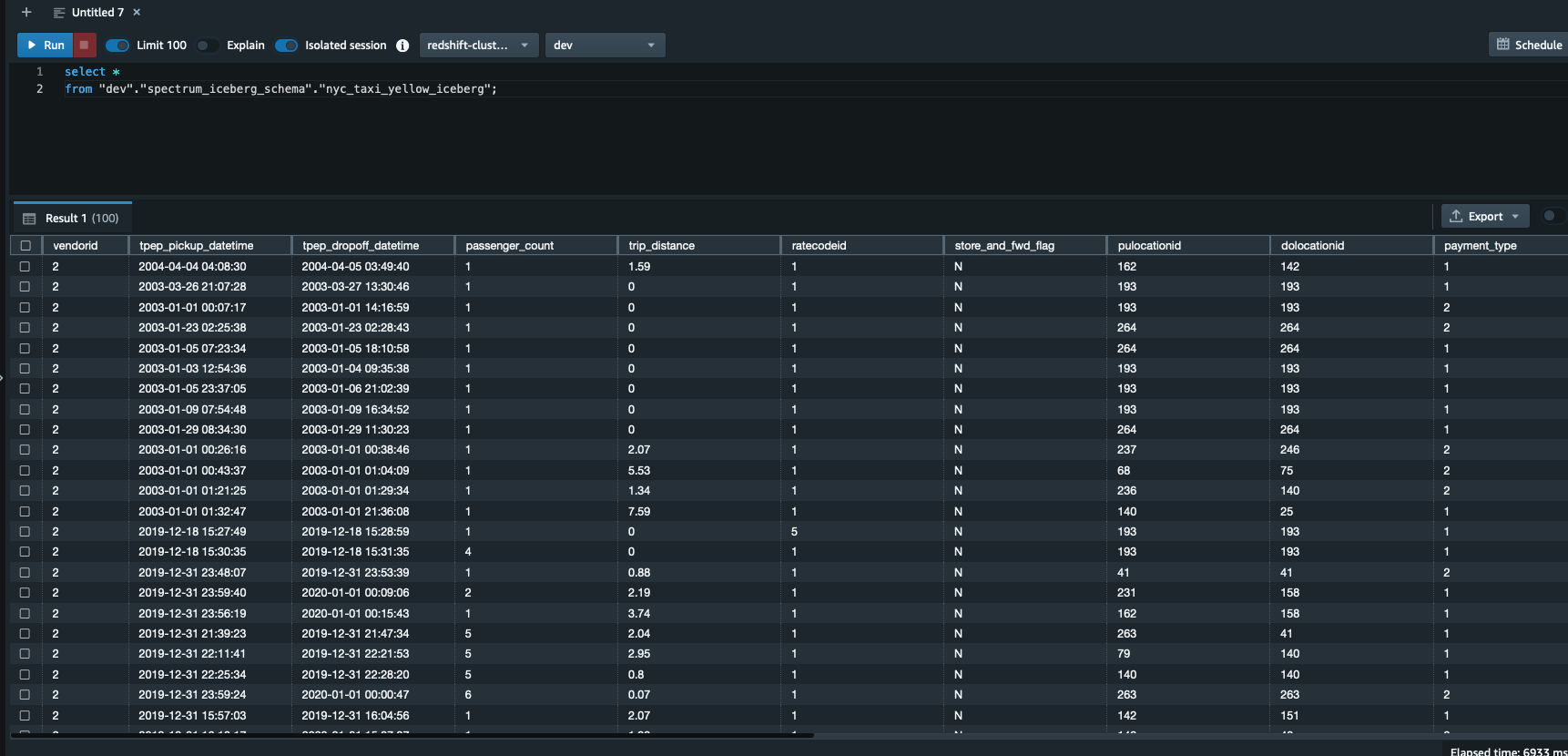
Run the following query in Query Editor v2. Note that spectrum\_iceberg\_schema is the name of the external schema created in Amazon Redshift and nyc\_taxi\_yellow\_iceberg is the table in the AWS Glue database used in the query:
The query data output in the following screenshot shows that the AWS Glue table with Iceberg format is queryable using Redshift Spectrum.
Check the explain plan of querying the Iceberg table
You can use the following query to get the explain plan output, which shows the format is ICEBERG:

Validate updates for data consistency
After the update is complete on the Iceberg table, you can query Amazon Redshift to see the transactionally consistent view of the data. Let’s run a query by picking a vendorid and for a certain pick-up and drop-off:
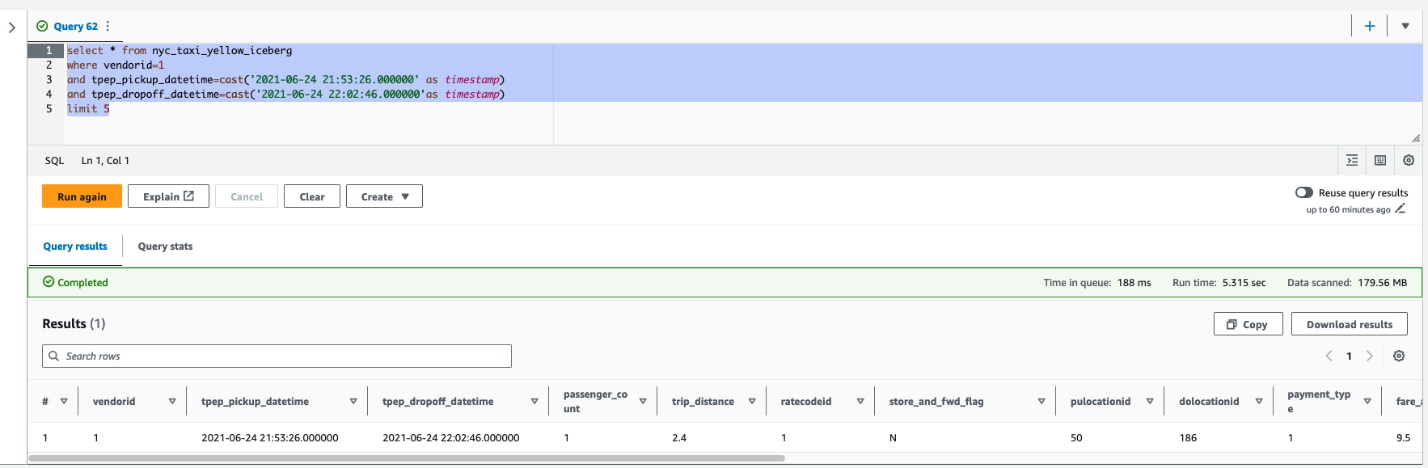
Next, update the value of passenger\_count to 4 and trip\_distance to 9.4 for a vendorid and certain pick-up and drop-off dates in Athena:
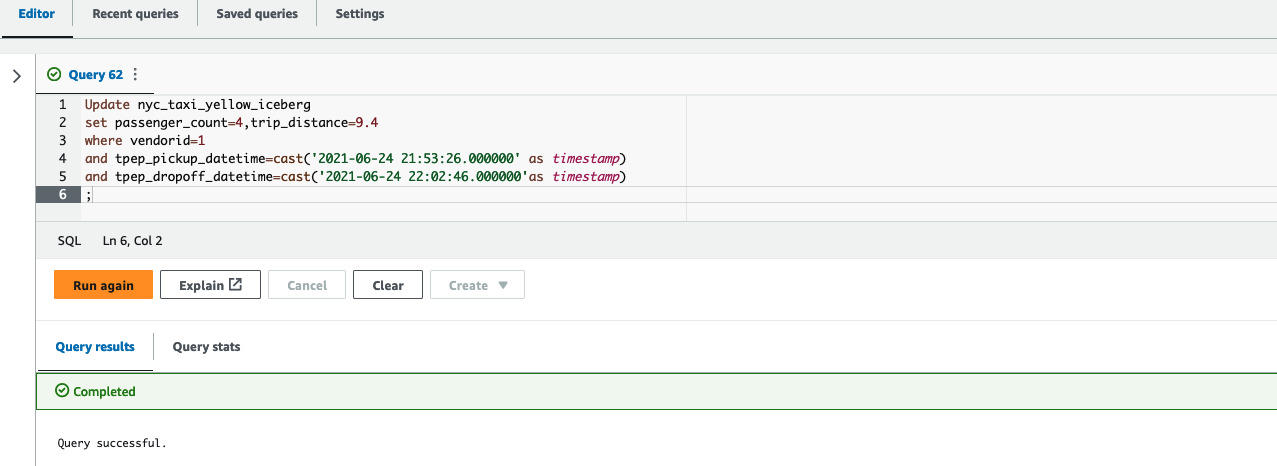
Finally, run the following query in Query Editor v2 to see the updated value of passenger\_count and trip\_distance:
As shown in the following screenshot, the update operations on the Iceberg table are available in Amazon Redshift.

Create a unified view of the local table and historical data in Amazon Redshift
As a modern data architecture strategy, you can organize historical data or less frequently accessed data in the data lake and keep frequently accessed data in the Redshift data warehouse. This provides the flexibility to manage analytics at scale and find the most cost-effective architecture solution.
In this example, we load 2 years of data in a Redshift table; the rest of the data stays on the S3 data lake because that dataset is less frequently queried.
- Use the following code to load 2 years of data in the
nyc\_taxi\_yellow\_recenttable in Amazon Redshift, sourcing from the Iceberg table:
- Next, you can remove the last 2 years of data from the Iceberg table using the following command in Athena because you loaded the data into a Redshift table in the previous step:

After you complete these steps, the Redshift table has 2 years of the data and the rest of the data is in the Iceberg table in Amazon S3.
- Create a view using the
nyc\_taxi\_yellow\_icebergIceberg table andnyc\_taxi\_yellow\_recenttable in Amazon Redshift: - Now query the view, depending on the filter conditions, Redshift Spectrum will scan either the Iceberg data, the Redshift table, or both. The following example query returns a number of records from each of the source tables by scanning both tables:

Partition evolution
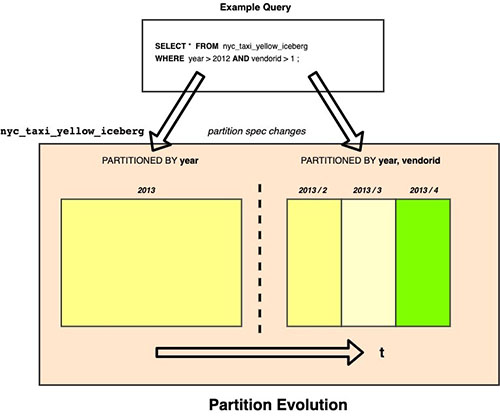
Iceberg uses hidden partitioning, which means you don’t need to manually add partitions for your Apache Iceberg tables. New partition values or new partition specs (add or remove partition columns) in Apache Iceberg tables are automatically detected by Amazon Redshift and no manual operation is needed to update partitions in the table definition. The following example demonstrates this.
In our example, if the Iceberg table nyc\_taxi\_yellow\_iceberg was originally partitioned by year and later the column vendorid was added as an additional partition column, then Amazon Redshift can seamlessly query the Iceberg table nyc\_taxi\_yellow\_iceberg with two different partition schemes over a period of time.
Considerations when querying Iceberg tables using Amazon Redshift
During the preview period, consider the following when using Amazon Redshift with Iceberg tables:
- Only Iceberg tables defined in the AWS Glue Data Catalog are supported.
- CREATE or ALTER external table commands are not supported, which means the Iceberg table should already exist in an AWS Glue database.
- Time travel queries are not supported.
- Iceberg versions 1 and 2 are supported. For more details on Iceberg format versions, refer to Format Versioning.
- For a list of supported data types with Iceberg tables, refer to Supported data types with Apache Iceberg tables (preview).
- Pricing for querying an Iceberg table is the same as accessing any other data formats using Amazon Redshift.
For additional details on considerations for Iceberg format tables preview, refer to Using Apache Iceberg tables with Amazon Redshift (preview).
Customer feedback
“Tinuiti, the largest independent performance marketing firm, handles large volumes of data on a daily basis and must have a robust data lake and data warehouse strategy for our market intelligence teams to store and analyze all our customer data in an easy, affordable, secure, and robust way,” says Justin Manus, Chief Technology Officer at Tinuiti. “Amazon Redshift’s support for Apache Iceberg tables in our data lake, which is the single source of truth, addresses a critical challenge in optimizing performance and accessibility and further simplifies our data integration pipelines to access all the data ingested from different sources and to power our customers’ brand potential.”
Conclusion
In this post, we showed you an example of querying an Iceberg table in Redshift using files stored in Amazon S3, cataloged as a table in the AWS Glue Data Catalog, and demonstrated some of the key features like efficient row-level update and delete, and the schema evolution experience for users to unlock the power of big data using Athena.
You can use Amazon Redshift to run queries on data lake tables in various files and table formats, such as Apache Hudi and Delta Lake, and now with Apache Iceberg (preview), which provides additional options for your modern data architectures needs.
We hope this gives you a great starting point for querying Iceberg tables in Amazon Redshift.
About the Authors
 Rohit Bansal is an Analytics Specialist Solutions Architect at AWS. He specializes in Amazon Redshift and works with customers to build next-generation analytics solutions using other AWS Analytics services.
 Satish Sathiya is a Senior Product Engineer at Amazon Redshift. He is an avid big data enthusiast who collaborates with customers around the globe to achieve success and meet their data warehousing and data lake architecture needs.
 Ranjan Burman is an Analytics Specialist Solutions Architect at AWS. He specializes in Amazon Redshift and helps customers build scalable analytical solutions. He has more than 16 years of experience in different database and data warehousing technologies. He is passionate about automating and solving customer problems with cloud solutions.